
AuditSnap
Compliance-focused screenshot tool with UTC timestamps and intelligent file naming for audit evidence collection.
As of June 2026, AuditSnap has 22 users in the Productivity category.
Usersup 69.2 percent+69.2%
22
22
Ratingno change0%
—
— reviews
Reviewsno change0%
—
Version
1.3.0
Manifest V3
History
5 snapshotsTracking since Apr 1, 2026.
View as table
| Date | Users | Rating | Reviews | Version |
|---|---|---|---|---|
| Apr 1, 2026 | 13 | — | — | 1.3.0 |
| Apr 18, 2026 | 19 | — | — | 1.3.0 |
| Apr 28, 2026 | 22 | — | — | 1.3.0 |
| May 8, 2026 | 20 | — | — | 1.3.0 |
| May 15, 2026 | 21 | — | — | 1.3.0 |
| Now | 22 | — | — | 1.3.0 |
Permissions & access
- Permissions
- activeTabstoragedownloadsscriptingdesktopCaptureoffscreen
- Host access
- <all_urls>
Screenshots
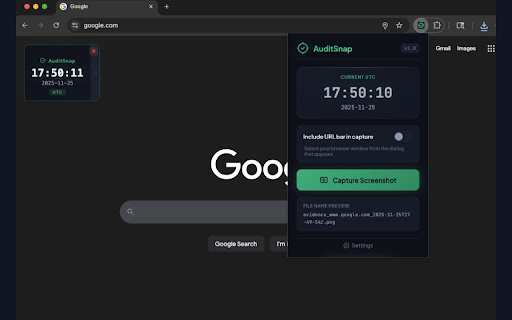

About
AuditSnap captures timestamped screenshots for compliance and audit evidence.

Every screenshot includes a floating UTC timestamp overlay, no more manually documenting when evidence was captured.

WHY USE AUDITSNAP:
• Automatic UTC timestamps on every capture
• Smart file naming with domain, date, and custom prefixes
• Capture with or without the browser URL bar
• Draggable timestamp position
• Keyboard shortcut (Alt+Shift+S) for quick captures

SETTINGS & CUSTOMIZATION:
• Custom prefix — Add your identifier (e.g., "SOC2", "audit", "evidence")
• Naming patterns — Build filenames using {custom}, {domain}, {title}, {date}, {time}, {timestamp}
• Timestamp position — Choose default corner placement (top-left, top-right, bottom-left, bottom-right)
• URL bar capture — Include browser chrome in screenshots when needed

PERFECT FOR:
• SOC 2 audit evidence
• Security configuration reviews
• Cloud provider console documentation
• Vendor security assessments
• Internal compliance checks

HOW IT WORKS:
1. Click the extension icon
2. If the URL Bar is needed toggle "Include URL bar in capture" to on
3. Click "Capture Screenshot"
4. File saves automatically with smart naming

Example filename: evidence_console.cloud.google.com_2025-01-15T14-30-00Z.png

No account required. No data leaves your browser. Screenshots save directly to your downloads folder.

Future Releases:
1. Embedded audit log added to Image
2. Integration with GRC platforms (Vanta, Drata) to add manual evidence to controls
Technical
- Version
- 1.3.0
- Manifest
- V3
- Size
- 58.39KiB
- Min Chrome
- 88
- Languages
- 1
- Featured
- No
Metadata
- ID
- jdegmbjaicdgkgpngnbhjhknjkkkcdam
- Developer ID
- u041eee73814ed79baca891ddd491374d
- Developer Email
- [email protected]
- Created
- Nov 29, 2025
- Last Updated (Store)
- Dec 2, 2025
- Last Scraped
- Jun 3, 2026
- Website
- riskandresponse.com
- Support URL
- —
- Privacy Policy
- —
Similar extensions
Alternatives to AuditSnap, ranked by description similarity.

CompliSnap - Professional Audit Screenshots
Full-page screenshots with automatic timestamps. Perfect for SOC 2, ISO 27001, HIPAA compliance & audit documentation.
5

Screenata: Compliance Evidence Collector
Automate compliance evidence collection for SOC 2, ISO 27001, GDPR & more.
33
★ 5.0

AutoSnap
Takes screenshots of a URL at regular intervals and saves them.
84
★ 5.0

SnapsVault - Screenshot Manager
Professional screenshot management with quality settings, session organization, and intelligent storage optimization
4

ProofSnap
Snap once. Prove forever. Turn your browser into a trust engine—sealing screenshots with cryptographic proof.
85
★ 5.0

SwiftShot
Capture, annotate, redact, and export screenshots. Legal stamps, Bates numbers, OCR, voice commands, PDF/Word export. 100% local.
1

Snapper
Minimal screenshot tool with customizable capture areas and intelligent file naming
9
★ 5.0

Formular Screenshot Tracker
Generiere automatisch Screenshots der Formulardaten von Webseiten die du besuchst und speichere sie innerhalb vom Browser.
2
★ 5.0
Data sourced from the Chrome Web Store · last verified Jun 3, 2026.