
Manage youtube subscriptions
Import or Export your Youtube Subscriptions
As of May 2026, Manage youtube subscriptions has 538 users and a 1.00/5 rating from 3 reviews in the Productivity category.
Usersdown 2.9 percent−2.9%
538
538
Ratingno change0%
1.00
3 reviews
Reviewsno change0%
3
Version
1.0.1
Manifest V3
History
3 snapshotsTracking since Apr 1, 2026.
View as table
| Date | Users | Rating | Reviews | Version |
|---|---|---|---|---|
| Apr 1, 2026 | 554 | 1.00 | 3 | 1.0.1 |
| Apr 30, 2026 | 577 | 1.00 | 3 | 1.0.1 |
| May 28, 2026 | 565 | 1.00 | 3 | 1.0.1 |
| Now | 538 | 1.00 | 3 | 1.0.1 |
Permissions & access
- Permissions
- storagetabsscriptingclipboardWritenotifications
- Host access
- https://www.youtube.com/*, https://youtube.com/*, https://youtube.com/
Screenshots

About
**How to manage youtube subscriptions?**

You can you Manage youtube subscriptions Chrome Extension! Import or Export your Youtube Subscriptions use one Click.

Import and Export your YouTube subscriptions (channel URL) from and to a simple text format and clipboard.

"Subscriptions Importer for Youtube" is a must-have tool for managing your YouTube subscriptions. With this extension, you can easily import and export your subscriptions to and from different accounts.

Import your subscriptions to another account by simply providing a list of channel URLs.

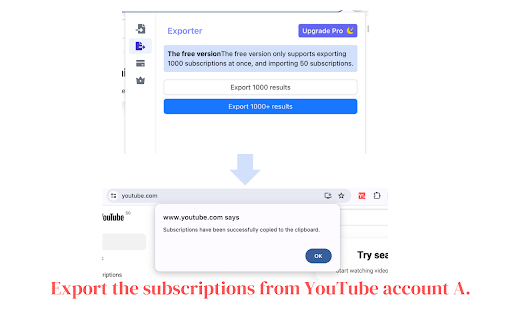
Export your subscriptions to a list of channel URLs to clipboard, making it easy to backup or share your subscriptions with others.

This extension is perfect for users who have multiple YouTube accounts and want to keep their subscriptions in sync, or for users who want to share their subscriptions with friends or family. With "Subscriptions Importer for Youtube", you'll save time and hassle when managing your subscriptions.

The extension is user-friendly, easy to use and it does not require any technical skills to use it. It's a must-have for any YouTube user who wants to take control of their subscriptions.

** This extension can export more than 1000 subscriptions! (premium)

How it works:
- First, install this extension.
- Next, click on the red icon next to your URL bar. Don't see the icon? Click on the puzzle piece, and then click on the pin to move it to your URL bar.
- Follow the on-screen instructions. They're rather easy.
- If you chose to import, wait for the end of the importing process.
- If you chose to export, you'll have a list of your YouTube subscriptions copied to your clipboard.

**Manage youtube subscriptions VS Subscriptions Importer For Youtube?**

Better than Subscriptions Importer For Youtube, We can import and export faster and more stably, and the paid functions are cheaper.
Technical
- Version
- 1.0.1
- Manifest
- V3
- Size
- 2.48MiB
- Min Chrome
- 88
- Languages
- 36
- Featured
- No
Metadata
- ID
- jdcdabhjfojdlcibamilndodbjhjebjj
- Developer ID
- uc3c45a22d9fe1d5dc655237c38e185b4
- Developer Email
- [email protected]
- Created
- Mar 14, 2024
- Last Updated (Store)
- Jun 19, 2024
- Last Scraped
- May 28, 2026
- Website
- —
- Support URL
- —
- Privacy Policy
- https://www.chromeextensionhub.com/privacy
Similar extensions
Alternatives to Manage youtube subscriptions, ranked by description similarity.

YouTube Subscriptions Exporter & Importer
Easily export, import, and transfer your YouTube subscriptions. Quickly move channel URLs between accounts.
481
★ 3.4

Subscriptions Importer For Youtube
Import or Export your Youtube Subscriptions
10.0K
★ 3.6

YouTube Subscriptions Importer
Import or Export your YouTube Subscriptions
11
★ 1.0

Subscription Importer & Exporter For YouTube
One-click importing or exporting your YouTube Subscriptions
6

YouTube Playlist Importer & Exporter
Export YouTube playlist details to CSV and import playlists from CSV.
1.0K
★ 2.0

YouTube Unsubscriber
Bulk unsubscribe from YouTube channels easily and efficiently
27
★ 1.0

PocketTube: Youtube Subscription Manager
Group YouTube subscriptions into YouTube folder. Video Deck for Youtube. Mark as watched videos. Filter YouTube video. Youtube mode
300.0K
★ 4.6

SubShift: Transfer your YouTube subscriptions
Backup, export, and transfer your YouTube subscriptions with one click. Never lose your curated content feed again.
7.0K
★ 3.9
Data sourced from the Chrome Web Store · last verified May 28, 2026.