
Merge Tab Groups
Merge Chrome tab groups by name or by manual selection. Optional auto-merge.
As of May 2026, Merge Tab Groups has 85 users and a 5.00/5 rating from 1 reviews in the Productivity category.
Usersup 150.0 percent+150.0%
85
85
Ratingno change0%
5.00
1 reviews
Reviewsno change0%
1
Version
0.1.5
Manifest V3
History
5 snapshotsTracking since Apr 1, 2026.
View as table
| Date | Users | Rating | Reviews | Version |
|---|---|---|---|---|
| Apr 1, 2026 | 34 | — | — | 0.1.5 |
| Apr 20, 2026 | 37 | — | — | 0.1.5 |
| May 6, 2026 | 54 | — | — | 0.1.5 |
| May 17, 2026 | 64 | 5.00 | 1 | 0.1.5 |
| May 30, 2026 | 80 | 5.00 | 1 | 0.1.5 |
| Now | 85 | 5.00 | 1 | 0.1.5 |
Permissions & access
- Permissions
- tabGroupstabsstorage
- Host access
- None declared
Screenshots
About
Merge Tab Groups keeps your workspace tidy by merging tab groups with the same name into one. It works immediately when a duplicate group appears (or on demand), moving tabs without waiting for pages to finish loading. Optimized for low‑power laptops and busy browsers.

What it does:

Merge duplicates by name automatically or on demand
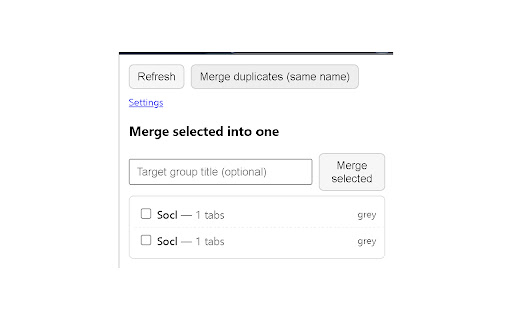
Merge selected groups manually (choose the final title)
Move tabs as soon as they’re created/URL commits — no need to wait for full load
Optional “Fast merge” discards non‑active, already‑committed tabs during the merge to reduce CPU/network
Optional “Keep collapsed” preserves a compact view after merging
Why it’s safe:

Does not read page content
No analytics, no remote servers, no data collection
Only uses minimal permissions to read/move tabs and save settings
Notes:

Chrome’s Saved Tab Groups (chips on the toolbar) aren’t exposed to extensions when closed. To merge duplicates created from saved groups, open at least one of the groups first.
Merging is per window.
Keyboard shortcut:

Ctrl+Shift+M — merge duplicate names in the current window (configurable at chrome://extensions/shortcuts)
Settings:

Auto‑merge duplicates
Case‑sensitive match
Include unnamed groups
Fast merge (optional)
Keep collapsed (optional)
Open Source:

Source is included in the extension package. No data leaves your device.
Key Features

Merge duplicates: One click or keyboard shortcut
Manual merge: Pick any groups and a final title
Instant moves: Per‑tab relocation as URLs appear
Low‑power friendly: Optional fast path to cut page loading during merges
Clean UI: Keep the result collapsed (optional)
Technical
- Version
- 0.1.5
- Manifest
- V3
- Size
- 32.87KiB
- Min Chrome
- 88
- Languages
- 1
- Featured
- No
Metadata
- ID
- jdbnhiecjaimhhiaegdecbakmnejlbhe
- Developer ID
- u41bda6089b68838696c80e74b2a9bbd5
- Developer Email
- [email protected]
- Created
- Sep 8, 2025
- Last Updated (Store)
- Sep 8, 2025
- Last Scraped
- May 30, 2026
- Website
- —
- Privacy Policy
- —
Similar extensions
Alternatives to Merge Tab Groups, ranked by description similarity.

Tabs, Organized Automatically
Your browser organizes itself. Tabs are automatically grouped by site — no setup, no clicks.
—

One-click Tab Dedup Group Manager
Stop tab overload and reclaim your workspace with One-click Tab Manager, the high-performance browser extension designed to…
11

Last Used Tab Groups
Organize your tab groups automatically by recency in an intelligent side panel.
—

Gemini Chrome Tabs
Smart tab management for Chrome. Prevent duplicate tabs, auto-merge same URLs, and keep your browser clean with one-click cleanup
2

Easy Tab Grouper
Easily group selected tabs or add a tab to an existing group using Chrome's native tab grouping.
8

United Tabs
Automatically group and organize your browser tabs.
17
★ 5.0

Project Tab Groups
Save, restore, and switch tab groups per project
—
★ 1.0

Tab Warrior
Automatically manage tabGroups
2
Data sourced from the Chrome Web Store · last verified May 30, 2026.