
QR Code Reader
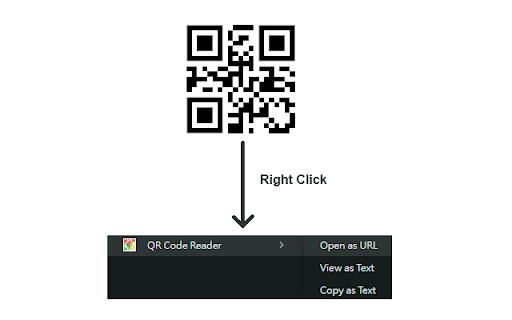
Right click on QR code images, and open as URL / view as text / copy as text. Completely offline - no network is required.
As of June 2026, QR Code Reader has 90 users and a 5.00/5 rating from 1 reviews in the Productivity category.
Usersup 18.4 percent+18.4%
90
90
Ratingno change0%
5.00
1 reviews
Reviewsno change0%
1
Version
0.4.0
Manifest V3
90-day change · In the last 90 days this extension 1 version update, changed permissions.
History
8 snapshotsTracking since Apr 21, 2026.
View as table
| Date | Users | Rating | Reviews | Version |
|---|---|---|---|---|
| Apr 21, 2026 | 76 | 5.00 | 1 | 0.3.0 |
| Apr 28, 2026 | 83 | 5.00 | 1 | 0.4.0 |
| May 6, 2026 | 79 | 5.00 | 1 | 0.4.0 |
| May 11, 2026 | 83 | 5.00 | 1 | 0.4.0 |
| May 17, 2026 | 76 | 5.00 | 1 | 0.4.0 |
| May 23, 2026 | 81 | 5.00 | 1 | 0.4.0 |
| May 30, 2026 | 89 | 5.00 | 1 | 0.4.0 |
| Jun 5, 2026 | 91 | 5.00 | 1 | 0.4.0 |
| Now | 90 | 5.00 | 1 | 0.4.0 |
Changelog
- Apr 21, 2026description
Instantly decode any QR code image with a simple right-click. No need to pull out your phone! Google Chrome Right-click QR Code Reader is a powerful and convenient tool that adds a seamless QR code scanning utility directly into your browser's context menu.

Whether you're browsing articles, event tickets, or product pages, this extension allows you to interact with QR codes as easily as you would any other link.

Key Features
- Instant Right-Click Access: Simply right-click on any QR code image to bring up your scanning options.
  1. Open as URL: If the QR code contains a web link, open it directly in a new tab. If not, display it instantly in an alert box.
  2. View as Text: If the QR code contains plain text, contact info, or other data, display it instantly in an alert box.
  3. Copy as Text: Silently copy the QR code's entire content (URL or text) to your clipboard with a single click. This app would not and cannot get any contents from your clipboard, it only populate new contents to your clipboard.

- Works Offline: The entire decoding process happens locally in your browser. The extension works perfectly even without an internet connection.

- Privacy First: Your privacy is paramount. Google Chrome Right-click QR Code Reader works entirely on your machine. No image data or decoded content is ever sent over the internet, ensuring your activity remains completely private.

How to Use
1. Navigate to any webpage and find a QR code image.
2. Right-click the image to open the context menu.
3. Select one of the three convenient options: "Open as URL", "View as Text", or "Copy as Text".

Changelog
Version 0.3 - improved alert box messages - non-URL decoded text is now displayed directly when "Open as URL option" is selected. Improved error message of no QR code founded.
Version 0.2 - now decoding QR code in Canvas elements is supported
Version 0.1 - add context menu on right-clicking on images, to provide QR code decoding features.
Instantly decode any QR code image with a simple right-click. No need to pull out your phone! Google Chrome Right-click QR Code Reader is a powerful and convenient tool that adds a seamless QR code scanning utility directly into your browser's context menu.

Whether you're browsing articles, event tickets, or product pages, this extension allows you to interact with QR codes as easily as you would any other link.

Key Features
- Instant Right-Click Access: Simply right-click on any QR code image to bring up your scanning options.
  1. Open as URL: If the QR code contains a web link, open it directly in a new tab. If not, display it instantly in an alert box.
  2. View as Text: If the QR code contains plain text, contact info, or other data, display it instantly in an alert box.
  3. Copy as Text: Silently copy the QR code's entire content (URL or text) to your clipboard with a single click. This app would not and cannot get any contents from your clipboard, it only populate new contents to your clipboard.

- Works Offline: The entire decoding process happens locally in your browser. The extension works perfectly even without an internet connection.

- Privacy First: Your privacy is paramount. Google Chrome Right-click QR Code Reader works entirely on your machine. No image data or decoded content is ever sent over the internet, ensuring your activity remains completely private.

How to Use
1. Navigate to any webpage and find a QR code image.
2. Right-click the image to open the context menu.
3. Select one of the three convenient options: "Open as URL", "View as Text", or "Copy as Text".

Changelog
Version 0.4  [2026 Apr 6]
- Enhanced QR code detection on transparent PNG images (alpha channel handling)
- Added support for decoding QR codes in local files opened via file:// URLs
Version 0.3
- Improved alert box messages
- Non-URL decoded text is now displayed directly when "Open as URL option" is selected.
- Improved error message of no QR code founded.
Version 0.2
- now decoding QR code in Canvas elements is supported
Version 0.1
- add context menu on right-clicking on images, to provide QR code decoding features.
- Apr 21, 2026host_permissions
<all_urls>
<all_urls>, file:///*
Permissions & access
- Permissions
- contextMenusactiveTabclipboardWritescripting
- Host access
- <all_urls>, file:///*
Screenshots
About
Instantly decode any QR code image with a simple right-click. No need to pull out your phone! Google Chrome Right-click QR Code Reader is a powerful and convenient tool that adds a seamless QR code scanning utility directly into your browser's context menu.

Whether you're browsing articles, event tickets, or product pages, this extension allows you to interact with QR codes as easily as you would any other link.

Key Features
- Instant Right-Click Access: Simply right-click on any QR code image to bring up your scanning options.
  1. Open as URL: If the QR code contains a web link, open it directly in a new tab. If not, display it instantly in an alert box.
  2. View as Text: If the QR code contains plain text, contact info, or other data, display it instantly in an alert box.
  3. Copy as Text: Silently copy the QR code's entire content (URL or text) to your clipboard with a single click. This app would not and cannot get any contents from your clipboard, it only populate new contents to your clipboard.

- Works Offline: The entire decoding process happens locally in your browser. The extension works perfectly even without an internet connection.

- Privacy First: Your privacy is paramount. Google Chrome Right-click QR Code Reader works entirely on your machine. No image data or decoded content is ever sent over the internet, ensuring your activity remains completely private.

How to Use
1. Navigate to any webpage and find a QR code image.
2. Right-click the image to open the context menu.
3. Select one of the three convenient options: "Open as URL", "View as Text", or "Copy as Text".

Changelog
Version 0.4  [2026 Apr 6]
- Enhanced QR code detection on transparent PNG images (alpha channel handling)
- Added support for decoding QR codes in local files opened via file:// URLs
Version 0.3
- Improved alert box messages
- Non-URL decoded text is now displayed directly when "Open as URL option" is selected.
- Improved error message of no QR code founded.
Version 0.2
- now decoding QR code in Canvas elements is supported
Version 0.1
- add context menu on right-clicking on images, to provide QR code decoding features.
Technical
- Version
- 0.4.0
- Manifest
- V3
- Size
- 72.79KiB
- Min Chrome
- 88
- Languages
- 1
- Featured
- No
Metadata
- ID
- jbmahbopakagcjapokicplhogphjihme
- Developer ID
- u39c7f1006ec269651929ab204390a700
- Developer Email
- [email protected]
- Created
- Jul 21, 2025
- Last Updated (Store)
- Apr 6, 2026
- Last Scraped
- Jun 12, 2026
- Website
- —
- Support URL
- —
Similar extensions
Alternatives to QR Code Reader, ranked by description similarity.

QR Code Scanner - Free Barcode Reader
Scan QR codes and read barcodes effortlessly with our Free QR Code Scanner and Barcode Reader!
1.0K
★ 5.0

QR Code Scanner
Scan QR codes instantly on any webpage! Click, select, and get results. Doesn’t require an internet connection. Add to Chrome now!
1.0K
★ 3.7

Quick QR
Instantly generate a QR code for the current page or any other URL
149
★ 5.0

QR Code Reader (Offline)
Offline QR Code Reader with History & Favorites - Best QR Code Scanner for Google Chrome
438

QR Code Reader
This simple QR Code Reader app lets you scan QR codes from a web page or uploaded image, or via your camera or screen sharing
10.0K
★ 5.0

QRLink
Generate QR codes for links and active text selections via context menu.
7
★ 5.0

QR Code Scanner
Scan and decode QR codes on any webpage. Supports multiple QR codes detection with one click.
2

Simple QR Code Generator
A very no nonsense QR code generator for Chrome
20
Data sourced from the Chrome Web Store · last verified Jun 12, 2026.