
QR Code Scanner - Free Barcode Reader
Scan QR codes and read barcodes effortlessly with our Free QR Code Scanner and Barcode Reader!
As of June 2026, QR Code Scanner - Free Barcode Reader has 1,000 users and a 5.00/5 rating from 1 reviews in the Productivity category.
Usersup 1.6 percent+1.6%
1.0K
1,000
Ratingno change0%
5.00
1 reviews
Reviewsno change0%
1
Version
2.0
Manifest V3
History
2 snapshotsTracking since Apr 1, 2026.
View as table
| Date | Users | Rating | Reviews | Version |
|---|---|---|---|---|
| Apr 1, 2026 | 984 | — | — | 2.0 |
| May 27, 2026 | 1.0K | — | — | 2.0 |
| Now | 1.0K | 5.00 | 1 | 2.0 |
Permissions & access
- Permissions
- None declared
- Host access
- None declared
Screenshots


About
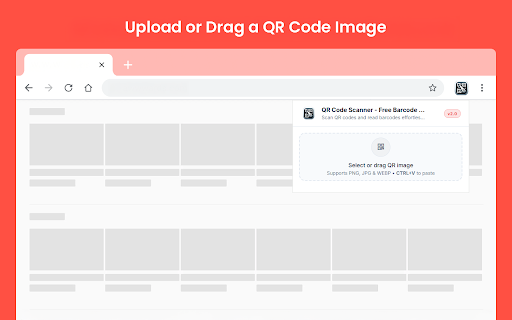
QR Code Scanner - Free Barcode Reader is a simple Chrome extension that helps you scan QR codes and barcodes from image files directly in your browser. If you need a practical qr code reader or a quick qr code scanner, this extension makes the process easy without requiring a camera.

You can upload or drag an image into the extension and see the decoded result in seconds. It is useful when you need to open a QR code from a saved image or screenshot while browsing on desktop.

Key Features
✓ Scan QR Codes from Images: Open an image file and extract the encoded result directly inside the extension.
✓ Barcode Support: In addition to QR codes, the extension also works as a simple barcode scanner for supported image files.
✓ Drag and Drop Upload: Add your QR image quickly by dragging it into the upload area.
✓ Clipboard Paste Support: You can also paste a copied image directly into the extension with CTRL+V.
✓ PNG, JPG, and WEBP Support: The extension supports common image formats, making it easier to scan saved screenshots and exported images.
✓ Decoded Result Box: Once the scan is complete, the content appears in a clear result area for quick review.
✓ One-Click Copy: Use the Copy button to copy the decoded result instantly.

Why use it?
This extension lets you read QR codes from image files directly in your browser. You can upload or paste a QR image and see the decoded result immediately. It is useful when you receive QR codes as screenshots, saved images, or shared files.

How to use this?
1. Install the extension from the Chrome Web Store.
2. Open the extension by clicking its icon.
3. Drag and drop a QR image into the upload area, select an image file, or paste an image with CTRL+V.
4. Wait for the extension to scan the image.
5. View the decoded result in the result box and use Copy if needed.
6. Click Scan Another Image to load a new file.

QR Code Scanner - Free Barcode Reader helps you read QR codes from images in a simple way directly in Chrome.
Technical
- Version
- 2.0
- Manifest
- V3
- Size
- 294KiB
- Min Chrome
- 88
- Languages
- 53
- Featured
- No
Metadata
- ID
- eommfjpcpjfdacmfbadhlplmnmelldib
- Developer ID
- uf62178378ae535eb6612c7d7a3f108eb
- Developer Email
- [email protected]
- Created
- Mar 26, 2024
- Last Updated (Store)
- Mar 10, 2026
- Last Scraped
- Jun 9, 2026
- Website
- https://moryconvert.com/
- Support URL
- https://moryconvert.com/contact
- Privacy Policy
- https://moryconvert.com/privacy-policy
Similar extensions
Alternatives to QR Code Scanner - Free Barcode Reader, ranked by description similarity.

QR Code Scanner
Scan QR codes instantly on any webpage! Click, select, and get results. Doesn’t require an internet connection. Add to Chrome now!
1.0K
★ 3.7

QR Code Scanner From Image
Effortlessly scan QR codes with QR Code Scanner from Image. This fast, reliable QR reader delivers results in seconds—scan here!
10.0K
★ 4.7

QR Code Reader
This simple QR Code Reader app lets you scan QR codes from a web page or uploaded image, or via your camera or screen sharing
10.0K
★ 5.0

Free Barcode, QR Code Generator
Generate barcodes and QR codes for free with this easy-to-use extension! Perfect for businesses and personal use.
793

QR Code Reader
Extension to read QR Codes from images: popup, separate version and context menu (right-click).
53
★ 5.0

WebQR Scanner
Scan QR codes directly from web pages
24

QR Code Scanner
Scan and decode QR codes on any webpage. Supports multiple QR codes detection with one click.
2

QR Code Scanner
Scan QR codes from images on websites or upload PDF files. Fast, private, and secure - all processing happens locally.
28
★ 5.0
Data sourced from the Chrome Web Store · last verified Jun 9, 2026.