
Copy To Notion: Clip anything to Notion
Easily capture, organize, and access all your online clips directly in Notion.
As of June 2026, Copy To Notion: Clip anything to Notion has 10,000 users and a 4.72/5 rating from 369 reviews in the Workflow & Planning category.
Usersno change0%
10.0K
10,000
Ratingno change0%
4.72
369 reviews
Reviewsup 5.7 percent+5.7%
369
Version
0.20.0
Manifest V3
History
3 snapshotsTracking since Apr 1, 2026.
View as table
| Date | Users | Rating | Reviews | Version |
|---|---|---|---|---|
| Apr 1, 2026 | 10.0K | 4.72 | 349 | 0.20.0 |
| May 3, 2026 | 10.0K | 4.72 | 350 | 0.20.0 |
| Jun 2, 2026 | 10.0K | 4.72 | 364 | 0.20.0 |
| Now | 10.0K | 4.72 | 369 | 0.20.0 |
Permissions & access
- Permissions
- contextMenusstorageactiveTabscriptingcookies
- Host access
- *://*/*
Screenshots



About
Copy to Notion: The Ultimate Web Clipper and Organizer for Notion

Save and organize web content seamlessly into Notion with Copy to Notion—the ultimate Chrome extension designed for Notion users. Transform how you collect, organize, and retrieve online content directly into your Notion workspace.

💡 Key Features:

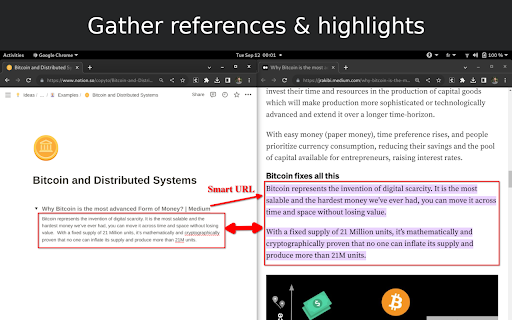
✅ Web Clipper for Notion: Easily save articles, text snippets, screenshots, images, bookmarks, notes, and any webpage elements directly to Notion, preserving original formatting.

✅ Multi-Select Functionality: Select multiple items—text, images, or any webpage elements—and save them to Notion in one go.

✅ Intuitive Notion Integration: Save web clips directly to specific Notion pages or databases, fitting seamlessly into your Notion workflow.

✅ Advanced Highlighting & Screenshots: Capture essential website highlights and full-page screenshots for thorough research documentation.

✅ CSS Selector Feature: Auto-fill your database fields dynamically with data such as images, text, and URLs from web pages using your preset CSS selectors.

✅ Personalized Notes: Add custom notes to your saved clips, capturing your insights and thoughts instantly.

✅ Automatic Link Saving: Each clip includes the source URL for quick reference and citation.

✅ Bookmarking & Embedding Made Simple: Bookmark URLs or embed them within Notion pages for organized access.

✅ Web Clips Manager Template: Utilize our exclusive ready-to-use Notion template to centralize and manage your clippings effectively.

✅ Flexible Saving Options: Choose exactly where in Notion you save your clips, allowing for customized organization.

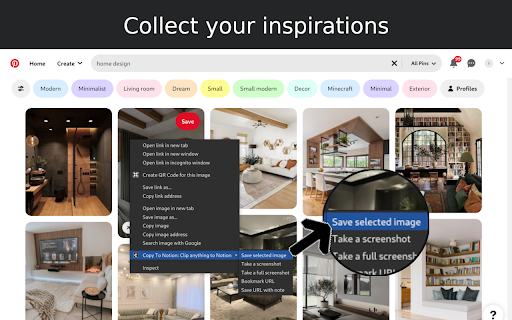
✅ Right-Click Image Saving: Save images directly to Notion via right-click, streamlining your content gathering process.

✅ Full-Screen Capture: Easily capture and save entire webpage screenshots to Notion for comprehensive reference.

✅ Customizable Saving Options: Tailor how and where your clips are saved within Notion for personalized organization.

✅ Site-Specific Database Forms: Set up unique database forms for different websites, enhancing organization.

✅ Keyboard Shortcuts: Leverage shortcuts for rapid note-taking, bookmarking, and more, enhancing your productivity.

✅ Multi-Workspace Support: Easily switch between multiple Notion workspaces for diverse projects.

👥 Ideal For:

✅ Notion Users Seeking a Web Clipper: Save web content like articles, images, and text snippets directly into Notion.

✅ Researchers and Students: Build a personal knowledge base by capturing design assets, statistics, and research findings.

✅ Content Creators and Designers: Collect inspiration, visuals, and design elements for your projects.

✅ Professionals Tracking Competitive Intelligence: Gather competitor information, pricing, and marketing materials.

✅ Newsletter Curators: Compile content and resources effortlessly for upcoming issues.

✅ Project Managers: Develop project plans and roadmaps by gathering relevant information and resources.

✅ Social Media Managers: Clip quotes, articles, and images for future social media posts.

✅ Language Learners: Save vocabulary words, grammar rules, and learning resources into Notion.

✅ Recipe Collectors: Clip recipes and cooking tips from different websites.

✅ Travel Enthusiasts: Gather information on destinations, attractions, and accommodations.

✅ Anyone Streamlining Online Research: Efficiently collect and organize information from various sources.

✉️ We Value Your Input

Curious about our upcoming features? Check out our roadmap: https://copytonotion.featurebase.app/

For assistance or feedback, reach out to us at [email protected]. We're committed to continually improving Copy to Notion based on your insights.
Technical
- Version
- 0.20.0
- Manifest
- V3
- Size
- 169KiB
- Min Chrome
- 88
- Languages
- 1
- Featured
- Yes
Metadata
- ID
- jbeooomlnkgbokicnpcabkpnacabjnbm
- Developer ID
- u98a2b0f6d92b1add2b3ff43539d4040e
- Developer Email
- [email protected]
- Created
- Oct 13, 2022
- Last Updated (Store)
- Jan 21, 2025
- Last Scraped
- Jun 2, 2026
- Website
- copytonotion.com
- Privacy Policy
- https://copytonotion.com/privacy
Similar extensions
Alternatives to Copy To Notion: Clip anything to Notion, ranked by description similarity.

Notion Highlights
Save web highlights to Notion instantly. Detects open Notion pages. Zero friction! 🔥
23

Notion Web Clipper
Use our Web Clipper to save any website into Notion.
1.0M
★ 3.3

NoteFlow
Clip pages and highlights into your Notion workspace with tags and organization
—

Copy2Note
Copy highlighted text to Notion with custom hotkeys
4

Save to Notion
Save the Web to Notion
400.0K
★ 4.3

NotesToNotion
Notes, Highlights, Videos, Audios, Articles, Posts, Books in One Notion.
1.0K
★ 3.5

WebNoter
One-click creating Web notes to Notion with auto-filled URLs & titles. Instant sync, user-friendly database interface.
161
★ 5.0

Save To Note
Capture every web wonder, turn them into personal notes.Let your favorite things orbit around you like digital constellations.
2
Data sourced from the Chrome Web Store · last verified Jun 2, 2026.