
Redpen: Report bugs with screenshot/recording
Capture screenshot and record screen to report bugs and visual feedback.
As of June 2026, Redpen: Report bugs with screenshot/recording has 474 users and a 5.00/5 rating from 19 reviews in the Developer Tools category.
Usersdown 0.4 percent−0.4%
474
474
Ratingno change0%
5.00
19 reviews
Reviewsno change0%
19
Version
1.0.78
Manifest V3
History
3 snapshotsTracking since Apr 1, 2026.
View as table
| Date | Users | Rating | Reviews | Version |
|---|---|---|---|---|
| Apr 1, 2026 | 476 | 5.00 | 19 | 1.0.78 |
| May 3, 2026 | 478 | 5.00 | 19 | 1.0.78 |
| Jun 2, 2026 | 471 | 5.00 | 19 | 1.0.78 |
| Now | 474 | 5.00 | 19 | 1.0.78 |
Permissions & access
- Permissions
- scriptingactiveTabtabsstoragehistorywebRequest
- Host access
- *://*/*
Screenshots


About
The easiest way to send feedback and report bugs is, take screenshots or record screens of any website or desktop application, highlight issues using annotation tools, and submit them to your favorite issues tracking service.

💁 Helpful for
• Quality analysts, developers, designers, product managers, web agencies, consulting companies, product companies, and many more…
• All-in-one feedback and bug reporting tool useful in customer support, UAT & Beta testing, and product development.

🔑 Key Benefits
• Faster time to market - By reducing product development time by eliminating back-and-forth communication between teams.
• Increase customer satisfaction - By faster turnaround of bugs or feedback submitted by customers.
• Save Cost - By minimizing the development and support costs.

📋 Features
✪ Screenshot & Annotation tools
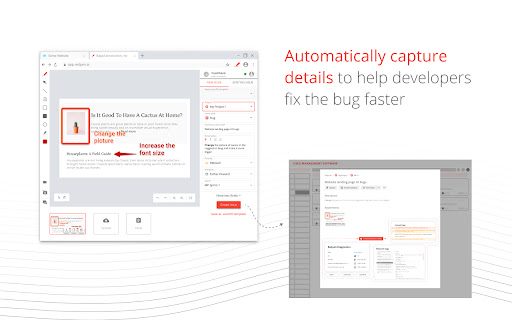
• Take screenshots of any web page of a website or desktop screen and highlight issues using annotation tools.

✪ Screen recording & Voice comments
• Record and explain issues visually on the web page or desktop screen with voice comments and annotation tools.
• Double click the Redpen extension to start recording the screen.

✪ Auto-capture technical details
• Minimize troubleshooting time with auto-collected browser or desktop-specific metadata.
• Collect technical metadata like OS details, browser details, screen size, console logs, network logs, cookies, local storage, IndexedDB, etc.

✪ Auto-fill templates
• Report bugs faster with pre-defined templates. While reporting bugs, auto-populate the common form fields to eliminate field selection every time.

✪ Widget
• Add Redpen Widget to your website to capture unlimited feedback.

🧰 Integrations
• Jira Software
• Jira Service Desk
• Azure DevOps

🛠 Redpen applications/tools
• Browser Extensions - Chrome, Edge, Safari
• See others at https://www.redpen.ai/downloads

$ Pricing & Plan
• Our individual plan is FREE FOREVER.
. Free Video recording
• Visit Customer Support Request and Bug Capture Platform - Redpen to start your 14-days free trial (no credit card required).
Technical
- Version
- 1.0.78
- Manifest
- V3
- Size
- 325KiB
- Min Chrome
- 88
- Languages
- 1
- Featured
- Yes
Metadata
- ID
- jaemdkifbanjcbchakllpngalackncfb
- Developer ID
- ub0343d293744ba98e2764e02be54d8d5
- Developer Email
- [email protected]
- Created
- Aug 8, 2021
- Last Updated (Store)
- Jul 31, 2024
- Last Scraped
- Jun 2, 2026
- Website
- redpen.ai
Similar extensions
Alternatives to Redpen: Report bugs with screenshot/recording, ranked by description similarity.

BugBul Bug Reporter
Hızlıca ekran görüntüsü veya video alın, sesli not ekleyin ve Jira/Trello'ya anında raporlayın.
7

Usersnap - Capture visual feedback & bugs
Capture your screen, collect user feedback, and track bugs reports on any website, prototype, or application.
6.0K
★ 4.7

BetterBugs: Create precise bug reports with 1-click
One-click bug reports with all the context devs need
10.0K
★ 4.9

ReportaBug
Visual software feedback and bug reporting
30
★ 5.0

Userback: Visual Feedback & Bug Reporting
Userback is a visual feedback & bug reporting tool for websites
5.0K
★ 4.7

Screendesk - Record & Report Bugs
Record bugs directly from your browser, with all the context developers need to fix them.
11
★ 5.0

Capture: Screen recording & sharing
Capture videos, screenshots, events and more to report bugs faster.
2.0K
★ 4.9

BugRepro
Capture bugs with screenshots, recordings, console logs, and network data. Works on any site to help teams debug faster.
13
★ 5.0
Data sourced from the Chrome Web Store · last verified Jun 2, 2026.