
TabDog
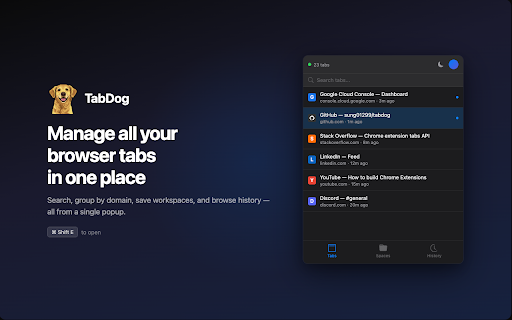
Manage all your browser tabs in one place - search, group by domain, save workspaces, and quickly switch between tabs
As of June 2026, TabDog has 40 users and a 5.00/5 rating from 3 reviews in the Productivity category.
Usersup 73.9 percent+73.9%
40
40
Ratingno change0%
5.00
3 reviews
Reviewsno change0%
3
Version
3.0.1
Manifest V3
90-day change · In the last 90 days this extension 1 version update.
History
10 snapshotsTracking since Apr 1, 2026.
View as table
| Date | Users | Rating | Reviews | Version |
|---|---|---|---|---|
| Apr 1, 2026 | 23 | 5.00 | 3 | 3.0.0 |
| Apr 16, 2026 | 28 | 5.00 | 3 | 3.0.0 |
| Apr 24, 2026 | 35 | 5.00 | 3 | 3.0.1 |
| May 1, 2026 | 30 | 5.00 | 3 | 3.0.1 |
| May 7, 2026 | 33 | 5.00 | 3 | 3.0.1 |
| May 12, 2026 | 34 | 5.00 | 3 | 3.0.1 |
| May 18, 2026 | 36 | 5.00 | 3 | 3.0.1 |
| May 24, 2026 | 41 | 5.00 | 3 | 3.0.1 |
| May 31, 2026 | 38 | 5.00 | 3 | 3.0.1 |
| Jun 6, 2026 | 34 | 5.00 | 3 | 3.0.1 |
| Now | 40 | 5.00 | 3 | 3.0.1 |
Changelog
- Apr 16, 2026description
TabDog — Manage All Your Browser Tabs in One Place

TabDog is a powerful tab manager that helps you search, organize, and switch between tabs instantly. Save workspaces, browse history, and take control of your tabs — all from a single popup.

✨ KEY FEATURES

📋 Tab Management
• Instant search — find any tab by title, URL, or domain
• Domain grouping — tabs automatically organized by website
• Recently closed — reopen tabs closed within the last 30 minutes
• Close tabs individually or by domain group

🔍 Workspaces
• Save your current tabs as a named workspace
• Add custom URLs with smart autocomplete from open tabs and history
• Restore a workspace instantly — tabs open alongside your current ones
• Color-coded labels (9 colors) for easy organization
• Chrome Tab Groups — restored workspaces are grouped with matching name and color

⚡ History
• Browse the last 7 days of browsing history
• Search and filter by keyword
• Entries grouped by date (Today, Yesterday, etc.)

🛠️ KEYBOARD SHORTCUTS

• Cmd+Shift+E (Mac) / Ctrl+Shift+E (Win/Linux) — Open TabDog
• ↑ / ↓ — Navigate through the list
• Enter — Activate selected tab or expand group
• C — Close selected tab
• Cmd+F / Ctrl+F — Focus search bar
• Cmd+1/2/3 — Switch between Tabs, Workspaces, History
• Escape — Clear search or close popup
• Type to search instantly


📋 PERMISSIONS

PERMISSIONS
• tabs / tabGroups / sessions — Read and manage tab information
• storage — Save settings and local data
• history — Browse your recent history and power autocomplete
• identity — Google sign-in for workspace cloud sync
• alarms — Periodic workspace sync
• No host permissions. No access to page content.

🔄 WHAT'S NEW — v3.0.0
• Complete UI rewrite — rebuilt with Svelte 5 for a faster, modern interface
• New keyboard navigation — full arrow key support with visual highlight
• Smart autocomplete — custom URL input suggests from open tabs and history
• Simplified workspace restore — one click to open, no extra steps
• Improved discoverability — action buttons are always subtly visible

📖 OPEN SOURCE

TabDog is open source and available on GitHub. Feel free to:
• Review the code
• Report issues
• Suggest features
• Contribute improvements
GitHub Link: https://github.com/sung01299/tabdog

💬 SUPPORT

Having issues? Questions? Feedback?
• Check our GitHub repository for documentation
• Open an issue for bug reports
• Star the project if you find it useful!

Take control of your tabs. Download TabDog today.

🐕 Your tabs. Your way. Your menu bar.
TabDog — Manage All Your Browser Tabs in One Place

TabDog is a powerful tab manager that helps you search, organize, and switch between tabs instantly. Save workspaces, browse history, and take control of your tabs — all from a single popup.

✨ KEY FEATURES

📋 Tab Management
• Instant search — find any tab by title, URL, or domain
• Domain grouping — tabs automatically organized by website
• Recently closed — reopen tabs closed within the last 30 minutes
• Close tabs individually or by domain group

🔍 Workspaces
• Save your current tabs as a named workspace
• Add custom URLs with smart autocomplete from open tabs and history
• Restore a workspace instantly — tabs open alongside your current ones
• Color-coded labels (9 colors) for easy organization
• Chrome Tab Groups — restored workspaces are grouped with matching name and color

⚡ History
• Browse the last 7 days of browsing history
• Search and filter by keyword
• Entries grouped by date (Today, Yesterday, etc.)

🛠️ KEYBOARD SHORTCUTS

• Cmd+Shift+E (Mac) / Ctrl+Shift+E (Win/Linux) — Open TabDog
• ↑ / ↓ — Navigate through the list
• Enter — Activate selected tab or expand group
• C — Close selected tab
• Cmd+F / Ctrl+F — Focus search bar
• Cmd+1/2/3 — Switch between Tabs, Workspaces, History
• Escape — Clear search or close popup
• Type to search instantly


📋 PERMISSIONS

PERMISSIONS
• tabs / tabGroups / sessions — Read and manage tab information
• storage — Save settings and local data
• history — Browse your recent history and power autocomplete
• identity — Google sign-in for workspace cloud sync
• alarms — Periodic workspace sync
• No host permissions. No access to page content.

🔄 WHAT'S NEW — v3.0.1
• Google OAuth logout error fixed

🔄 WHAT'S NEW — v3.0.0
• Complete UI rewrite — rebuilt with Svelte 5 for a faster, modern interface
• New keyboard navigation — full arrow key support with visual highlight
• Smart autocomplete — custom URL input suggests from open tabs and history
• Simplified workspace restore — one click to open, no extra steps
• Improved discoverability — action buttons are always subtly visible

📖 OPEN SOURCE

TabDog is open source and available on GitHub. Feel free to:
• Review the code
• Report issues
• Suggest features
• Contribute improvements
GitHub Link: https://github.com/sung01299/tabdog

💬 SUPPORT

Having issues? Questions? Feedback?
• Check our GitHub repository for documentation
• Open an issue for bug reports
• Star the project if you find it useful!

Take control of your tabs. Download TabDog today.

🐕 Your tabs. Your way. Your menu bar.
Permissions & access
- Permissions
- tabstabGroupsstoragesessionsidentityalarmshistory
- Host access
- None declared
Screenshots


About
TabDog — Manage All Your Browser Tabs in One Place

TabDog is a powerful tab manager that helps you search, organize, and switch between tabs instantly. Save workspaces, browse history, and take control of your tabs — all from a single popup.

✨ KEY FEATURES

📋 Tab Management
• Instant search — find any tab by title, URL, or domain
• Domain grouping — tabs automatically organized by website
• Recently closed — reopen tabs closed within the last 30 minutes
• Close tabs individually or by domain group

🔍 Workspaces
• Save your current tabs as a named workspace
• Add custom URLs with smart autocomplete from open tabs and history
• Restore a workspace instantly — tabs open alongside your current ones
• Color-coded labels (9 colors) for easy organization
• Chrome Tab Groups — restored workspaces are grouped with matching name and color

⚡ History
• Browse the last 7 days of browsing history
• Search and filter by keyword
• Entries grouped by date (Today, Yesterday, etc.)

🛠️ KEYBOARD SHORTCUTS

• Cmd+Shift+E (Mac) / Ctrl+Shift+E (Win/Linux) — Open TabDog
• ↑ / ↓ — Navigate through the list
• Enter — Activate selected tab or expand group
• C — Close selected tab
• Cmd+F / Ctrl+F — Focus search bar
• Cmd+1/2/3 — Switch between Tabs, Workspaces, History
• Escape — Clear search or close popup
• Type to search instantly


📋 PERMISSIONS

PERMISSIONS
• tabs / tabGroups / sessions — Read and manage tab information
• storage — Save settings and local data
• history — Browse your recent history and power autocomplete
• identity — Google sign-in for workspace cloud sync
• alarms — Periodic workspace sync
• No host permissions. No access to page content.

🔄 WHAT'S NEW — v3.0.1
• Google OAuth logout error fixed

🔄 WHAT'S NEW — v3.0.0
• Complete UI rewrite — rebuilt with Svelte 5 for a faster, modern interface
• New keyboard navigation — full arrow key support with visual highlight
• Smart autocomplete — custom URL input suggests from open tabs and history
• Simplified workspace restore — one click to open, no extra steps
• Improved discoverability — action buttons are always subtly visible

📖 OPEN SOURCE

TabDog is open source and available on GitHub. Feel free to:
• Review the code
• Report issues
• Suggest features
• Contribute improvements
GitHub Link: https://github.com/sung01299/tabdog

💬 SUPPORT

Having issues? Questions? Feedback?
• Check our GitHub repository for documentation
• Open an issue for bug reports
• Star the project if you find it useful!

Take control of your tabs. Download TabDog today.

🐕 Your tabs. Your way. Your menu bar.
Technical
- Version
- 3.0.1
- Manifest
- V3
- Size
- 90.62KiB
- Min Chrome
- 116
- Languages
- 1
- Featured
- No
Metadata
- ID
- jadjicoipoakmiahodaniigoocompfpi
- Developer ID
- ucde1a6ea2c8a7833b54de4c74a322fb6
- Developer Email
- [email protected]
- Created
- Jan 13, 2026
- Last Updated (Store)
- Apr 2, 2026
- Last Scraped
- Jun 6, 2026
- Website
- —
- Support URL
- —
- Privacy Policy
- https://sung01299.github.io/tabdog/privacy-policy
Similar extensions
Alternatives to TabDog, ranked by description similarity.

Tabforge – Smart Tab Manager
Smart tab manager to organize tabs, close duplicates, group tabs by domain, and search open tabs instantly.
3
★ 5.0

TabTail – Smart Tab Manager
Awesome tab manager: group by domain, move/cycle/pin, close duplicates, mute audio, save sessions, bookmark tabs & more
6
★ 5.0

Session Paw: SideWise Tabs Outliner
Tree Style Tabs Outliner & Quick Jump to Recent Tabs & Group Tab and Windows & Tab Session Manager.
763
★ 4.0

Tabbify
Find, Organize, Save and Sync your browser tabs.
19
★ 5.0

Desktab - Quick visual tab manager
Tame tab clutter instantly. Visual grid to switch, search, mute, and close tabs with Cmd+. Includes light/dark theme settings.
1

Tab Hero
A modern, sleek chrome extension to help you manage tabs and apps.
1
★ 5.0

Tab Organizer
Intelligent tab management with auto-grouping and powerful search
241
★ 4.2

Tab-Pilot - AI Tab Manager & Organizer
AI tab manager. Organize, save & find tabs with smart suggestions, nested folders, workspaces & Drive sync. Local AI runs privately.
34
★ 5.0
Data sourced from the Chrome Web Store · last verified Jun 6, 2026.