
TabTail – Smart Tab Manager
Awesome tab manager: group by domain, move/cycle/pin, close duplicates, mute audio, save sessions, bookmark tabs & more
As of May 2026, TabTail – Smart Tab Manager has 6 users and a 5.00/5 rating from 2 reviews in the Productivity category.
Usersup 100.0 percent+100.0%
6
6
Ratingno change0%
5.00
2 reviews
Reviewsno change0%
2
Version
1.0.0
Manifest V3
History
5 snapshotsTracking since Apr 1, 2026.
View as table
| Date | Users | Rating | Reviews | Version |
|---|---|---|---|---|
| Apr 1, 2026 | 3 | 5.00 | 2 | 1.0.0 |
| Apr 19, 2026 | 5 | 5.00 | 2 | 1.0.0 |
| May 8, 2026 | 2 | 5.00 | 2 | 1.0.0 |
| May 16, 2026 | 4 | 5.00 | 2 | 1.0.0 |
| May 30, 2026 | 9 | 5.00 | 2 | 1.0.0 |
| Now | 6 | 5.00 | 2 | 1.0.0 |
Permissions & access
- Permissions
- tabsstoragecontextMenusnotificationsbookmarks
- Host access
- <all_urls>
Screenshots


About
TabTail – Smart Tab Manager
A powerful Chrome extension that supercharges your browsing with intelligent tab management, keyboard shortcuts, and AI-powered organization. Say goodbye to tab chaos and hello to effortless productivity!

Why TabTail?
In today's multi-tab world, managing dozens of open tabs can be overwhelming. TabTail brings order to the chaos with one-click actions, smart grouping, and session management – all while keeping your data private and local.

Key Benefits:
- Save Time: Quickly mute noisy tabs, close duplicates, or reorganize with a single click or shortcut.
- Stay Organized: Group tabs by domain, save workspaces, or let AI suggest logical sessions.
- Boost Productivity: Customizable shortcuts and context menus put power at your fingertips.
- Privacy First: Everything runs locally – no data leaves your browser.

Core Features

Tab Organization & Movement
- Move Tabs Easily: Send any tab to the first or last position, or cycle left/right with wraparound.
- Pin/Unpin Tabs: Toggle pinning for quick access to favorites.
- Close Duplicates: Automatically detect and remove duplicate tabs (configurable to ignore query parameters).
- Close Tabs to the Right: Tidy up by closing all tabs after the active one.
- Close Other Tabs: Keep only the current tab open and close the rest.

Audio & Media Management
- Mute/Unmute Current Tab: Silence or restore audio for the active tab instantly.
- Navigate to Audible Tab: Jump straight to any tab playing sound.

Smart Bookmarks & Windows
- Smart Bookmark Toggle: One action to bookmark or unbookmark the current page (customizable behavior).
- Maximize/Minimize Window: Toggle your browser window between full-screen and normal modes.

Session & Workspace Management
- Save & Restore Sessions: Capture your current tab layout as a named workspace and reopen it anytime.
- Manage Sessions: View, restore, or delete saved sessions – stored per browser profile.
- AI-Powered Tab Splitting: Let our local AI analyze your tabs and suggest intelligent groupings into logical sessions (no external servers involved).

Customization & UI
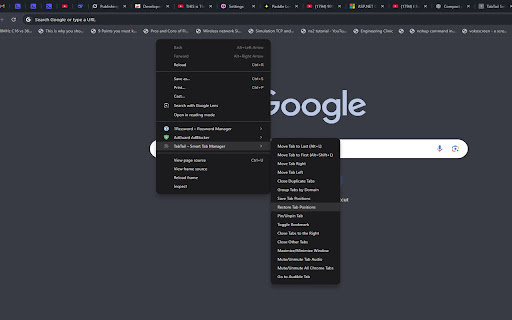
- Context Menu Integration: Right-click any tab for instant actions – enable/disable items as needed.
- Keyboard Shortcuts: Fully customizable (set via chrome://extensions/shortcuts). Defaults include Alt+L for move to last, Alt+Left/Right for cycling.
- Popup Interface: Click the extension icon for a clean dashboard to search, manage tabs, and access features.
- Options Page: Fine-tune settings like focus behavior, duplicate detection, and shortcut display in menus.
- Domain Grouping: Auto-group tabs by website while preserving your original order.

How It Works
1. Install the Extension: Load it from the Chrome Web Store.
2. Access Features:
   - Right-click a tab for context menu options.
   - Click the TabTail icon in your toolbar for the popup.
   - Use keyboard shortcuts for speed.
3. Customize: Visit the options page to tailor the experience to your workflow.
4. Sessions: Save your current tabs as a workspace via the popup – restore later with one click.
All operations are fast (under 500ms for most actions) and respect Chrome's Manifest V3 standards.

Installation
1. Search for "TabTail" in the Chrome Web Store (https://chromewebstore.google.com).
2. Click Add to Chrome.
3. Grant minimal permissions (tabs, storage, contextMenus).
4. Pin the icon to your toolbar for quick access.
Pro Tip: Configure shortcuts at chrome://extensions/shortcuts to match your habits.

Privacy & Security
TabTail is built with your privacy in mind:
- Local Only: All data (sessions, preferences) stays in your browser – no cloud sync or external APIs.
- Minimal Permissions: Only accesses tabs for management, storage for settings, and context menus for UI.
- No Tracking: We don't collect or transmit any user data.
For full details, see our Privacy Policy ([INSERT PUBLIC PRIVACY POLICY URL HERE]).

Support & Feedback
- Questions? Email us at [email protected].
- Feature Requests: Share your ideas – we're always improving!
- Report Issues: Use the Chrome Web Store reviews or contact support.

TabTail: Tailor your tabs, master your browser.
Technical
- Version
- 1.0.0
- Manifest
- V3
- Size
- 695KiB
- Min Chrome
- 88
- Languages
- 6
- Featured
- No
Metadata
- ID
- jclglfpfnfljmgdalcpdjcnmhomfibdf
- Developer ID
- ua200605f6c9ea897a1734fea835ac855
- Developer Email
- [email protected]
- Created
- Nov 16, 2025
- Last Updated (Store)
- Nov 16, 2025
- Last Scraped
- May 30, 2026
- Website
- —
- Support URL
- [email protected]
Similar extensions
Alternatives to TabTail – Smart Tab Manager, ranked by description similarity.

SmartTab Manager
Intelligently manage, organize, and optimize your browser tabs with AI-powered features.
6
★ 5.0

Tab Manager Pro
Organize, search, and manage browser tabs across windows. Group by domain, find duplicates, boost productivity.
3

TabInsights - Productivity Analytics
Track focus time, block distractions, and start productive work in one click with Sprints and Workspaces.
8
★ 5.0

Tabforge – Smart Tab Manager
Smart tab manager to organize tabs, close duplicates, group tabs by domain, and search open tabs instantly.
3
★ 5.0

TabTidy - Smart Tab Manager
Smart tab manager to organize, save, and restore your browser tabs
49
★ 4.7

Tab Tools
Powerful tab management tools: group, copy, organize, and manage your Chrome tabs efficiently with keyboard shortcuts and modern UI
26
★ 5.0

tabMind - AI smart tree style tabs
Organize & visualize tabs, bookmarks in a smart AI-driven hierarchy. Organize tabs in tree based on its content not just who open it
288
★ 5.0

TabToolKit - The Ultimate Tab Management Solution
An elegant tab manager with smart grouping and navigation features
10
Data sourced from the Chrome Web Store · last verified May 30, 2026.