Restoration AI: Fix Old Photos, Scratches & Water Stains
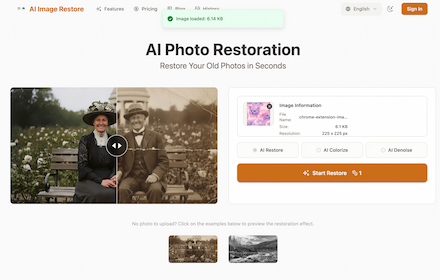
Instantly repair old photos with AI. The specialist tool to remove scratches, water stains, mold, and unblur faces in one click.
As of June 2026, Restoration AI: Fix Old Photos, Scratches & Water Stains has 11 users in the Productivity category.
Usersup 83.3 percent+83.3%
11
11
Ratingno change0%
—
— reviews
Reviewsno change0%
—
Version
1.0.1
Manifest V3
History
7 snapshotsTracking since Apr 18, 2026.
View as table
| Date | Users | Rating | Reviews | Version |
|---|---|---|---|---|
| Apr 18, 2026 | 6 | — | — | 1.0.1 |
| Apr 27, 2026 | 6 | — | — | 1.0.1 |
| May 7, 2026 | 6 | — | — | 1.0.1 |
| May 12, 2026 | 8 | — | — | 1.0.1 |
| May 17, 2026 | — | — | — | 1.0.1 |
| May 24, 2026 | 10 | — | — | 1.0.1 |
| Jun 6, 2026 | 9 | — | — | 1.0.1 |
| Now | 11 | — | — | 1.0.1 |
Permissions & access
- Permissions
- contextMenusstoragenotifications
- Host access
- None declared
Screenshots


About
Bring your cherished memories back to life! PhotoRestore.ai is a powerful Chrome extension that uses advanced Artificial Intelligence to restore old photos, fix blurry images, colorize black-and-white pictures, and upscale low-resolution graphics—all within your browser.

Whether you are a genealogist preserving family history, a designer needing higher quality assets, or just someone who wants to fix a grainy selfie, PhotoRestore.ai is your go-to solution.

✨ KEY FEATURES:
📸 Restore Old Photos (AI Repair): Say goodbye to scratches, tears, and creases. Our AI accurately detects and repairs damage in vintage photographs, reconstructing missing details to make faces clear and sharp again.

⚡ One-Click Efficiency: No need for complex software like Photoshop. Simply upload, choose your enhancement, and download.

🚀 WHY CHOOSE PHOTORESTORE.AI?
- Specific for Photo Restoration: Unlike generic editors, our model is trained specifically on human faces and old textures.
- Privacy First: We respect your data. Your photos are processed securely.
- Lightweight: Does not slow down your browser.

Use Cases:
- Digitizing family albums and genealogy research.
- Enhancing ecommerce product photos.
- Improving social media posts (Instagram, Facebook, Pinterest).
- Restoring scanned documents and historical archives.

How to get started:
1. Click "Add to Chrome".
2. Open the extension icon.
3. Upload your image (JPG, PNG, WebP supported).
4. Watch the AI magic happen!
Technical
- Version
- 1.0.1
- Manifest
- V3
- Size
- 30.98KiB
- Min Chrome
- 88
- Languages
- 1
- Featured
- No
Metadata
- ID
- iolijbikkfjeekdnfalbieoeolfoggfm
- Developer ID
- ua69d2c7635d083462190c1e8e395c777
- Developer Email
- [email protected]
- Created
- Nov 20, 2025
- Last Updated (Store)
- May 7, 2026
- Last Scraped
- Jun 6, 2026
- Website
- photorestore.ai
- Support URL
- https://photorestore.ai
- Privacy Policy
- https://photorestore.ai/privacy-policy
Similar extensions
Alternatives to Restoration AI: Fix Old Photos, Scratches & Water Stains, ranked by description similarity.

Old Photo Restoration - Professional Photo Repair
Restore precious old photos with professional AI-powered repair technology. Fix damaged, faded, and blurred vintage photographs.
16

AI Image Toolbox
AI photo restoration, mosaic remover, background cutout, cartoon, couple, makeup, and portrait tools by 1bit.ai
4

RepairPhotoAI - AI Photo Restoration
Paste image URL or right-click images to repair. Floating button, hover actions. RepairPhotoAI.com
3
★ 1.0

Photo Enhancer
Use Photo Enhancer to upscale image resolution. This image upscaler enhance photo with AI.
445
★ 5.0

Image to Image AI Free - ZestyGen
Free AI image transformation tools. Transform photos with AI art generator, image editor, photo restoration, face swap.
8

Unblur Image
Use Unblur Image to enhance image quality, unblur picture details, and ai upscale low-res photos for unblur, clear photo anytime.
1.0K
★ 4.7

AI Mosaic Remover
Right-click any image to remove mosaic instantly using AI.
7

AI Image Upscaler - Enhance images to 4K Quality Instantly
Upscale low-resolution images to 4K with AI. One-click enhancement for sharper details, reduced noise, and crystal-clear results.
73
★ 1.0
Data sourced from the Chrome Web Store · last verified Jun 6, 2026.