
AI Image Toolbox
AI photo restoration, mosaic remover, background cutout, cartoon, couple, makeup, and portrait tools by 1bit.ai
As of June 2026, AI Image Toolbox has 4 users in the Productivity category.
Usersno change0%
4
4
Ratingno change0%
—
— reviews
Reviewsno change0%
—
Version
3.0.0
Manifest V3
90-day change · In the last 90 days this extension 1 version update, changed permissions.
History
5 snapshotsTracking since Apr 18, 2026.
View as table
| Date | Users | Rating | Reviews | Version |
|---|---|---|---|---|
| Apr 18, 2026 | — | — | — | 1.0 |
| Apr 28, 2026 | — | — | — | 1.0 |
| May 7, 2026 | — | — | — | 1.0 |
| May 31, 2026 | 1 | — | — | 3.0.0 |
| Jun 6, 2026 | 3 | — | — | 3.0.0 |
| Now | 4 | — | — | 3.0.0 |
Changelog
- May 7, 2026description
📸 Old Photo Restoration: Instantly Restore Images Using AI
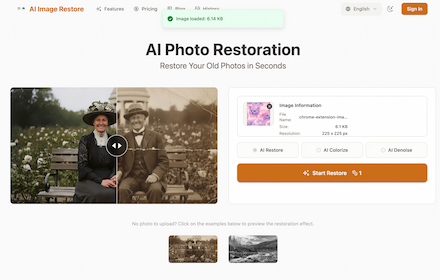
The Old Photo Restoration extension is a seamless bridge between images you find online and the specialized restoration tools available at https://www.1bit.ai/services/old-photo-restoration. Its core purpose is to simplify and speed up the process of restoring old, damaged, or low-quality photos.

What is its purpose? The extension allows users to instantly take any image they encounter on the web—such as a historic photo on an archive site or a family photo shared on social media—and send it directly to the AI restoration service. There, AI technology can be used to repair scratches, reduce fade, sharpen blurred details, and revitalize the image to a like-new condition.

Why should a user install it?

⚡️ Instant Restoration Initiation: The Right-Click functionality eliminates the cumbersome steps of downloading the image, navigating to the website, and manually uploading the file. You start the restoration process with a single click.

🧠 Access Advanced AI Tools: Users gain immediate, direct access to the 1bit.ai specialized service, which employs AI to automatically and effectively handle complex tasks like scratch removal, color correction, and detail enhancement.

🚀 Seamless Workflow: Whether you are doing historical research, archiving family photos, or collecting images for a project, the extension integrates the restoration initiation directly into your browsing workflow.

🖱️ Dual Access Points: The extension offers flexibility: use the right-click menu to launch restoration with a specific web image, or click the toolbar icon to go straight to the restoration homepage to upload a local file.
AI Image Toolbox for Chrome

Edit, transform, and generate stunning images without leaving your current tab.

AI Image Toolbox brings 1bit.ai image tools into a fast Chrome side panel workflow. Upload your photo, choose a style, run the job, and download results in minutes.

What you can do

Restore old photos and improve damaged images
Remove mosaic and unwanted backgrounds
Turn photos into cartoon-style artwork
Create couple-style image blends
Apply AI makeup and portrait enhancements
Track job progress and download final results in one place


Why users like it

No app switching: work directly inside Chrome
Simple workflow: upload, choose style, generate
Clean side panel UI designed for quick edits
Secure connection to official 1bit.ai services


How to install

Open the Chrome Web Store listing for AI Image Toolbox.
Click Add to Chrome.
Confirm by clicking Add extension.
(Optional) Click the puzzle icon and pin AI Image Toolbox for quick access.
Open the extension and sign in with your account to start using all tools.
- May 7, 2026short_description
Upload your old, scratched, or faded photograph to restore it to a like-new condition.
AI photo restoration, mosaic remover, background cutout, cartoon, couple, makeup, and portrait tools by 1bit.ai
- May 7, 2026name
Old Photo Restoration
AI Image Toolbox
- May 7, 2026host_permissions
(empty)
https://*.1bit.ai/*
- May 7, 2026permissions
contextMenus
storage, identity, activeTab, scripting, sidePanel, contextMenus, tabs
Permissions & access
- Permissions
- storageidentityactiveTabscriptingsidePanelcontextMenustabs
- Host access
- https://*.1bit.ai/*
Screenshots


About
AI Image Toolbox for Chrome

Edit, transform, and generate stunning images without leaving your current tab.

AI Image Toolbox brings 1bit.ai image tools into a fast Chrome side panel workflow. Upload your photo, choose a style, run the job, and download results in minutes.

What you can do

Restore old photos and improve damaged images
Remove mosaic and unwanted backgrounds
Turn photos into cartoon-style artwork
Create couple-style image blends
Apply AI makeup and portrait enhancements
Track job progress and download final results in one place


Why users like it

No app switching: work directly inside Chrome
Simple workflow: upload, choose style, generate
Clean side panel UI designed for quick edits
Secure connection to official 1bit.ai services


How to install

Open the Chrome Web Store listing for AI Image Toolbox.
Click Add to Chrome.
Confirm by clicking Add extension.
(Optional) Click the puzzle icon and pin AI Image Toolbox for quick access.
Open the extension and sign in with your account to start using all tools.
Technical
- Version
- 3.0.0
- Manifest
- V3
- Size
- 586KiB
- Min Chrome
- 88
- Languages
- 1
- Featured
- No
Metadata
- ID
- dcgogfjmgpcealjnbfeolalgjoehmbfg
- Developer ID
- u13527058caf2a85b498d846ecf9ccd53
- Developer Email
- [email protected]
- Created
- Dec 11, 2025
- Last Updated (Store)
- Apr 29, 2026
- Last Scraped
- Jun 6, 2026
- Website
- 1bit.ai
- Support URL
- https://www.1bit.ai/ai-cartoon-generator
- Privacy Policy
- https://www.1bit.ai/privacy
Similar extensions
Alternatives to AI Image Toolbox, ranked by description similarity.

RepairPhotoAI - AI Photo Restoration
Paste image URL or right-click images to repair. Floating button, hover actions. RepairPhotoAI.com
3
★ 1.0
Restoration AI: Fix Old Photos, Scratches & Water Stains
Instantly repair old photos with AI. The specialist tool to remove scratches, water stains, mold, and unblur faces in one click.
11

Old Photo Restoration - Professional Photo Repair
Restore precious old photos with professional AI-powered repair technology. Fix damaged, faded, and blurred vintage photographs.
16

AI Mosaic Remover
Right-click any image to remove mosaic instantly using AI.
7

Image to Image AI Free - ZestyGen
Free AI image transformation tools. Transform photos with AI art generator, image editor, photo restoration, face swap.
8

Photo Enhancer
Use Photo Enhancer to upscale image resolution. This image upscaler enhance photo with AI.
445
★ 5.0

AI Image Editor
Right-click any image on the web and instantly edit it using AI.
6

Unblur Image
Use Unblur Image to enhance image quality, unblur picture details, and ai upscale low-res photos for unblur, clear photo anytime.
1.0K
★ 4.7
Data sourced from the Chrome Web Store · last verified Jun 6, 2026.