
Basecamp Ping Manager
Organise your Basecamp pings, give them a group name, and access them with a single click.
As of June 2026, Basecamp Ping Manager has 224 users and a 5.00/5 rating from 5 reviews in the Workflow & Planning category.
Usersup 4.2 percent+4.2%
224
224
Ratingno change0%
5.00
5 reviews
Reviewsno change0%
5
Version
1.0.5
Manifest V3
History
3 snapshotsTracking since Apr 23, 2026.
View as table
| Date | Users | Rating | Reviews | Version |
|---|---|---|---|---|
| Apr 23, 2026 | 215 | 5.00 | 5 | 1.0.5 |
| May 13, 2026 | 228 | 5.00 | 5 | 1.0.5 |
| Jun 8, 2026 | 221 | 5.00 | 5 | 1.0.5 |
| Now | 224 | 5.00 | 5 | 1.0.5 |
Permissions & access
- Permissions
- storagetabs
- Host access
- None declared
Screenshots


About
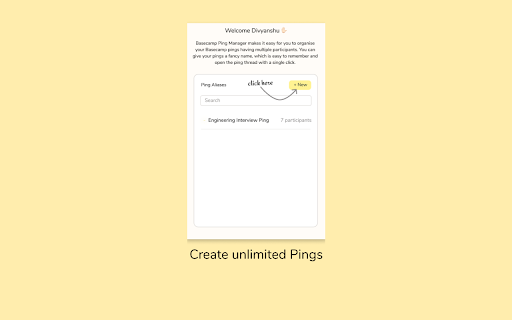
Basecamp Ping Manager makes it easy for you to bookmark your Basecamp pings having multiple participants. You can give your pings a fancy name, which is easy to remember and open the ping thread with a single click.

Features
1. Easily access your pings from all tabs.
2. You can bookmark a ping for future reference.
3. Create custom names for your pings
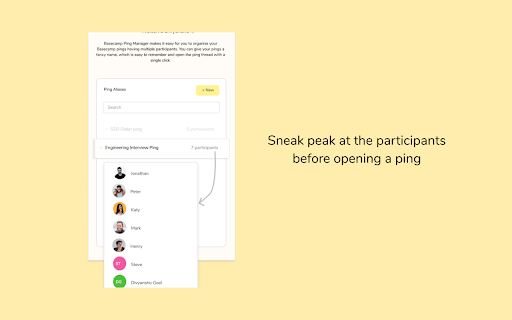
4. Check participants before opening a ping
5. Open Ping directly in Basecamp Desktop app
6. Open meet directly from chat

How to use?

1. Install the extension. Pin📌 the extension.

2. Click on the extension icon in the taskbar. A popup window would appear.

3. If you're not already signed in, the popup will ask you to Sign in to Basecamp. This is a one step process to connect your Basecamp Ping Manager with Basecamp. Now, you are good to go. You can create as many aliases of the pings as you need.

4. Simply open the Basecamp Ping that you want to save (open the ping in the browser).

5. Now, click on the extension icon on the taskbar. You will see a button to add new pings. The extension will fetch the details of the ping automatically (if you have followed Step 3).

6. Enter a name under which you want to save the ping, and click on save button.

7. The ping bookmark is created and will be available to you all times.
Just click on the extension icon on the taskbar and you will see all the pings that you have created. To open a ping, just click on the ping name and it will take you to the Basecamp ping.

Note - All your Basecamp ping information remains stored on your system. We do not collect any of your pings information.


Version - v1.0.5
- Open Meet from chat

Version - v1.0.3
- Open Ping in Basecamp Desktop App
- Delete Ping Alias
- Add Aliases button inside Basecamp in Browser

Version - v1.0.2
- Check Participants
- Bug fixes

Version - v1.0.1
- Create Basecamp ping aliases
- Check List of all pings
- Click on a ping to open it in browser
Technical
- Version
- 1.0.5
- Manifest
- V3
- Size
- 52.65KiB
- Min Chrome
- 88
- Languages
- 1
- Featured
- Yes
Metadata
- ID
- iognjlnaalbhfmcbdpcpajgnhkinoiik
- Developer ID
- u1262283e108b06f286574a396331f261
- Developer Email
- [email protected]
- Created
- Oct 31, 2021
- Last Updated (Store)
- Jan 13, 2022
- Last Scraped
- Jun 8, 2026
- Website
- —
- Support URL
- —
- Privacy Policy
- —
Similar extensions
Alternatives to Basecamp Ping Manager, ranked by description similarity.

TaskPing
Simple yet powerful task reminders with instant notifications. Never miss a deadline again!
4
★ 5.0

Pro ChatGPT Bookmarks
Add a professional bookmarking sidebar to ChatGPT — save, search, and organize messages locally.
8
★ 5.0

MarkBase - Quick Bookmark Manager
Quickly save bookmarks to your MarkBase account with one click
10
★ 1.0

Tab Snooze & Organizer - PingLater
Tab snooze extension to save tabs for later. Set reminders, organize tabs, and get notified. Beautiful tab manager for Chrome.
183
★ 5.0

ChatGPT Bookmark Manager
Bookmark ChatGPT responses and return to them later
94
★ 3.0

PineTab
Organize your tabs across all windows. Select, close in bulk, or save as bookmarks in a chosen folder. Simple, fast tab management.
35
★ 5.0

Pinalist - Bookmark Manager
All-in-one bookmark manager
540
★ 5.0

ChatGPT Bookmark
ChatGPT Bookmark is a simple extension that enables users to bookmark and easily access their conversations with ChatGPT
455
★ 2.1
Data sourced from the Chrome Web Store · last verified Jun 8, 2026.