
sAIve - ChatGPT to PDF & Markdown
Export entire ChatGPT conversations to PDF & Markdown
As of June 2026, sAIve - ChatGPT to PDF & Markdown has 323 users and a 4.20/5 rating from 5 reviews in the Productivity category.
Usersup 115.3 percent+115.3%
323
323
Ratingno change0%
4.20
5 reviews
Reviewsno change0%
5
Version
0.0.4
Manifest V3
90-day change · In the last 90 days this extension 2 version updates, changed permissions.
History
10 snapshotsTracking since Apr 1, 2026.
View as table
| Date | Users | Rating | Reviews | Version |
|---|---|---|---|---|
| Apr 1, 2026 | 150 | 4.20 | 5 | 0.0.2 |
| Apr 17, 2026 | 158 | 4.20 | 5 | 0.0.2 |
| Apr 22, 2026 | 175 | 4.20 | 5 | 0.0.2 |
| Apr 27, 2026 | 186 | 4.20 | 5 | 0.0.2 |
| May 4, 2026 | 190 | 4.20 | 5 | 0.0.2 |
| May 10, 2026 | 199 | 4.20 | 5 | 0.0.2 |
| May 15, 2026 | 207 | 4.20 | 5 | 0.0.2 |
| May 21, 2026 | 227 | 4.20 | 5 | 0.0.2 |
| Jun 6, 2026 | 255 | 4.20 | 5 | 0.0.2 |
| Jun 15, 2026 | 289 | 4.20 | 5 | 0.0.3 |
| Now | 323 | 4.20 | 5 | 0.0.4 |
Changelog
- Jun 6, 2026host_permissions
https://chatgpt.com/*, https://chat.openai.com/*, https://*.blob.core.windows.net/*, https://files.oaiusercontent.com/*, https://*.oaiusercontent.com/*, https://images.openai.com/*, <all_urls>
https://chatgpt.com/*, https://chat.openai.com/*, https://*.blob.core.windows.net/*, https://files.oaiusercontent.com/*, https://*.oaiusercontent.com/*, https://images.openai.com/*
Permissions & access
- Permissions
- tabsstoragescriptingdownloadsoffscreendeclarativeNetRequestidentity
- Host access
- https://chatgpt.com/*, https://chat.openai.com/*, https://*.blob.core.windows.net/*, https://files.oaiusercontent.com/*, https://*.oaiusercontent.com/*, https://images.openai.com/*
Screenshots


About
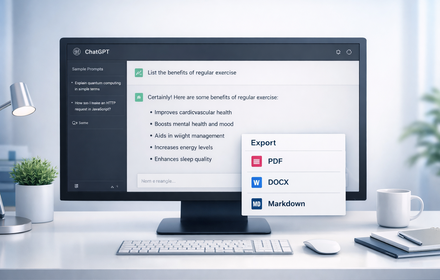
Save your entire ChatGPT conversation to PDF or Markdown.

sAIve adds one-click export buttons directly to ChatGPT, letting you save complete conversations without leaving the page.

✦ Features

✔ Two ways to PDF – "Save as PDF" for sAIve's optimized, clean formatting, or "Print to PDF" for a quick browser-native save. Different results, same conversation — try both!

✔ Markdown Export – Clean text files ready for Notion, Obsidian, GitHub, or any Markdown editor. Choose how user messages appear: code blocks, blockquotes, or headings.

✔ Quick Export Buttons – Export icons appear right next to the Share button in ChatGPT

✔ Fully Customizable – Headers, footers, page numbers, timestamps, URLs, and user message styling. Make it yours.

✔ Citation Support – Preserves web citations and source links from ChatGPT responses

✔ Code Highlighting – 17 programming languages with syntax coloring

✔ Math Support – Equations and LaTeX render as readable symbols

✔ Works in any language – Full emoji and Unicode support for international users

🔒 Private by design – Everything happens in your browser. Your conversations are never uploaded or sent anywhere.

✦ Why export your chats?

Saving your conversations means no more platform lock-in. Share a clean PDF instead of a link that might expire. Archive important research. Or use your exported chats as context for future AI sessions — just drop the file into any chatbot and pick up where you left off.

Works with all ChatGPT conversation types including Canvas documents and images.

⚙️ sAIve adds 3 subtle buttons to ChatGPT's interface for quick exports. Don't want them? Turn them off anytime in settings — you can still export from the toolbar icon.
Technical
- Version
- 0.0.4
- Manifest
- V3
- Size
- 4.33MiB
- Min Chrome
- 88
- Languages
- 1
- Featured
- No
Metadata
- ID
- iocmlflmghnjefpegfghjfepfceakbjc
- Developer ID
- u7bd1278d4cc81c5f132c442b95ccbc14
- Developer Email
- [email protected]
- Created
- Dec 18, 2025
- Last Updated (Store)
- Jun 13, 2026
- Last Scraped
- Jun 15, 2026
- Website
- getsaive.com
- Support URL
- https://getsaive.com/
- Privacy Policy
- https://getsaive.com/privacy/
Similar extensions
Alternatives to sAIve - ChatGPT to PDF & Markdown, ranked by description similarity.

ChatExport – Export ChatGPT to PDF, TXT, Markdown & HTML
Export ChatGPT chats to PDF, TXT, Markdown & HTML in one click. Custom fonts, dark mode & instant downloads. Save AI chats.
32

ChatGPT to PDF
Use ChatGPT to PDF to save chats as PDF, print conversations, and export ChatGPT chats instantly.
599
★ 4.0
ChatGPT Exporter
Export ChatGPT conversations to PDF, Word, Markdown, and Text.
194
★ 1.0

ChatGPT Export
Export ChatGPT conversations to PDF, Markdown, or DOCX with beautiful styling
3

AI Chat Exporter - ChatGPT, Claude, Gemini & DeepSeek to PDF
Export ChatGPT, Claude, Gemini, DeepSeek, Grok to PDF. Batch save chats with code, math & images. Export your AI history.
1.0K
★ 4.5

ChatGPT Exporter: PDF & HTML
Export ChatGPT conversations as polished PDFs or clean HTML pages. Fast, private, and easy to use.
22

ChatGPT Elegant Exporter - Save ChatGPT to PDF, HTML, Markdown, or Text
Export ChatGPT conversations as beautifully styled PDF, HTML, Markdown, or Text files with code highlighting and dark mode support.
211
★ 4.7

ChatGPT PDF Exporter – Download ChatGPT History
Easily save your ChatGPT chats as PDF, Markdown, or other formats—every detail preserved flawlessly.
260
★ 4.4
Data sourced from the Chrome Web Store · last verified Jun 15, 2026.