
Disney+ Episode Selector: episode list
Extension adds an episode list button to select the episode while watching Disney+ series.
As of June 2026, Disney+ Episode Selector: episode list has 124 users in the Entertainment category.
Usersup 6.9 percent+6.9%
124
124
Ratingno change0%
—
— reviews
Reviewsno change0%
—
Version
1.0.9
Manifest V3
90-day change · In the last 90 days this extension 1 version update.
History
7 snapshotsTracking since Apr 18, 2026.
View as table
| Date | Users | Rating | Reviews | Version |
|---|---|---|---|---|
| Apr 18, 2026 | 116 | — | — | 1.0.8 |
| Apr 28, 2026 | 107 | — | — | 1.0.8 |
| May 7, 2026 | 110 | — | — | 1.0.8 |
| May 15, 2026 | 118 | — | — | 1.0.8 |
| May 24, 2026 | 120 | — | — | 1.0.8 |
| May 31, 2026 | 124 | — | — | 1.0.9 |
| Jun 6, 2026 | 127 | — | — | 1.0.9 |
| Now | 124 | — | — | 1.0.9 |
Changelog
- May 24, 2026description
Go to the next episode smoothly with Disney+ Episode Selector. No more searching for the series through the home page, no more going back and forth to change the episode.

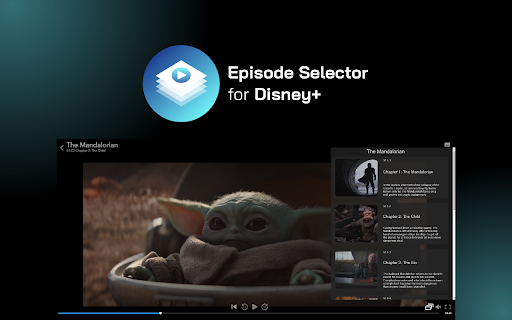
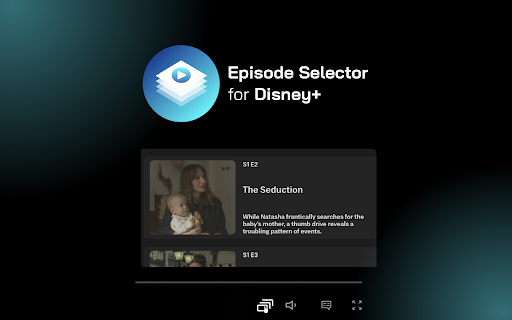
This extension improves Disney+ navigation by adding new Netflix-like button. Now you’ll be able to see the episode list and choose one of them.

How to use Disney+ Episode Selector?

1. Add the extension to your Chrome browser.
2. Go to Disney+ and pick a TV show to watch.
3. Navigate to the playback options (at the bottom of the player), and you should see new Select Episode icon.
4. Click on the select episode button to navigate through the episodes. The list will show available episodes.

Entertainment shouldn't be complicated. Enjoy watching your favorite series with easy access to more episodes.

❗**Disclaimer: All product and company names are trademarks or registered trademarks of their respective holders. This extension holds no association or affiliation with them or any third-party companies.**❗
Go to the next episode smoothly with Disney+ Episode Selector. No more searching for the series through the home page, no more going back and forth to change the episode.

This extension improves Disney+ navigation by adding a new Netflix-like button. Now you'll be able to see the episode list and choose one of them.

How to use Disney+ Episode Selector?

1. Add the extension to your Chrome browser.
2. Go to Disney+ and pick a TV show to watch.
3. Navigate to the playback options (at the bottom of the player), and you should see the new Select Episode icon.
4. Click on the select episode button to navigate through the episodes. The list will show available episodes.

Entertainment shouldn't be complicated. Enjoy watching your favorite series with easy access to more episodes.

❗**Disclaimer: All product and company names are trademarks or registered trademarks of their respective holders. This extension holds no association or affiliation with them or any third-party companies.**❗
- May 24, 2026name
Disney+ Episode Selector: episode list.
Disney+ Episode Selector: episode list
Permissions & access
- Permissions
- storage
- Host access
- *://*.disneyplus.com/*
Screenshots



About
Go to the next episode smoothly with Disney+ Episode Selector. No more searching for the series through the home page, no more going back and forth to change the episode.

This extension improves Disney+ navigation by adding a new Netflix-like button. Now you'll be able to see the episode list and choose one of them.

How to use Disney+ Episode Selector?

1. Add the extension to your Chrome browser.
2. Go to Disney+ and pick a TV show to watch.
3. Navigate to the playback options (at the bottom of the player), and you should see the new Select Episode icon.
4. Click on the select episode button to navigate through the episodes. The list will show available episodes.

Entertainment shouldn't be complicated. Enjoy watching your favorite series with easy access to more episodes.

❗**Disclaimer: All product and company names are trademarks or registered trademarks of their respective holders. This extension holds no association or affiliation with them or any third-party companies.**❗
Technical
- Version
- 1.0.9
- Manifest
- V3
- Size
- 64.5KiB
- Min Chrome
- 88
- Languages
- 55
- Featured
- No
Metadata
- ID
- inbhchglkbolpccfahkefnbnajndmone
- Developer ID
- u35d68d9a9899f10c34ae0174e98ab72f
- Developer Email
- [email protected]
- Created
- Sep 5, 2023
- Last Updated (Store)
- May 21, 2026
- Last Scraped
- Jun 6, 2026
- Website
- —
- Privacy Policy
- https://awesomextensions.com/privacy_policy/
Similar extensions
Alternatives to Disney+ Episode Selector: episode list, ranked by description similarity.

Hulu Episode Selector: Hulu episode list.
Extension adds an episode list button to select the episode while watching Hulu series.
105

AMC+ Episode Selector: episode list.
The extension adds an episode list button to select the episode while watching AMC+ series.
—

Viaplay Episode Selector: episode list.
Extension adds an episode list button to select the episode while watching Viaplay series.
3

Skip ads and intros, works with Disney Plus [QVI]
Independent software - not affiliated with Disney. Automatically skip Disney+ ads, intros, recaps and go to next episode.
10.0K
★ 3.6

Disney+ AutoSkip
This is an extension that skips the resume and intro of Disney+ videos and jumps to the next episode
1.0K
★ 4.0

Voice Control for Disney+
🔊Voice Control for Disney+ 🚀 Play, pause, fast-forward, and more! 🙌🎬
28

Apple TV Extended: boost your viewing [QVI]
Boost your Apple TV viewing experience: adjust speed, skip intros & recaps, hide spoilers.
1.0K
★ 2.2

Netflix Skipper: skip intros, recaps & more [QVI]
Automatically skip intros, recaps, 'Are you still watching?' and next episode on Netflix
30.0K
★ 4.1
Data sourced from the Chrome Web Store · last verified Jun 6, 2026.