
tabVertikal - vertical tabs
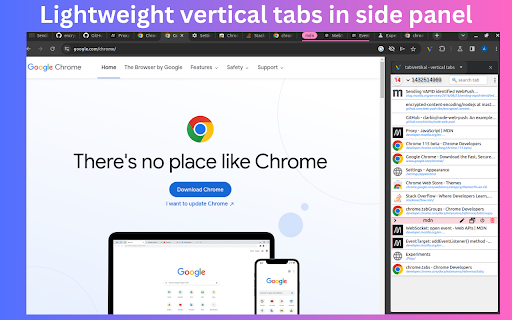
Manage tabs & tabGroups vertically in side panel. Advanced auto tab grouping. Switch workspaces. Auto suspend tab
As of June 2026, tabVertikal - vertical tabs has 4,000 users and a 4.30/5 rating from 27 reviews in the Workflow & Planning category.
Usersdown 20.0 percent−20.0%
4.0K
4,000
Ratingno change0%
4.30
27 reviews
Reviewsno change0%
27
Version
0.2.23
Manifest V3
90-day change · In the last 90 days this extension lost 1.0K users.
History
2 snapshotsTracking since Apr 1, 2026.
View as table
| Date | Users | Rating | Reviews | Version |
|---|---|---|---|---|
| Apr 1, 2026 | 5.0K | 4.30 | 27 | 0.2.23 |
| May 2, 2026 | 4.0K | 4.30 | 27 | 0.2.23 |
| Now | 4.0K | 4.30 | 27 | 0.2.23 |
Permissions & access
- Permissions
- sidePaneltabstabGroupsstoragecontextMenus
- Host access
- None declared
Screenshots


About
📢 Lightweight vertical tabs in side panel with tabGroups,auto tab grouping.

📌 Why you should consider this:
✪ Switch workspaces
✪ Tab suspender
✪ Auto tab suspension
✪ Native chrome tabgroups support
✪ Auto tab grouping based on your custom rules not just domain
✪ Import / export tab in html,json,markdown,csv format
✪ Set window's title and edit tab's title.
✪ Remove duplicate & sort tabs
✪ Dark mode and dozens of themes.
✪ Multi windows
✪ Fuzzy search
✪ Lightweight 52KB
✪ Pure & clean code that powers fastest performance.
✪ Negligible memory consumption ~2MB (consume 400% less memory than new tab).
✪ No third-party library used.
✪ No tracking & no Ads.

📌 == FEATURES ==

🎯 Manage tab vertically:
Remove duplicates,sort tabs and suspend tabs

✅ Switch workspace in one click
switch workspaces according to your workflow.
Unlimited number of workspaces.
opened tabs are saved in current workspace and selected workspace's tabs will open.

✅ Auto tab grouping based on your custom rules not just domain
Create custom rule to auto group tabs. Match:

1. Tab titles
2. Top domain (e.g match "google.com" in chromewebstore.google.com)
3. Domain (e.g match "chromewebstore.google.com" in chromewebstore.google.com)
4. First path segment (e.g match "detail" in https://chromewebstore.google.com/detail/)
5. Two path segment (e.g match "en-US/docs" in https://developer.mozilla.org/en-US/docs/Web/API/HTMLInputElement)
   keyboars shortcuts: Ctrl+Alt+R

✅ Auto tab suspension
Auto suspend tab when not using more than x minutes
Enable tab suspension on extension's options page

✅ window's title
Give name to your window to organize your workflow.
Emoji picker provided.

✅ Import⬇️ and export⬆️ tabs
Import / export tab in html,json,markdown,csv format

🔄 Sort and filter tabs
Drag and drop tabs with ease, effortlessly rearranging them to match your workflow and priorities.

🌘 Dark Mode:
Dark Mode intelligently aligns with your system theme, ensuring a comfortable browsing experience without any manual adjustments.

Two Ways to Open the Extension Sidebar:

1. Click the Extension icon. You need to "Pin" the extension to the browser toolbar.
2. Use shortcut keys. Please set it at "chrome://extensions/shortcuts" by yourself, the default is Alt+V .

Set the position of the sidebar: left or right:
Browser Settings → Appearance → Side panel

ℹ️ Support
Join tabVertikal on google groups:
https://groups.google.com/g/tabvertikal

You can mail us: <[email protected]>

Note: Recommended chrome version 127+

🚀Version 0.2.2
⇒ zommbie scrollbar removed
 ⇒ ADDED: Auto group all ungroup tabs feature added in more menu
⇒ ADDED: ungroup all tabs right click popup menu (on extension's action) added
 ⇒🐛FIXED: auto tab group stop working after some time fixed
 ⇒🐛 FIXED: workspace bugs fixed
Technical
- Version
- 0.2.23
- Manifest
- V3
- Size
- 157KiB
- Min Chrome
- 123
- Languages
- 16
- Featured
- Yes
Metadata
- ID
- aahjeignibghcnabifeoclpebaleldkj
- Developer ID
- ub3b8480b6be84c55c602ecbdc7b4db97
- Developer Email
- [email protected]
- Created
- Jun 7, 2023
- Last Updated (Store)
- Aug 12, 2024
- Last Scraped
- Jun 1, 2026
- Website
- tabrail.site
- Support URL
- —
- Privacy Policy
- http://tabrail.site/privacy
Similar extensions
Alternatives to tabVertikal - vertical tabs, ranked by description similarity.

Vertical Tabs - Tabybara
Display and manage your tabs vertically in side panel.
360
★ 4.9

Vertical Tabs | Quick Tabs Management
Management your tabs with sidebar, easy to do quick search, pin, group, drag, close your tabs.
—

Super Vertical Tabs
A vertical tab management extension with grouping, search, and customization features.
4

SideTab – Vertical Tabs in Side Panel
Vertical tabs in side panel to organize, view, and switch tabs easily with a clean sidebar tab manager..
5

Group My Tabs
Group tabs by domain in Chrome with one click, enhancing built-in functionality for organized browsing.
26
★ 5.0

Tab & Group Manager
A tab manager with vertical view designed for developers
33
★ 5.0
Group Tabs By Domain
Streamline browsing. Group tabs by domain effortlessly. Stay organized, boost productivity.
5.0K
★ 4.3

Tab Organizer: Productivity Tool
Tab manager and productivity tool for Chrome. Group tabs by domain and rules, save tabs, restore tabs, sort tabs, customize colors.
2.0K
★ 3.5
Data sourced from the Chrome Web Store · last verified Jun 1, 2026.