
Wondershare PDFelement - PDF Creator, Webpage to PDF Converter tools
Convert webpage to PDF for free. Online PDF creator in your browser.
As of June 2026, Wondershare PDFelement - PDF Creator, Webpage to PDF Converter tools has 6,000 users and a 1.83/5 rating from 12 reviews in the Workflow & Planning category.
Usersup 20.0 percent+20.0%
6.0K
6,000
Ratingdown 4.2 percent−4.2%
1.83
12 reviews
Reviewsup 9.1 percent+9.1%
12
Version
1.3.2
Manifest V3
90-day change · In the last 90 days this extension gained 1.0K users, 1 version update.
History
10 snapshotsTracking since Apr 24, 2026.
View as table
| Date | Users | Rating | Reviews | Version |
|---|---|---|---|---|
| Apr 24, 2026 | 5.0K | 1.91 | 11 | 1.3.1 |
| Apr 29, 2026 | 6.0K | 1.83 | 12 | 1.3.2 |
| May 4, 2026 | 5.0K | 1.83 | 12 | 1.3.2 |
| May 9, 2026 | 6.0K | 1.83 | 12 | 1.3.2 |
| May 12, 2026 | 6.0K | 1.83 | 12 | 1.3.2 |
| May 16, 2026 | 5.0K | 1.83 | 12 | 1.3.2 |
| May 30, 2026 | 6.0K | 1.83 | 12 | 1.3.2 |
| Jun 4, 2026 | 5.0K | 1.83 | 12 | 1.3.2 |
| Jun 8, 2026 | 6.0K | 1.83 | 12 | 1.3.2 |
| Jun 14, 2026 | 5.0K | 1.83 | 12 | 1.3.2 |
| Now | 6.0K | 1.83 | 12 | 1.3.2 |
Changelog
- Apr 24, 2026name
Wondershare PDFelement
Wondershare PDFelement - PDF Creator, Webpage to PDF Converter tools
- Apr 24, 2026description
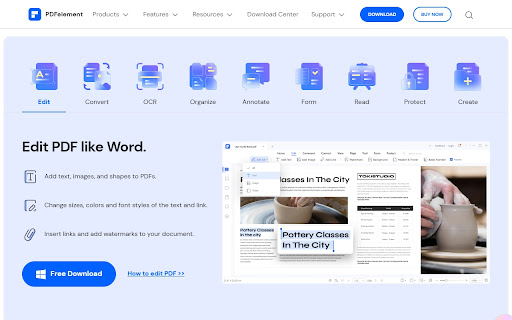
This plugin is used to convert the webpages to PDF. Users can set the layout, add watermarks, headers/footers, and apply security settings for the PDF during conversion. Wondershare PDFelement is required to use this plugin. For more information, go to pdf.wondershare.com.
onvert webpage to PDF and simplify your workflow. Our powerful Webpage to PDF Chrome extension lets you capture any webpage, preserve its original layout, and save it as a high-quality PDF in seconds.
Whether you're saving articles, research, or important online content, this tool offers a fast, reliable, and seamless way to convert webpages without leaving your browser.

Key Features of Wondershare PDFelement Webpage to PDF Converter
Here are some of the key features of this extension:
One-click conversion: Instantly turn any webpage into a PDF with a single click—quick, simple, and efficient.
Preserve original layout: Maintain the exact structure of the page, including text, images, and formatting.
High-quality output: Convert webpages into clean, professional PDFs suitable for sharing or archiving.
Full-page capture: Easily capture entire webpages without stitching multiple screenshots together.
Add pages to existing PDF:Convert the web page to PDF and add to an existing PDF
Chrome integration: Works directly within Chrome—no extra software or tools required.
Flexible saving options: Save files to your device or upload them to your cloud storage.

How to Convert a Webpage to PDF
Follow these simple steps:
Install the Wondershare PDFelement Convert Webpage to PDF extension
Open the webpage you want to save
Click the extension icon in your browser
Your PDF file will be generated and ready to download within seconds

Why Choose This Webpage to PDF Converter?
Fast and efficient: Convert pages instantly without delays
No additional software needed: Everything works directly inside Chrome
Easy access: Use the toolbar for quick, one-click conversions
Privacy-focused: We do not track, store, or collect your data
Perfect for organization: Archive webpages and build your personal knowledge base

Who Can Benefit?
✔️ Students: Save academic materials and research papers
✔️ Researchers: Archive important online sources
✔️ Professionals: Store business documents and references
✔️ Freelancers: Keep project resources organized
✔️ Everyone: Quickly save any webpage for offline use

Advanced Features
➤ Full-page screenshot capture for complete webpage saving
➤ Convert web page to PDF and email
➤ Instant access from the Chrome toolbar
➤ Seamlessly work with desktop PDF editor - Wondershare PDFelement

FAQs
❓ How do I install the extension?
Go to the Chrome Web Store and click “Add to Chrome” to install instantly.
❓ How do I convert a webpage to PDF?
Simply click the extension icon while viewing a webpage, and your PDF will be generated automatically.
❓ Can I save entire webpages?
Yes, the tool supports full-page capture and conversion.
❓ Is my data safe?
Absolutely. We do not collect or store your data or browsing activity.
❓ Is support available?
Yes, you can contact us via email or leave feedback in the Chrome Web Store.

Additional Benefits
⚡ No downloads or external tools required
⚡ Accurate formatting for all types of webpages
⚡ Ideal for full-page screenshots and archiving
⚡ Save locally or upload to your cloud storage
⚡ Activate desktop version of PDFelement

Convert Webpage to PDF is your all-in-one solution for capturing, saving, and sharing web content effortlessly. Start converting and organizing your online content today .
- Apr 24, 2026short_description
To convert the web page to PDF
Convert webpage to PDF for free. Online PDF creator in your browser.
Permissions & access
- Permissions
- tabscontextMenuscookiesstoragenativeMessagingpageCapture
- Host access
- <all_urls>
Screenshots



About
onvert webpage to PDF and simplify your workflow. Our powerful Webpage to PDF Chrome extension lets you capture any webpage, preserve its original layout, and save it as a high-quality PDF in seconds.
Whether you're saving articles, research, or important online content, this tool offers a fast, reliable, and seamless way to convert webpages without leaving your browser.

Key Features of Wondershare PDFelement Webpage to PDF Converter
Here are some of the key features of this extension:
One-click conversion: Instantly turn any webpage into a PDF with a single click—quick, simple, and efficient.
Preserve original layout: Maintain the exact structure of the page, including text, images, and formatting.
High-quality output: Convert webpages into clean, professional PDFs suitable for sharing or archiving.
Full-page capture: Easily capture entire webpages without stitching multiple screenshots together.
Add pages to existing PDF:Convert the web page to PDF and add to an existing PDF
Chrome integration: Works directly within Chrome—no extra software or tools required.
Flexible saving options: Save files to your device or upload them to your cloud storage.

How to Convert a Webpage to PDF
Follow these simple steps:
Install the Wondershare PDFelement Convert Webpage to PDF extension
Open the webpage you want to save
Click the extension icon in your browser
Your PDF file will be generated and ready to download within seconds

Why Choose This Webpage to PDF Converter?
Fast and efficient: Convert pages instantly without delays
No additional software needed: Everything works directly inside Chrome
Easy access: Use the toolbar for quick, one-click conversions
Privacy-focused: We do not track, store, or collect your data
Perfect for organization: Archive webpages and build your personal knowledge base

Who Can Benefit?
✔️ Students: Save academic materials and research papers
✔️ Researchers: Archive important online sources
✔️ Professionals: Store business documents and references
✔️ Freelancers: Keep project resources organized
✔️ Everyone: Quickly save any webpage for offline use

Advanced Features
➤ Full-page screenshot capture for complete webpage saving
➤ Convert web page to PDF and email
➤ Instant access from the Chrome toolbar
➤ Seamlessly work with desktop PDF editor - Wondershare PDFelement

FAQs
❓ How do I install the extension?
Go to the Chrome Web Store and click “Add to Chrome” to install instantly.
❓ How do I convert a webpage to PDF?
Simply click the extension icon while viewing a webpage, and your PDF will be generated automatically.
❓ Can I save entire webpages?
Yes, the tool supports full-page capture and conversion.
❓ Is my data safe?
Absolutely. We do not collect or store your data or browsing activity.
❓ Is support available?
Yes, you can contact us via email or leave feedback in the Chrome Web Store.

Additional Benefits
⚡ No downloads or external tools required
⚡ Accurate formatting for all types of webpages
⚡ Ideal for full-page screenshots and archiving
⚡ Save locally or upload to your cloud storage
⚡ Activate desktop version of PDFelement

Convert Webpage to PDF is your all-in-one solution for capturing, saving, and sharing web content effortlessly. Start converting and organizing your online content today .
Technical
- Version
- 1.3.2
- Manifest
- V3
- Size
- 58.33KiB
- Min Chrome
- 88
- Languages
- 11
- Featured
- No
Metadata
- ID
- ilmgaoiahpbgamghoailbgpakhphhckb
- Developer ID
- u794cddf5c043100e116e181d6cd69127
- Developer Email
- [email protected]
- Created
- Dec 8, 2022
- Last Updated (Store)
- Apr 9, 2026
- Last Scraped
- Jun 14, 2026
- Website
- https://pdf.wondershare.com/
- Privacy Policy
- https://www.wondershare.com/privacy.html
Similar extensions
Alternatives to Wondershare PDFelement - PDF Creator, Webpage to PDF Converter tools, ranked by description similarity.

Foxit PDF Creator
To convert the web page to Foxit PDF
8.0M
★ 2.8

HiPDF – AI PDF Editor, Converter & PDF Tools Online
Wondershare HiPDF is an AI-powered PDF tool that enables chatting, reading, editing, converting, and managing PDF documents online.
10.0K
★ 4.4

PDF Ultimate - Personal Edition
All-in-one PDF toolkit: Snap, Capture, Clean, and Merge.
—

Tungsten Power PDF
Create PDF from web page
10.0K
★ 2.5

Right PDF
Convert a web page to PDF
192
★ 1.0

EZ PDF
Enhance your PDF experience with our all-in-one Chrome extension for converting, splitting, merging, and securing PDFs.
102
Webpage to PDF Converter
Install webpage to PDF converter & capture entire webpage as pdf. Or edit PDF and download with one click.
70.0K
★ 3.4

PDF Splitter
Split pdf documents instantly from your home and new tab page!
1.0K
★ 3.3
Data sourced from the Chrome Web Store · last verified Jun 14, 2026.