Webpage to PDF Converter
Install webpage to PDF converter & capture entire webpage as pdf. Or edit PDF and download with one click.
As of May 2026, Webpage to PDF Converter has 70,000 users and a 3.36/5 rating from 254 reviews in the Workflow & Planning category.
Usersno change0%
70.0K
70,000
Ratingdown 0.9 percent−0.9%
3.36
254 reviews
Reviewsup 2.0 percent+2.0%
254
Version
1.2
Manifest V3
History
2 snapshotsTracking since May 1, 2026.
View as table
| Date | Users | Rating | Reviews | Version |
|---|---|---|---|---|
| May 1, 2026 | 70.0K | 3.39 | 249 | 1.2 |
| May 30, 2026 | 70.0K | 3.37 | 252 | 1.2 |
| Now | 70.0K | 3.36 | 254 | 1.2 |
Permissions & access
- Permissions
- tabsdownloadsnotificationsstoragegcmscripting
- Host access
- <all_urls>
Screenshots
About
If you're looking for an easy way to save and share web content, the Webpage to PDF Converter extension is just what you need. With just a few clicks, you can turn any webpage into a high-quality PDF file that's easy to read and share. This PDF converter is fast and reliable, making it the perfect tool for anyone who wants to save online content as a PDF file for later use or share it with others.

Key Features Of Web Page To PDF Converter

Here are some of the key features of this extension:

>>Easy-to-use: Our webpage to PDF converter is designed to be simple and user-friendly, making it easy for anyone to use, regardless of technical expertise.

>>Fast and reliable: The conversion process is quick and efficient, and the resulting PDF files are of high quality.

>>Multiple webpage support: Our converter can convert multiple webpages into a single PDF document.

>>Browser integration: The tool integrates seamlessly with your browser, allowing you to convert webpages to PDFs directly from your browser.


Steps To Save Webpages as PDFs

>>Install our webpage to PDF converter on your browser
>>Open the webpage you want to convert to PDF
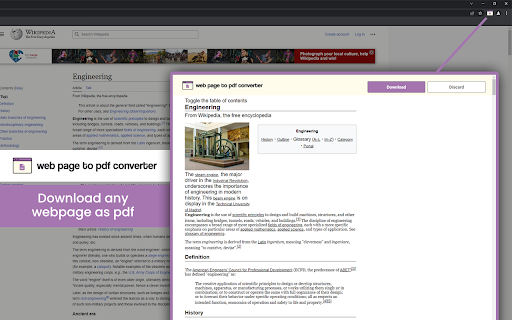
>>Click on the extension icon in your browser and click “Download” button to save webpage as PDF file on your device


FAQs

1. Can I convert multiple webpages into a single PDF document?
>> Yes! Webpage to PDF saver supports the conversion of multiple webpages into a single PDF document.

2. Is this Web page to PDF saver free to use?
>> Yes. It is completely free to use.
Technical
- Version
- 1.2
- Manifest
- V3
- Size
- 1.28MiB
- Min Chrome
- 88
- Languages
- 54
- Featured
- Yes
Metadata
- ID
- gpkildejogofhhobidokcjpolaikgldj
- Developer ID
- u99e2ddc5cd17197071f1fa6dd89e28e3
- Developer Email
- [email protected]
- Created
- Feb 24, 2023
- Last Updated (Store)
- Jul 27, 2023
- Last Scraped
- May 30, 2026
- Website
- —
- Support URL
- —
Similar extensions
Alternatives to Webpage to PDF Converter, ranked by description similarity.

Easy Save
Download web pages as PDF uses Easy Save extension.
65
Save image as PDF
Save image as PDF using the context menu on the image for download photo. An easy way to save picture as PDF, JPG, PNG, or WebP.
100.0K
★ 4.3

MultCloud Save - Save Webpage as PDF
Save webpages in Chrome as PDF or images and save to the cloud or local.
1.0K
★ 2.9
Webpage to PDF
Convert any web page or local HTML file into a PDF document that resembles as closely as possible what you see in the browser.
437
★ 2.7

Bikub Save As Pdf
Convert current page in pdf format
16

PDF to JPG Converter
Bulk convert PDF to JPG swiftly & privately. Fast, secure, offline PDF to JPG Converter. Unlimited pdf to jpeg in high quality.
406
★ 4.6

Right PDF
Convert a web page to PDF
192
★ 1.0

Compress PDF – One-Click PDF Compression for Chrome
Instantly compress PDF files in Chrome. One-click action, no uploads, secure processing. Get a smaller, high-quality PDF in seconds!
4
Data sourced from the Chrome Web Store · last verified May 30, 2026.