Website Blocker and Focus Mode
Site Blocker chrome extension and focus mode to increase productivity.
As of May 2026, Website Blocker and Focus Mode has 1,000 users and a 3.00/5 rating from 4 reviews in the Education category.
Usersno change0%
1.0K
1,000
Ratingno change0%
3.00
4 reviews
Reviewsno change0%
4
Version
1.0.1
Manifest V3
History
1 snapshotsTracking since Apr 24, 2026.
View as table
| Date | Users | Rating | Reviews | Version |
|---|---|---|---|---|
| Apr 24, 2026 | 1.0K | 3.00 | 4 | 1.0.1 |
| Now | 1.0K | 3.00 | 4 | 1.0.1 |
Permissions & access
- Permissions
- tabsstoragealarmsnotifications
- Host access
- None declared
Screenshots

About
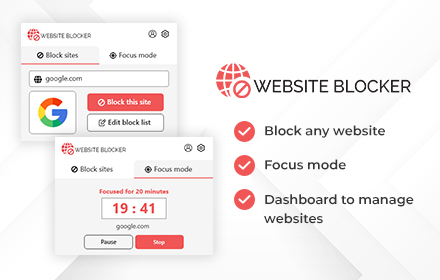
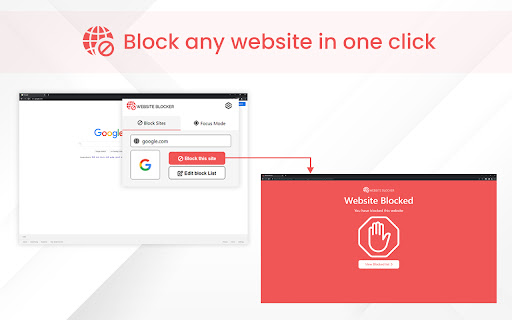
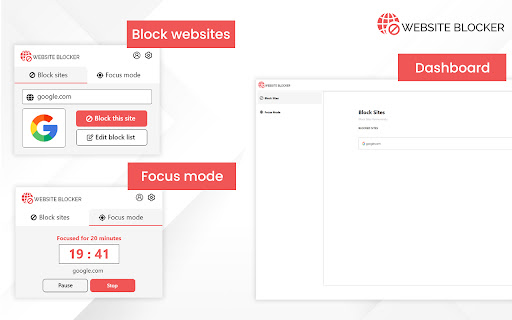
Website Blocker enables you to block any website you don't want to access from your laptop or desktop PC. Users can also block any website using Focus mode for a certain time.

Key Features of Website Blocker Extension:
>>Block any website that you do not want to access from your device
>>Block the website for a fixed period using Focus Mode
>>Users can block any number of websites both on normal mode and focus mode
>>Custom message on blocked pages
>>Time based website blocking

How To Use Website Blocker Extension to Block Websites :
>>Install the extension by clicking on “Add to Chrome” option
>>Visit any website that you want to block permanently or temporarily using Focus mode
>>Click on the extension icon to enable it
>>Now you will see two options Block sites & Focus Mode
>>You can edit Blocked website list anytime by clicking on Edit block list.
>>Select Focus Mode option only if you want to block the website temporarily or for a fixed time.

What is Focus Mode in Website blocking?
In Focus mode, users set a fixed amount of time they'd like to spend on particular websites before being blocked. So, if you spend too much time browsing, you can set a time limit so that you are reminded about the amount of time spent on the internet.

Why should you download Website Blocker Chrome Extension?
This extension allows you to focus on your work by restricting your time on internet browsing. That's why it's an excellent extension that can boost the efficiency of your work. It is also a great tool for students.

You can block any spammy website using this extension so that it does not waste your precious time in the future. Site blocker extension also helps you to increase your work efficiency and overall productivity.

Our productivity can be compromised by the free access of websites. There are times when it's better to switch off the outside world and concentrate on being productive. The Website Blocker Chrome extension helps you block websites in Chrome. This extension works perfectly both on the Windows and Mac platforms.
Technical
- Version
- 1.0.1
- Manifest
- V3
- Size
- 346KiB
- Min Chrome
- 88
- Languages
- 1
- Featured
- Yes
Metadata
- ID
- ilioecelhjbmebaimobaaggalibfphhl
- Developer ID
- u8a7207bef947d9def1d36bb501abe633
- Developer Email
- [email protected]
- Created
- Jun 13, 2022
- Last Updated (Store)
- Jul 9, 2022
- Last Scraped
- May 19, 2026
- Support URL
- —
Similar extensions
Alternatives to Website Blocker and Focus Mode, ranked by description similarity.

Fokus
Blocks specified websites by redirecting to a blocked page.
3
★ 5.0

Focus Mode - Unbreakable Study Lock
Enterprise-grade focus enforcement. Timer-locked distraction blocker with unremovable protection.
4

AI Website Blocker
An extension for blocking a pre-defined list of AI websites. Includes password protection and scheduling features.
9
★ 5.0

YouTube Brainrot Blocker - Advanced filtering for YouTube
Block channels, homefeed, shorts,recomemndations, and more for a distraction-free Youtube experience with single click
130
★ 4.0

Focus Mode
Block distracting websites during work hours
—
★ 5.0

Monk Focus
A Chrome extension to help you focus on your tasks by restricting browsing to selected focus sites.
18
★ 3.0

StudyShield - Stay Productive, Stay Safe
Block distracting websites, set focus timers, and boost productivity. Automatic adult content protection included. Stay focused!
1

WriteScholar Focus Mode
Block sites until you solve a puzzle or answer study questions. Earn your screen time. Free: 3, Pro: 20, Premium: unlimited.
4
Data sourced from the Chrome Web Store · last verified May 19, 2026.