TubePilot – YouTube Enhancer
YouTube enhancement extension — playback controls, UI customization, and productivity tools.
As of June 2026, TubePilot – YouTube Enhancer has 21 users in the Productivity category.
Usersup 200.0 percent+200.0%
21
21
Ratingno change0%
—
— reviews
Reviewsno change0%
—
Version
1.4.0
Manifest V3
History
8 snapshotsTracking since Apr 3, 2026.
View as table
| Date | Users | Rating | Reviews | Version |
|---|---|---|---|---|
| Apr 3, 2026 | 7 | — | — | 1.4.0 |
| Apr 17, 2026 | 9 | — | — | 1.4.0 |
| Apr 24, 2026 | 11 | — | — | 1.4.0 |
| May 8, 2026 | 12 | — | — | 1.4.0 |
| May 13, 2026 | 18 | — | — | 1.4.0 |
| May 19, 2026 | 19 | — | — | 1.4.0 |
| Jun 1, 2026 | 20 | — | — | 1.4.0 |
| Jun 7, 2026 | 19 | — | — | 1.4.0 |
| Now | 21 | — | — | 1.4.0 |
Permissions & access
- Permissions
- activeTabstorage
- Host access
- https://returnyoutubedislikeapi.com/*
Screenshots


About
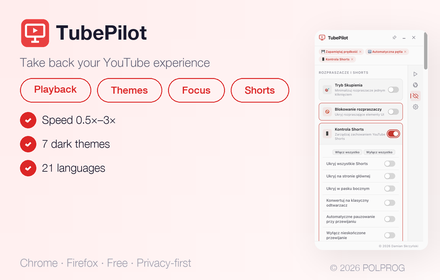
TubePilot is a powerful yet lightweight YouTube companion with one simple goal:

Help you stay focused on YouTube by reducing distractions, customizing playback, and giving you clean, practical controls — without turning YouTube into something complicated.

YouTube is designed to keep you watching. End screens, Shorts loops, overlays, and endless feeds can pull you away from what you actually came for. TubePilot gives you back control — with a minimalist approach, clear settings, and features that are easy to understand.

✅ One purpose: improve focus and usability on YouTube
🧩 Minimal & practical: only features that support that goal
🔒 Privacy-first: no tracking, no analytics, no data selling

---

Key Features (at a glance)

* ⚡ Playback Controls — custom speed, auto-loop, remember speed across videos, auto-play control
* 🎯 Focus Mode — hide all distractions with one click, schedule focus hours, keyboard shortcut
* 🧹 Declutter Tools — hide end screens, info cards, related videos, banners, comments, and more
* 🎬 Shorts Controls — auto-advance to next Short, convert Shorts to classic player, hide Shorts from feeds
* 🎨 Appearance — dark mode variants, cinematic mode, video filters (brightness, contrast, saturation)
* 👎 Dislike Visibility — restore dislike counts using the public Return YouTube Dislike API
* ⏸️ Smart Pausing — auto-pause on tab switch, auto-pause Shorts on scroll

---

What TubePilot Helps You Do

⚡ Full Playback Control

Fine-tune your viewing experience with precise playback settings.

* Set a default playback speed (0.25× to 3×)
* Remember speed across videos (or reset per video)
* Auto-loop videos for music, lectures, or background listening
* Block auto-play to prevent unwanted video starts
* Auto-pause when you switch tabs

---

🎯 Focus Mode

Instantly remove all distractions with a single toggle — or schedule it.

* Hides recommendations, comments, sidebars, end screens, cards, and chat
* Expands the video player to full width
* Optional schedule (set active hours)
* Keyboard shortcut for quick toggle

---

🧹 Declutter the YouTube Interface

Hide the elements that most often interrupt attention — on your terms.

You can remove or reduce:

* End screens & info cards
* Related videos & recommendations
* Promotional banners & overlays
* Comments & live chat
* Shorts thumbnails in feeds
* Subscribe overlays & join buttons
* Autoplay toggle

Choose between full hide or minimize mode (shrink to 15% opacity).

---

🎬 Shorts Controls That Reduce Interruptions

Shorts can easily turn into an infinite loop. TubePilot gives you full control.

* Auto-advance — automatically move to the next Short when the current one ends (instead of looping)
* Convert to classic player — redirect Shorts to the standard watch page
* Hide Shorts — remove Shorts from home feed, sidebar, or everywhere
* Auto-pause on scroll — pause Shorts when you scroll past them

---

🎨 Appearance & Visual Customization

Make YouTube look the way you want.

* Dark mode — multiple variants (Soft Dark, Dark Gray, Dark Blue, Deep Black, OLED, Minimal Dark, High Contrast)
* Cinematic mode — ambient glow effect around the video player
* Video filters — adjust brightness, contrast, saturation, hue, sepia, and blur
* Custom colors — accent color, background, text, and link colors

---

👎 Optional: Restore Dislike Visibility

TubePilot can optionally restore dislike counts using the public Return YouTube Dislike API.

This helps you:

* Evaluate videos faster
* Avoid misleading or low-quality uploads
* Make more informed clicks

Works on both regular videos and Shorts. Styled to match YouTube's native UI.

---

Designed for Clarity (Not Feature Bloat)

TubePilot is intentionally focused. It avoids adding dozens of complicated switches and instead concentrates on high-impact improvements that make YouTube feel more usable.

* ✨ Minimal, elegant popup interface
* ⚡ Lightweight — no performance impact
* 🧠 Easy-to-understand settings with clear labels
* 🔁 Works across YouTube navigation (SPA) without needing reloads
* 📌 Draggable, pinnable overlay — stays on screen while you browse
* 🌍 Available in 21 languages

---

Privacy & Data

TubePilot does not:

* collect personal data
* track your browsing behavior
* run analytics or profiling
* sell or share data

It works locally in your browser.

If you enable the optional dislikes feature, TubePilot may request dislike statistics from the Return YouTube Dislike API — and only for that purpose.
Technical
- Version
- 1.4.0
- Manifest
- V3
- Size
- 98.39KiB
- Min Chrome
- 88
- Languages
- 21
- Featured
- No
Metadata
- ID
- ilclhfpolkeliglinhfmekmjfpjcccjp
- Developer ID
- uf2f091b9ae469b29a492aa2ccbc4704a
- Developer Email
- [email protected]
- Created
- Feb 25, 2026
- Last Updated (Store)
- Mar 10, 2026
- Last Scraped
- Jun 7, 2026
- Website
- —
- Support URL
- https://polprog.pl/
Similar extensions
Alternatives to TubePilot – YouTube Enhancer, ranked by description similarity.
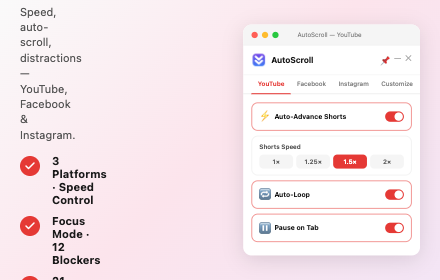
AutoScroll – Video Auto-Scroller
Auto-scroll extension for YouTube, Facebook & Instagram — smooth scrolling through video feeds with customizable speed.
266

YouTube Focus Pro
Distraction-free YouTube with Pro productivity tools
9
★ 4.7

TubeTunnel : Hide Shorts & Comments for YouTube
Hide YouTube related videos, shorts, comments, suggestions wall, homepage recommendations, trending, and other distractions.
5

CleanTube - Make YouTube™ Distraction FREE
Take control of YouTube Everything. Hide distractions, block keywords/channels, use a Pomodoro timer, and more.
11

Superpower YouTube - Disable YouTube Shorts & Comments + Content Filter
Make YouTube less distracting. Hide YouTube Shorts, comments, recommendations, autoplay, and block channels, keywords, and users.
584
★ 4.5

YouTube Focus Mode
Block distractions. Auto-skip ads, sponsors, intros & outros. The ultimate YouTube productivity tool.
10
★ 4.7
'Improve YouTube!' 🎧 (for YouTube & Videos)
YouTube, tidy & smart? Supercharge YouTube! Give it strong features, filter only the videos you want & exactly the look you like
400.0K
★ 4.5

YT Focus Mode
A lightweight focus mode for YouTube that reduces visual distractions and helps you start watching with intention.
3
★ 5.0
Data sourced from the Chrome Web Store · last verified Jun 7, 2026.