AI Mode Copy
Copy the Google AI Mode response and convert it to Markdown format.
As of June 2026, AI Mode Copy has 806 users and a 3.00/5 rating from 4 reviews in the Productivity category.
Usersup 501.5 percent+501.5%
806
806
Ratingdown 40.0 percent−40.0%
3.00
4 reviews
Reviewsup 300.0 percent+300.0%
4
Version
1.0.0
Manifest V3
History
8 snapshotsTracking since Apr 4, 2026.
View as table
| Date | Users | Rating | Reviews | Version |
|---|---|---|---|---|
| Apr 4, 2026 | 134 | 5.00 | 1 | 1.0.0 |
| Apr 18, 2026 | 139 | 5.00 | 1 | 1.0.0 |
| Apr 23, 2026 | 187 | 5.00 | 1 | 1.0.0 |
| May 4, 2026 | 195 | 5.00 | 1 | 1.0.0 |
| May 11, 2026 | 205 | 5.00 | 1 | 1.0.0 |
| May 20, 2026 | 237 | 5.00 | 1 | 1.0.0 |
| May 30, 2026 | 351 | 3.00 | 2 | 1.0.0 |
| Jun 7, 2026 | 746 | 3.00 | 2 | 1.0.0 |
| Now | 806 | 3.00 | 4 | 1.0.0 |
Permissions & access
- Permissions
- activeTabtabsclipboardWritecontextMenus
- Host access
- https://www.google.com/*
Screenshots


About
### **AI Mode Copy: One-Click Markdown Export for Google AI**

**Tired of not being able to copy responses from Google’s new AI Search Mode?**

Google AI Mode (Search Labs) offers powerful insights, but it comes with a major frustration: you cannot easily select or copy the text. Formatting is lost, and taking notes or sharing insights becomes a manual chore.

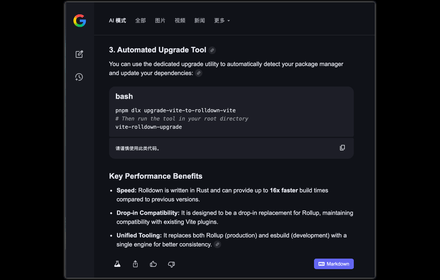
**AI Mode Copy** is the essential companion for your AI search experience. It seamlessly integrates into the Google AI interface, adding a "Markdown" button to every response, allowing you to capture ideas instantly with perfect formatting.

#### **Why You Need This Extension:**
*   **📝 Perfect Markdown Formatting:** Don't just copy text—copy *structure*. Headings, bold text, lists, code blocks, and tables are all preserved in standard Markdown.
*   **⚡ One-Click Efficiency:** No more screenshots or re-typing. A dedicated button appears right where you need it, at the footer of every AI response.
*   **🔓 Complete Response Capture:** Easily copy the entire AI reply, including elements that are typically hard to select manually.
*   **🌑 Seamless Integration:** Designed to look and feel like a native part of the Google AI interface.
*   **🛠 Built for Productivity:** Ideal for developers, researchers, and students who use AI to generate documentation, notes, or code snippets.

####  **Key Features:**
*   **Smart Conversion:** Automatically transforms complex HTML responses into clean, readable Markdown.
*   **Full Format Support:** Handles everything from simple paragraphs to complex tables and syntax-highlighted code.
*   **Multiple Copy Methods:** Use the on-page button, the extension popup, or the right-click context menu to copy full conversations.
*   **Lightweight & Secure:** No tracking, no data collection—just a simple tool to make your AI interactions better.

#### **How to Use:**
1.  Search on Google and enter **AI Mode**.
2.  Look for the **"Markdown"** button at the bottom of the AI's reply.
3.  Click to copy and paste it anywhere (Notion, Obsidian, GitHub, etc.)!

---

**🤖 Fun Fact:** This entire extension was built using 100% AI coding! It’s a tool built by AI, for AI users, to solve an AI platform’s limitation.

**Install AI Mode Copy today and take control of your AI-generated content!**
Technical
- Version
- 1.0.0
- Manifest
- V3
- Size
- 265KiB
- Min Chrome
- 88
- Languages
- 1
- Featured
- No
Metadata
- ID
- ikbmljkkgidfamghpmgfbljabjjajeia
- Developer ID
- u9e309039138414122c735c16e41bc2a4
- Developer Email
- [email protected]
- Created
- Jan 19, 2026
- Last Updated (Store)
- Jan 19, 2026
- Last Scraped
- Jun 7, 2026
- Website
- —
- Support URL
- https://github.com/MatrixAges/ai-mode-copy
- Privacy Policy
- —
Similar extensions
Alternatives to AI Mode Copy, ranked by description similarity.

ChatGPT & Gemini Markdown Copy
Add Markdown copy button to ChatGPT and Gemini responses
545
★ 5.0

AI Markdown Download
Copy AI chat content (Gemini, ChatGPT, Perplexity) as Markdown to clipboard.
50
★ 5.0

AI Overview Extractor
Extract AI Overviews content from Google Search to Markdown format
361
★ 4.2

AIMode: AI Text Analysis, YouTube Subtitles & Amazon Price Tracker
AI text analysis, live YouTube subtitles, and an Amazon price tracker. Your all-in-one assistant with Google Gemini
26

CheeseCloth: Markdown Converter for Better AI Prompts
Get better answers from AI. Strain chunky formatted text into smooth AI-ready Markdown. 100% private. 🧀
15

Article Clipper
Copy articles to clipboard in Markdown format with one click. Streamline your AI-powered article analysis.
84
★ 4.7

OneClick AI
Instantly understand web content and extract key points with AI-powered summarization and translation with just one click.
61
★ 5.0

AI Context Keeper
Save and manage AI-generated markdown documents from ChatGPT, Claude, Gemini, Perplexity, and Grok
2
Data sourced from the Chrome Web Store · last verified Jun 7, 2026.