
MagicHow: Documentation, Screenshots & SOPs
Advanced step recorder with screenshot annotations & PDF export. Document any process and create how-to guides & SOPs instructions.
As of June 2026, MagicHow: Documentation, Screenshots & SOPs has 4,000 users and a 5.00/5 rating from 5 reviews in the Workflow & Planning category.
Usersno change0%
4.0K
4,000
Ratingno change0%
5.00
5 reviews
Reviewsno change0%
5
Version
2.0.4
Manifest V3
90-day change · In the last 90 days this extension 1 version update.
History
2 snapshotsTracking since Apr 19, 2026.
View as table
| Date | Users | Rating | Reviews | Version |
|---|---|---|---|---|
| Apr 19, 2026 | 4.0K | 5.00 | 5 | 0.2.10 |
| May 16, 2026 | 4.0K | 5.00 | 5 | 0.2.10 |
| Now | 4.0K | 5.00 | 5 | 2.0.4 |
Permissions & access
- Permissions
- storagesidePanelactiveTabtabsscriptingcookiesoffscreenalarmstabCapturewebNavigation
- Host access
- <all_urls>
Screenshots



About
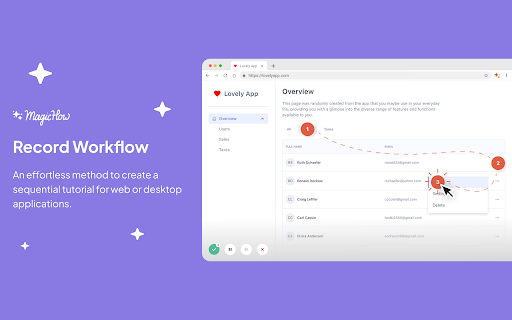
MagicHow is a free step-by-step guide creation tool for automatic process documentation and creating instructional documents like how-to guides, manuals, tutorials, and standard operating procedures (SOPs). It is designed to simplify the task of describing and explaining software-related processes for teams. By using our how-to guide creation tool, you can easily generate visual guides that provide step-by-step instructions for specific tasks. You can streamline the learning process and improves team performance by creating step-by-step guides for your team.

With MagicHow's screenshot generator for process documentation, you can capture screenshots of your computer screen as you go through a process, and it will compile them into a comprehensive document with step-by-step instructions. You have the flexibility to customize created guides by adding annotations, graphic elements, titles, logos, and selecting colors. Whether you need to create a knowledge base or document process with step-by-step instructions, how-to guides, or manuals. MagicHow can serve as a versatile step-by-step guide builder.

You can simplify the following tasks with our free process generator:

- A technical support manager composing a manual for customers on setting up, installing, and using a new software product.
- A sales manager preparing a guiding manual for using a CRM.
- A software developer sharing their experience with a how-to guide of use developer tools.
- A HR manager creating step-by-step instructions for the introduction of new software or process documentation.
- A hospital IT department creating a step-by-step guide on the Electronic Health Record (EHR) system for an administrator.

The automation provided by MagicHow saves you time and allows you to focus on strategic tasks instead of tedious screenshot capturing and editing. You can find new ways to enhance your team's productivity by identifying areas where additional guides can be created. Our free step-by-step guide generator strikes a balance between predefined options and your own vision, allowing you to personalize the guides to align with your branding standards.

Visual step-by-step guides created with MagicHow are beneficial for various types of process documentation. From onboarding new hires and answering client queries to implementing new tools and building software, MagicHow's free step-by-step guide creator helps you create effective instructional materials. It enables you to share the guides easily:
- via direct links;
- as PDF downloads;
- as HTML or Markdown copies;
- by embedding them in different platforms.
Updates to the guides can be made effortlessly, ensuring your audience always has access to the latest information.

📜 Feel free to use the browser extension to create SOPs, manuals, and step-by-step instructions for your knowledge base, or corporate portal.
❔ Generate responses to Frequently Asked Questions to avoid repetitive replies to requests from teammates and clients.
🏆 Empower your teammates with the knowledge they need to work productively and keep the service quality threshold high!

MagicHow is a valuable tool for the automated creation of instructional documents. It has the ability to generate visual guides simplifies the learning process, enhance team performance, and save time. With customizable features and various delivery options. Our free process record software can be used for a wide range of process documentation needs.
Technical
- Version
- 2.0.4
- Manifest
- V3
- Size
- 7.01MiB
- Min Chrome
- 88
- Languages
- 1
- Featured
- Yes
Metadata
- ID
- ijpjifeopinhiiofbbblkfgcdcfcmncd
- Developer ID
- u71f447b0cef229b8a326acf376c2c481
- Developer Email
- [email protected]
- Created
- Aug 3, 2023
- Last Updated (Store)
- May 14, 2026
- Last Scraped
- Jun 14, 2026
- Website
- magichow.co
- Support URL
- —
- Privacy Policy
- https://www.magichow.co/privacy
Similar extensions
Alternatives to MagicHow: Documentation, Screenshots & SOPs, ranked by description similarity.

StepHow : Automate Manual/Guide Creation
Automatic Capture Chrome Extension
4.0K
★ 5.0

Stepsy: create step-by-step guide with screenshots
Step-by-Step Guide Creator, SOP Documentation
4.0K
★ 4.5

Guidemaker - AI SOP & Step-by-Step Guides
Record your actions while you work and use AI to automatically generate instant how-to documentation, SOPs, tutorials, and more.
7.0K
★ 4.7

ClickGuide - Smart Web Documentation & Capture Tool
Capture and document user actions on web pages. Ideal for walkthroughs, SOPs, and support docs.
7

Quick Guides by Desk.Help - Free Step-by-Step How-to Guide Maker
Create step-by-step guides on the fly! Quick Guides turns your on-screen actions into a written guide with Highlights + Screenshots.
7
★ 5.0

SnapSteps - Step-by-Step Guide & SOP Generator
Turn any process into a beautiful step-by-step guide instantly. A premium Scribe alternative for training and documentation.
5

StepDoc - Easy Documents
Capture any workflow automatically and create, edit, share professional step-by-step guides/demos instantly.
10
★ 5.0

Showflow
Step by Step User Guides
5
Data sourced from the Chrome Web Store · last verified Jun 14, 2026.