
Google Bold Extractor
Extracts and copies em tags content from the current webpage
As of May 2026, Google Bold Extractor has 608 users and a 5.00/5 rating from 5 reviews in the Developer Tools category.
Usersup 13.0 percent+13.0%
608
608
Ratingno change0%
5.00
5 reviews
Reviewsno change0%
5
Version
1.0
Manifest V3
History
2 snapshotsTracking since Apr 25, 2026.
View as table
| Date | Users | Rating | Reviews | Version |
|---|---|---|---|---|
| Apr 25, 2026 | 538 | 5.00 | 5 | 1.0 |
| May 21, 2026 | 599 | 5.00 | 5 | 1.0 |
| Now | 608 | 5.00 | 5 | 1.0 |
Permissions & access
- Permissions
- activeTabtabsscripting
- Host access
- None declared
Screenshots
About
Google Search Results Bold Keywords Extractor Chrome Extension

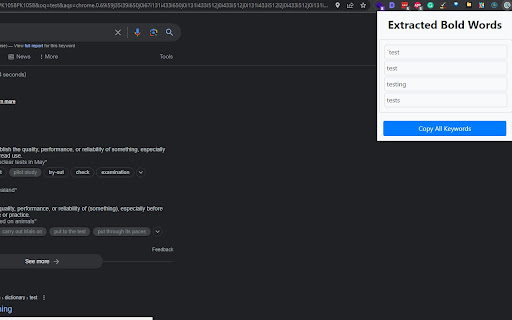
Google Search Results Bold Keywords Extractor is a simple Google Chrome extension that extracts text wrapped in <em> tags from the current web page and copies it to the clipboard. The extension works by injecting a content script into every page the user visits. The content script searches for all <em> tags on the page and extracts the text within them. The extracted text is then copied to the clipboard using the clipboardWrite permission.

Features
Extracts text wrapped in <em> tags from the current web page
Copies the extracted text to the clipboard
Works on all web pages
Easy to use

Usage
Once Bold Keywords Extractor is installed, it will automatically run on every web page you visit. To use the extension, simply click on the emTagExtractor icon in the Chrome toolbar. The extension will then extract all <em> tags on the page and copy the text within them to the clipboard.

Contributing
If you find a bug or have an idea for a new feature, feel free to open an issue or submit a pull request!
Technical
- Version
- 1.0
- Manifest
- V3
- Size
- 15.51KiB
- Min Chrome
- 88
- Languages
- 1
- Featured
- Yes
Metadata
- ID
- iihdimlicacgcnignahdlbmefffoejma
- Developer ID
- ufe02a8c29402a7b410bb09292ef2bb70
- Developer Email
- [email protected]
- Created
- May 24, 2023
- Last Updated (Store)
- May 24, 2023
- Last Scraped
- May 21, 2026
- Website
- https://www.bigtechies.com/
- Privacy Policy
- —
Similar extensions
Alternatives to Google Bold Extractor, ranked by description similarity.

Bold Text Extractor
Extracts all bold text from the current page.
19

Keyword Extractor
Extracts main keywords from the current webpage.
406

Content Extractor
Extract content from the current webpage using CSS selectors.
29

Image Extractor
Extracts image names and allows copying image URLs.
20.0K
★ 3.3

Image URL Extractor
Extract and display all image URLs from the current page with a vibrant UI.
319

SEO Specialist Tasks
SEO Chrome Extension to simplify SEO Specialists Tasks with automated features for analysis, reporting, and data extraction.
108
★ 5.0

SERP Content Extractor
Extracts URLs and full-page content from Google Search Result Pages (SERPs) for research, AI, or data analysis.
8

SERP Link Exporter
Extracts organic and ad URLs from Google Search results and copies them to the clipboard.
204
Data sourced from the Chrome Web Store · last verified May 21, 2026.