
Image Extractor
Extracts image names and allows copying image URLs.
As of June 2026, Image Extractor has 20,000 users and a 3.26/5 rating from 19 reviews in the Developer Tools category.
Usersno change0%
20.0K
20,000
Ratingup 6.5 percent+6.5%
3.26
19 reviews
Reviewsup 11.8 percent+11.8%
19
Version
1.2
Manifest V3
History
1 snapshotsTracking since May 3, 2026.
View as table
| Date | Users | Rating | Reviews | Version |
|---|---|---|---|---|
| May 3, 2026 | 20.0K | 3.06 | 17 | 1.2 |
| Now | 20.0K | 3.26 | 19 | 1.2 |
Permissions & access
- Permissions
- activeTab
- Host access
- None declared
Screenshots
About
Image Extractor Chrome Extension

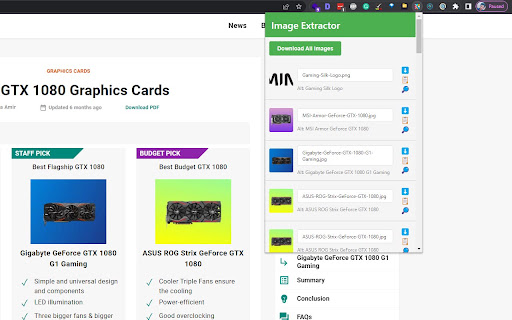
The Image Extractor Chrome extension allows users to extract image information from a webpage's content area, including image names, alt texts, and URLs. Users can also download individual images, copy image URLs, and download all images as a ZIP file.

Features

- Extract images from the content area of a webpage
- Display image names and alt texts
- Show a small image preview
- Download individual images
- Copy image URLs to clipboard
- Download all images as a ZIP file

Installation

1. Clone or download this repository.
2. Open the Chrome browser and navigate to `chrome://extensions/`.
3. Enable the "Developer mode" toggle in the top right corner.
4. Click "Load unpacked" and select the directory containing the extension files.
5. The Image Extractor extension is now installed and ready to use.

Usage

1. Navigate to a webpage with images you want to extract.
2. Click on the Image Extractor extension icon in the Chrome toolbar.
3. In the extension popup, click the "Extract Images" button.
4. The images from the content area will be displayed along with their names, alt texts, and a small preview.
5. To download an individual image, click the "Download" (⬇️) icon.
6. To copy an image URL, click the "Copy URL" (📋) icon.
7. To download all images as a ZIP file, click the "Download All Images" button.
Technical
- Version
- 1.2
- Manifest
- V3
- Size
- 70.24KiB
- Min Chrome
- 88
- Languages
- 1
- Featured
- Yes
Metadata
- ID
- aenndgkopjmlkcbaohiolnlcfacniknc
- Developer ID
- ufe02a8c29402a7b410bb09292ef2bb70
- Developer Email
- [email protected]
- Created
- May 25, 2023
- Last Updated (Store)
- Feb 23, 2025
- Last Scraped
- Jun 2, 2026
- Website
- https://www.bigtechies.com/
- Privacy Policy
- —
Similar extensions
Alternatives to Image Extractor, ranked by description similarity.

Image URL Extractor
Extract and display all image URLs from the current page with a vibrant UI.
319

Image Grabber
Extracts and downloads images from the current web page.
27

Content Extractor
Extract content from the current webpage using CSS selectors.
29

ImageHunter Pro
Extract, preview, download and copy images from any webpage instantly.
11
★ 5.0

XPath Extractor
Extract text and attributes from web elements using XPath. Test, highlight, and export data effortlessly.
29
★ 5.0

Bulk Image Grabber
Bulk Image Grabber: Download all page images.
9

Image Downloader & Scraper – Save All Images in Bulk
Download all images from any webpage in one click. Batch download, filter by type, and save images fast
366
★ 4.5
PhoenixMantis: Advanced Image Downloader & Editor
Discover images on web pages, edit with WASM power, and download in any format.
99
★ 4.8
Data sourced from the Chrome Web Store · last verified Jun 2, 2026.