
xPath Finder
Click on any element to get the xPath
As of May 2026, xPath Finder has 50,000 users and a 3.38/5 rating from 37 reviews in the Developer Tools category.
Usersno change0%
50.0K
50,000
Ratingup 1.5 percent+1.5%
3.38
37 reviews
Reviewsup 2.8 percent+2.8%
37
Version
1.0.3
Manifest V3
History
1 snapshotsTracking since Apr 25, 2026.
View as table
| Date | Users | Rating | Reviews | Version |
|---|---|---|---|---|
| Apr 25, 2026 | 50.0K | 3.33 | 36 | 1.0.3 |
| Now | 50.0K | 3.38 | 37 | 1.0.3 |
Permissions & access
- Permissions
- activeTabscriptingstorage
- Host access
- None declared
Screenshots




About
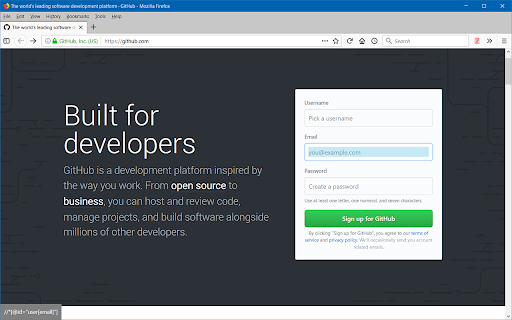
Plugin to get the elements xPath.

Usage:
1. Click on the plugin icon, cursor will be changed to the crosshair
2. Hover over the desired element (elements are highlighted on hover)
3. Click on the element and his xPath will display in the panel at the bottom of the page

Options:
- turn on/off inspector,
- turn on/off auto copy to clipboard,
- choose between short ID's or normal path,
- change xpath box position
Technical
- Version
- 1.0.3
- Manifest
- V3
- Size
- 14.89KiB
- Min Chrome
- 88
- Languages
- 1
- Featured
- Yes
Metadata
- ID
- ihnknokegkbpmofmafnkoadfjkhlogph
- Developer ID
- u184945593e306c27cdeae32681aba5e7
- Developer Email
- [email protected]
- Created
- Dec 6, 2017
- Last Updated (Store)
- Mar 13, 2025
- Last Scraped
- May 21, 2026
- Website
- —
- Support URL
- —
- Privacy Policy
- —
Similar extensions
Alternatives to xPath Finder, ranked by description similarity.

Xpather
Find, generate and test XPath expressions. Smart variants, element picker, zero telemetry.
52

xPath Helper PRO
Easily test XPath queries on web pages
602
★ 5.0

Element Inspector
Instantly capture XPath, CSS Selector, and OuterHTML of any DOM element. Hold Ctrl and click to inspect
10
★ 5.0

XPath Helper Pro
Extract, edit, and evaluate XPath queries with ease.
607
★ 5.0

XPath Highlighter
Instantly generate and validate XPath expressions by clicking any element on a webpage with a convenient side panelfunctionality.
64

Element Selectors
Chrome extension to find element selectors
2.0K
★ 4.8

XPathify
Instantly test and evaluate XPath expressions directly on web pages.
13
★ 5.0

CSS and XPath checker
A helper tool for to confirm CSS and XPath selector.
20.0K
★ 2.8
Data sourced from the Chrome Web Store · last verified May 21, 2026.