
Element Selectors
Chrome extension to find element selectors
As of May 2026, Element Selectors has 2,000 users and a 4.75/5 rating from 4 reviews in the Developer Tools category.
Usersno change0%
2.0K
2,000
Ratingno change0%
4.75
4 reviews
Reviewsno change0%
4
Version
0.0.1
Manifest V3
History
1 snapshotsTracking since Apr 26, 2026.
View as table
| Date | Users | Rating | Reviews | Version |
|---|---|---|---|---|
| Apr 26, 2026 | 2.0K | 4.75 | 4 | 0.0.1 |
| Now | 2.0K | 4.75 | 4 | 0.0.1 |
Permissions & access
- Permissions
- clipboardWrite
- Host access
- <all_urls>
Screenshots
About
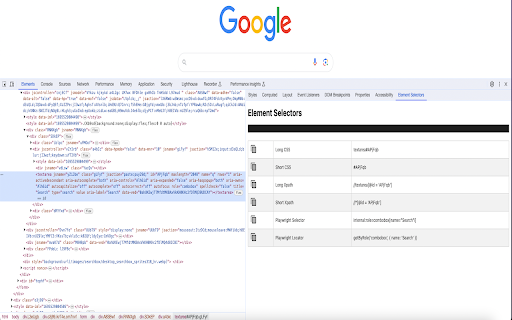
Xpath and CSS plugin to auto generate shortest xpath, css & Playwright Locators

Element Selectors plugin can also be used to auto generate the unique shortest xpath, shortest css and Playwright selectors.

Steps to generate xpath, css and playwright locator
1. Once installed, please restart your browser
2. Open the page you can want to get css selector
3. Open Devtools by clicking on the inspect window or F12 (Function F12)
4. Open the Element Selectors sidebar panel located in the devtools
5. Inspect the desired element to get the css locator

Features-
a) Playwright Locator
b) Short and Long CSS
c) Short and Long Xpath

If you are facing  any issue or want to give a feedback, feel free to reach out to me at [email protected]
Technical
- Version
- 0.0.1
- Manifest
- V3
- Size
- 318KiB
- Min Chrome
- 88
- Languages
- 1
- Featured
- Yes
Metadata
- ID
- fjgebdmbjiahfjcjaemkmifpdjaldfcc
- Developer ID
- uf51e5ead7558816102007bc9df3e2cbb
- Developer Email
- [email protected]
- Created
- Oct 3, 2023
- Last Updated (Store)
- Oct 3, 2023
- Last Scraped
- May 23, 2026
- Website
- —
Similar extensions
Alternatives to Element Selectors, ranked by description similarity.

SelectorsHub
Locators Plugin to Auto Generate and Verify Playwright Locators, XPath & CSS Selectors.
400.0K
★ 4.8

Web Element Selector Generator
Generate XPath and CSS selectors for web elements.
60
★ 5.0
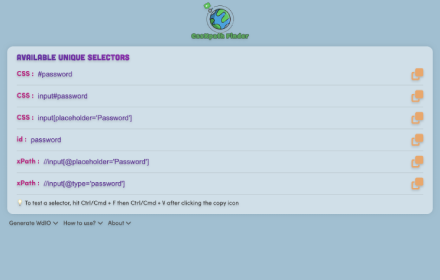
CssXpath Finder
The best CSS & Xpath finder for your web automation!
210
★ 5.0

SelectorsHub Pro
xPath plugin to auto generate, write and verify xpath & cssSelector.
5.0K
★ 5.0

XPath Finder Pro
Streamline automation with instant unique XPath/CSS generation, smart verification, and a premium draggable UI.
20
★ 5.0

XPath Finder & CSS Selector Generator – XPath Forte
XPath finder, CSS selector & Playwright locator generator. Element inspector with stability scoring for Selenium automation testing.
84
★ 5.0

CSS Selector Generator
Generate unique CSS selector for any element on web page with ease.
10

Xpather
Find, generate and test XPath expressions. Smart variants, element picker, zero telemetry.
52
Data sourced from the Chrome Web Store · last verified May 23, 2026.