
Recordify: FREE Screen Recorder
A FREE and easy to use screen recording extension
As of June 2026, Recordify: FREE Screen Recorder has 179 users and a 5.00/5 rating from 1 reviews in the Workflow & Planning category.
Usersup 53.0 percent+53.0%
179
179
Ratingno change0%
5.00
1 reviews
Reviewsno change0%
1
Version
5.2.46
Manifest V3
90-day change · In the last 90 days this extension 2 version updates.
History
9 snapshotsTracking since Apr 18, 2026.
View as table
| Date | Users | Rating | Reviews | Version |
|---|---|---|---|---|
| Apr 18, 2026 | 117 | 5.00 | 1 | 5.2.29 |
| Apr 27, 2026 | 130 | 5.00 | 1 | 5.2.29 |
| May 7, 2026 | 127 | 5.00 | 1 | 5.2.29 |
| May 12, 2026 | 132 | 5.00 | 1 | 5.2.42 |
| May 17, 2026 | 136 | 5.00 | 1 | 5.2.42 |
| May 24, 2026 | 142 | 5.00 | 1 | 5.2.42 |
| May 30, 2026 | 138 | 5.00 | 1 | 5.2.42 |
| Jun 6, 2026 | 149 | 5.00 | 1 | 5.2.42 |
| Jun 15, 2026 | 157 | 5.00 | 1 | 5.2.42 |
| Now | 179 | 5.00 | 1 | 5.2.46 |
Changelog
- May 7, 2026description
A great, simple to use and FREE screen recording tool to help you with your productivity.

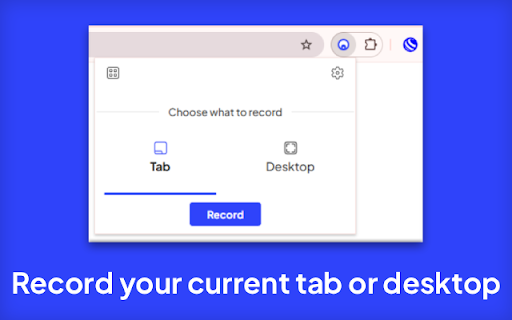
Recordify: FREE Screen Recorder allows you to record your current tab or desktop including the audio with the click of a button. Your recording can then be previewed before downloading it to use as you wish.

You can save your current recording to Google Drive after authenticating with Google.

Access your recordings in the future using the new 'My Captures' feature in the quick access menu in Recordify: FREE Screen Recorder.

Use the new Quick Settings menu to easily enable or disable microphone audio during your recordings. This powerful new feature means you can now add your voice to any screen capture.

You can now capture device audio too! Whether it’s music, video sound, or in-app audio, this brand new capability lets you record what you hear on your device.

Click the install button now and get Recordify: FREE Screen Recorder free of charge 😎
A great, simple to use and FREE screen recording tool to help you with your productivity.

• Recordify: FREE Screen Recorder allows you to record your current tab or desktop including the audio with the click of a button. Your recording can then be previewed before downloading it to use as you wish.

• You can save your current recording to Google Drive after authenticating with Google.

• Access your recordings in the future using the new 'My Captures' feature in the quick access menu in Recordify: FREE Screen Recorder.

• Use the new Quick Settings menu to easily enable or disable microphone audio during your recordings. This powerful new feature means you can now add your voice to any screen capture.

• You can now capture device audio too! Whether it’s music, video sound, or in-app audio, this brand new capability lets you record what you hear on your device.

Click the install button now and get Recordify: FREE Screen Recorder free of charge 😎
Permissions & access
- Permissions
- storagedesktopCaptureunlimitedStoragedownloadstabsidentityoffscreentabCaptureactiveTab
- Host access
- <all_urls>
Screenshots


About
A great, simple to use and FREE screen recording tool to help you with your productivity.

• Recordify: FREE Screen Recorder allows you to record your current tab or desktop including the audio with the click of a button. Your recording can then be previewed before downloading it to use as you wish.

• You can save your current recording to Google Drive after authenticating with Google.

• Access your recordings in the future using the new 'My Captures' feature in the quick access menu in Recordify: FREE Screen Recorder.

• Use the new Quick Settings menu to easily enable or disable microphone audio during your recordings. This powerful new feature means you can now add your voice to any screen capture.

• You can now capture device audio too! Whether it’s music, video sound, or in-app audio, this brand new capability lets you record what you hear on your device.

Click the install button now and get Recordify: FREE Screen Recorder free of charge 😎
Technical
- Version
- 5.2.46
- Manifest
- V3
- Size
- 787KiB
- Min Chrome
- 88
- Languages
- 1
- Featured
- No
Metadata
- ID
- igpmccnfdgkfbgdmnamhlphegclidlbk
- Developer ID
- uc94cf660fdafda7eb4322ccf4472607e
- Developer Email
- [email protected]
- Created
- May 8, 2022
- Last Updated (Store)
- Jun 12, 2026
- Last Scraped
- Jun 15, 2026
- Website
- chrometeq.com
- Support URL
- —
Similar extensions
Alternatives to Recordify: FREE Screen Recorder, ranked by description similarity.

Screen & Webcam recorder - Flonnect
Allows Screen Recording from your Webcam and Desktop
100.0K
★ 4.6

Screen Recorder
Screen recorder - simple, tiny, user-friendly and full-featured!
863
★ 4.5

Free Screen Recorder
Record screen along with audio and making the recording downloadable
20.0K
★ 3.4

Just Record
Simplest way to record from your camera and screen.
4

Browser Recorder
Screen recording with Browser Recorder for Chrome - voice capture online, record browser video, and sound from your entire screen.
2.0K
★ 4.6

Screen Recorder | Voice Recorder
Record sound or Record screen from the browser current tab
2.0K
★ 2.2

Screen recorder
Elevate your productivity with Screen Recorder tool. Effortlessly capture and share your screen recordings for optimal efficiency.
4.0K
★ 3.6

Video Recorder
Use Video Recorder, a simple tool to screen record. It also lets you audio recorder online, capturing both your camera and display.
10.0K
★ 4.3
Data sourced from the Chrome Web Store · last verified Jun 15, 2026.