
Screen Recorder
Screen recorder - simple, tiny, user-friendly and full-featured!
As of May 2026, Screen Recorder has 863 users and a 4.50/5 rating from 4 reviews in the Workflow & Planning category.
Usersup 10.1 percent+10.1%
863
863
Ratingno change0%
4.50
4 reviews
Reviewsno change0%
4
Version
1.0.5
Manifest V3
History
2 snapshotsTracking since Apr 29, 2026.
View as table
| Date | Users | Rating | Reviews | Version |
|---|---|---|---|---|
| Apr 29, 2026 | 784 | 4.50 | 4 | 1.0.5 |
| May 26, 2026 | 834 | 4.50 | 4 | 1.0.5 |
| Now | 863 | 4.50 | 4 | 1.0.5 |
Permissions & access
- Permissions
- declarativeNetRequest
- Host access
- http://*/*, https://*/*
Screenshots
About
Screen Recorder - simple, tiny, easy to use, and full-featured!

🔥Screen recorder Chrome extension - it’s free, without a watermark and signup process!!!

💡 Quick Start Tips

    Install the extension by clicking the "Add to Chrome" button
    Open a new browser page or reload the current page
    Click the extension icon
    Grant access to your microphone if you want to record your voice.
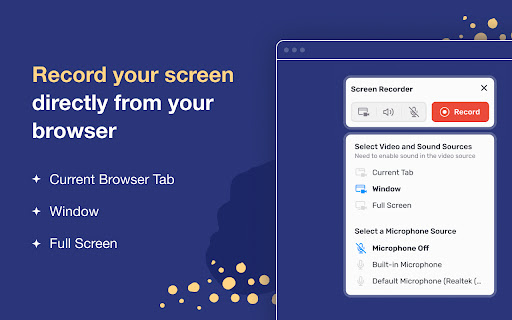
    Select video and audio sources in the pop-up dialog.
    Record your video.
    Once you click Stop, the recording will be automatically downloaded to your Downloads directory.

💥 Capture screen in three modes:
▸ Chrome Tab (with system sound)
▸ Specific application window
▸ Whole desktop

⭐️Key Features
🎬 Record unlimited videos and save them locally in searchable MP4 format.
🎥 Record audio from a microphone and system sound.
🚀 Pause, resume, or stop recording with a single button.
📌 Compact and draggable interface - it saves you screen space in full-screen mode. 🤔 Easy-to-use interface - you always know exactly what sources (video and audio) are being recorded.

⭐️Top Use cases
▸ Record simple tutorial videos: how to use any website or application.
▸ Save time when discussing a problem or bug: create steps to reproduce a video that helps the developer understand the context and find the problem.
▸ Capture system sound: recording system sound works for the Chrome tab option, so you can share your gameplay with all the details.
▸ Eliminate work meetings in favor of more effective, asynchronous communication.
Technical
- Version
- 1.0.5
- Manifest
- V3
- Size
- 236KiB
- Min Chrome
- 88
- Languages
- 55
- Featured
- No
Metadata
- ID
- bgnpgpfjdpmgfdegmmjdbppccdhjhdpe
- Developer ID
- u01ca17ddc2acbb047e49bae4acff78ca
- Developer Email
- [email protected]
- Created
- Sep 29, 2024
- Last Updated (Store)
- Feb 27, 2025
- Last Scraped
- May 26, 2026
- Website
- —
- Support URL
- —
- Privacy Policy
- —
Similar extensions
Alternatives to Screen Recorder, ranked by description similarity.

Screen & Webcam recorder - Flonnect
Allows Screen Recording from your Webcam and Desktop
100.0K
★ 4.6

Screen recorder
Elevate your productivity with Screen Recorder tool. Effortlessly capture and share your screen recordings for optimal efficiency.
4.0K
★ 3.6

Screen Recorder with Webcam + Video Editor
Screen recorder & desktop capture tool. Record a video, presentation, open a front camera, or a window. Edit, download, and share.
1.0K
★ 4.3

Quick Screen Recorder
Record your screen, browser tab, or window with one click. Fast, lightweight screen recorder with instant download and no watermark.
33

Screen Recorder for Chrome Free
Record your screen, tab, or camera with advanced features.
191
★ 4.7

Simple Screen Recorder
Record video from your current browser tab in one click. Simple Tab Recorder captures tab activity easily with high-quality output.
5.0K
★ 4.3

Browser Recorder
Screen recording with Browser Recorder for Chrome - voice capture online, record browser video, and sound from your entire screen.
2.0K
★ 4.6

Simple Screen Recorder
Record screen with audio and save as WebM.
4
Data sourced from the Chrome Web Store · last verified May 26, 2026.