
ChatGpt Models for Chrome
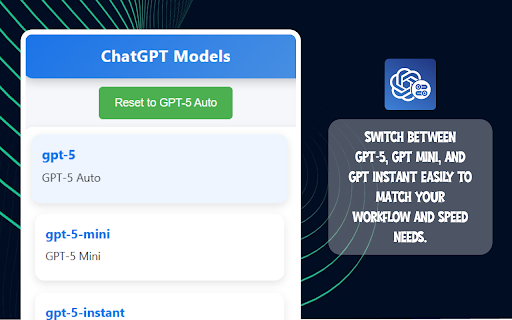
Use this extension to switch between models like GPT-5, GPT Mini, and GPT Instant based on your requirement
As of June 2026, ChatGpt Models for Chrome has 8 users in the Productivity category.
Usersno change0%
8
8
Ratingno change0%
—
— reviews
Reviewsno change0%
—
Version
1.0
Manifest V3
History
6 snapshotsTracking since Apr 20, 2026.
View as table
| Date | Users | Rating | Reviews | Version |
|---|---|---|---|---|
| Apr 20, 2026 | 8 | — | — | 1.0 |
| May 5, 2026 | 5 | — | — | 1.0 |
| May 15, 2026 | 6 | — | — | 1.0 |
| May 21, 2026 | 7 | — | — | 1.0 |
| May 27, 2026 | 6 | — | — | 1.0 |
| Jun 3, 2026 | 7 | — | — | 1.0 |
| Now | 8 | — | — | 1.0 |
Permissions & access
- Permissions
- storagenotifications
- Host access
- <all_urls>
Screenshots


About
Are you looking for a way to easily switch between different ChatGPT models while working in your browser? Or are you searching for a tool that lets you select the right model based on your task? With the ChatGPT Models for Chrome extension, you can instantly toggle between GPT-5, GPT Mini, and GPT Instant depending on your needs. Whether you want high accuracy, lightweight performance, or quick responses, this extension makes it simple to customize your AI experience with just one click.


Key Features

1. Multiple Model Options

Choose between GPT-5, GPT Mini, and GPT Instant directly from your browser.

2. Quick Switching

Seamlessly switch models without leaving your workflow.

3. Customizable Experience

Pick the best model based on your requirement—speed, accuracy, or balance.

4. Lightweight & User-Friendly

Simple interface designed for smooth performance on Chrome.


How to Use

Step 1: Install the Extension

Add the ChatGPT Models for Chrome extension to your browser.

Step 2: Open the Extension Panel

Click on the extension icon from your Chrome toolbar.

Step 3: Select Your Preferred Model

Choose between GPT-5, GPT Mini, or GPT Instant based on your task.

Step 4: Start Using the Model

The selected model will now be active, and you can enjoy a tailored AI experience instantly.


Why It Is Useful?

This extension is useful because it gives you flexibility and control over how you interact with ChatGPT. Instead of being limited to one model, you can switch depending on whether you need fast replies, lightweight usage, or advanced accuracy. It saves time, improves productivity, and adapts to your working style.


Who Can Use It?

The ChatGPT Models for Chrome extension is ideal for students, professionals, researchers, content creators, and developers who frequently use ChatGPT. Whether you need quick answers, deep research outputs, or optimized performance, this tool is designed to suit everyone’s requirements.
Technical
- Version
- 1.0
- Manifest
- V3
- Size
- 25.56KiB
- Min Chrome
- 88
- Languages
- 1
- Featured
- No
Metadata
- ID
- igihodcccodipldocmgimcinhppplaoc
- Developer ID
- u3896594b4f8f021ff7c7a899df8b7385
- Developer Email
- [email protected]
- Created
- Sep 14, 2025
- Last Updated (Store)
- May 12, 2026
- Last Scraped
- Jun 9, 2026
- Website
- —
- Support URL
- —
Similar extensions
Alternatives to ChatGpt Models for Chrome, ranked by description similarity.

Flame AI
Chat seamlessly with multiple OpenAI models using your private OpenAI API key.
10
★ 5.0

GPT Anywhere: ChatGPT AI Assistant | Claude 4, GPT-4o, Claude 3.5, o1 &More
Your AI assistant with ChatGPT, Claude & more. Chat, compare, and interact with multiple AI models anywhere in your browser.
23
★ 5.0

ChatGPT Extension
Use ChatGPT quickly and powerfully in Google Chrome.
10.0K
★ 4.6

ChromeGPT for ChatGPT
The easiest way to use ChatGPT.
889
★ 5.0

ChatGPT Chrome Extension
Use ChatGPT Chrome Extension to add fast ChatGPT search and an AI assistant through a convenient ChatGPT sidebar in your browser.
159
★ 5.0

ChatGPT Assistant
The ChatGPT Assistant Chrome Extension is a productivity solution designed to optimize communication across platforms All Social…
20

ChatGPT
Integrate ChatGPT into your daily browsing & search experience!
6

AiGrid: Multi-AI Side-by-Side Chat
Compare ChatGPT, Gemini, Claude & Grok side-by-side. Unified search, shared history, and resizable panels in one tab.
56
★ 4.7
Data sourced from the Chrome Web Store · last verified Jun 9, 2026.