
Easy Refresh plus
EasyRefresh+: auto refresh tabs with 1-click timers, manage tab actions, monitor timer status, and batch refresh URLs.
As of June 2026, Easy Refresh plus has 437 users in the Workflow & Planning category.
Usersdown 6.4 percent−6.4%
437
437
Ratingno change0%
—
— reviews
Reviewsno change0%
—
Version
2.05
Manifest V3
History
5 snapshotsTracking since Apr 18, 2026.
View as table
| Date | Users | Rating | Reviews | Version |
|---|---|---|---|---|
| Apr 18, 2026 | 467 | — | — | 2.05 |
| Apr 27, 2026 | 460 | — | — | 2.05 |
| May 7, 2026 | 480 | — | — | 2.05 |
| May 19, 2026 | 488 | — | — | 2.05 |
| Jun 2, 2026 | 464 | — | — | 2.05 |
| Now | 437 | — | — | 2.05 |
Permissions & access
- Permissions
- tabsstorageactiveTabalarms
- Host access
- *://*/*
Screenshots

About
EasyRefresh+ allows you to auto refresh tab(s) with preset 1-click timers or custom intervals. Features include setting up unlimited timers, stopping all timers, refreshing the current browser window, refreshing all windows in a single account, and managing tab actions such as muting audio in all tabs. Monitor the status of active timers and stop them individually or all at once. Batch refresh a list of URLs by entering them in the designated input field.

This is the premier refresh extension designed for ultimate convenience and efficiency in tab management. It is perfect for critical applications such as monitoring stock data, checking for news releases, keeping an eye on your favorite team's score through blogs or news websites, and much more. With a range of easy-to-use features and a responsive interface, it simplifies your browsing experience by automating tab refresh actions and more.

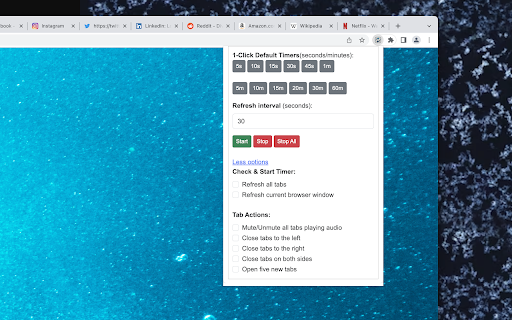
● 1-Click Default Timers: Users can quickly select from preset timer buttons ranging from 5 seconds to 60 minutes (5s, 10s, 15s, 30s, 45s, 1m, 5m, 10m, 15m, 20m, 30m, 60m) to start the refresh interval.

● Custom Refresh Interval: Users can input their preferred refresh interval in seconds, offering more flexibility in setting a timer.

● Start, Stop, and Stop All: Users can easily start, stop, or stop all timers with dedicated buttons.

● More options: Users can access additional settings such as:

Refresh all tabs
Refresh current browser window
Mute/Unmute all tabs playing audio
Close tabs to the left, right, or on both sides
Open five new tabs

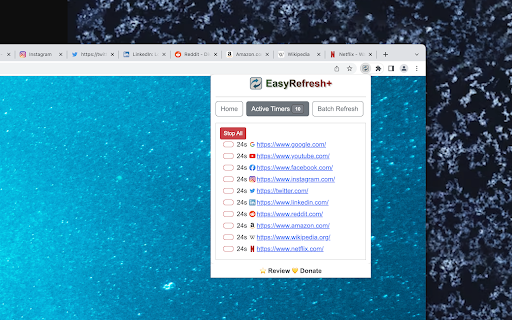
● Active Timers(Status): Users can view the list of active timers and their details, and also stop individual timers or all timers at once.

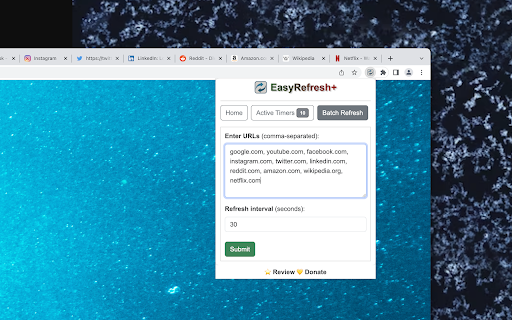
● Batch Refresh: Users can input multiple URLs up-to 10 (comma-separated) and set a refresh interval in seconds. Clicking "Submit" will spawn the tabs and start the timers.

● Easy Navigation: Users can navigate between the Home, Active Timers, and Batch Refresh tabs with the provided buttons.

● Responsive Design: The extension uses Bootstrap CSS for a clean and responsive user interface.

● More by developer section: briefly describes work by the dev

● Review/Donate Link: Users can leave a review using the links provided in the footer and support it if they find useful.

Easy Refresh plus delivers a seamless browsing experience with its user-friendly approach to tab management and refreshing. Whether you're keeping track of fluctuating stock prices, awaiting the latest product release, or following live events, EasyRefresh+ has got you covered. As the go-to choice for many users, it continues to enhance productivity and streamline the browsing process. Try EasyRefresh+ now and see how it can transform your browsing habits for the better. Don't forget to leave a review and support the extension's development with a donation if you find it helpful.
Technical
- Version
- 2.05
- Manifest
- V3
- Size
- 370KiB
- Min Chrome
- 88
- Languages
- 1
- Featured
- No
Metadata
- ID
- igbigagbmebpdmhmklockbcdhnjhjklk
- Developer ID
- u862746e4967f374b15c56939b833c9ad
- Developer Email
- [email protected]
- Created
- Apr 27, 2023
- Last Updated (Store)
- Nov 4, 2025
- Last Scraped
- Jun 2, 2026
- Website
- —
- Support URL
- —
- Privacy Policy
- —
Similar extensions
Alternatives to Easy Refresh plus, ranked by description similarity.

AutoRefresh - Automatic Page Refresh Extension
A tab-specific auto-refresh timer with customizable intervals, in tab visualization and much more!
2.0K
★ 4.8

Auto Refresh Plus
Automatically refresh pages with custom intervals and advanced settings.
363
★ 5.0

Tab Auto Refresher
Refreshes specific tabs at random intervals with configurable units. Option to reopen closed tabs.
11

Easy Auto Tab Reload
Effortlessly auto-refresh tabs with custom intervals. Simple start/stop controls, manual reload, and saved settings for productivity
6

Auto Page Refresher Pro
Automatically refresh web pages at custom intervals with advanced features like random timing, refresh limits, and visual timer.
7

Tab Refresher Pro
Tab Refresher Pro with timer controls and status indicators
5

Swift Auto Refresh
Stay Ahead with Swift Auto Refresh: Effortless Page Refreshing at Your Fingertips!
20.0K
★ 5.0

Auto Refresh Extension
Automatically refreshes the page based on user-defined time intervals.
888
★ 5.0
Data sourced from the Chrome Web Store · last verified Jun 2, 2026.