
Auto Page Refresher Pro
Automatically refresh web pages at custom intervals with advanced features like random timing, refresh limits, and visual timer.
As of June 2026, Auto Page Refresher Pro has 7 users in the Workflow & Planning category.
Usersup 250.0 percent+250.0%
7
7
Ratingno change0%
—
— reviews
Reviewsno change0%
—
Version
1.0.0
Manifest V3
History
5 snapshotsTracking since Apr 9, 2026.
View as table
| Date | Users | Rating | Reviews | Version |
|---|---|---|---|---|
| Apr 9, 2026 | 2 | — | — | 1.0.0 |
| May 9, 2026 | 1 | — | — | 1.0.0 |
| May 20, 2026 | 3 | — | — | 1.0.0 |
| May 27, 2026 | 5 | — | — | 1.0.0 |
| Jun 9, 2026 | 6 | — | — | 1.0.0 |
| Now | 7 | — | — | 1.0.0 |
Permissions & access
- Permissions
- storagetabsactiveTab
- Host access
- <all_urls>
Screenshots
About
Tired of manually refreshing pages? Auto Page Refresher Pro automatically reloads any webpage at your custom intervals, keeping you updated without the hassle.

## Perfect For:

* Stock traders monitoring real-time prices
* Developers testing code changes instantly
* Students checking exam results
* Professionals monitoring dashboards & analytics
* Shoppers tracking product availability
* Crypto investors tracking charts
* YouTubers monitoring subscriber counts
* Content creators tracking engagement metrics

## Key Features:

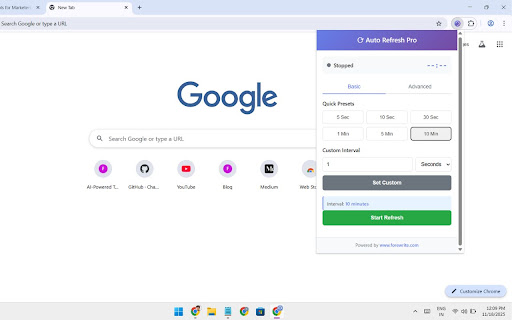
✓ Custom Time Intervals - Choose from presets (5s, 10s, 30s, 1m, 5m, 10m, 15m) or set your own interval in seconds, minutes, or hours

✓ Visual Timer Display - See the countdown to next refresh directly on the page. Know exactly when the refresh will happen

✓ Random Interval Refresh - Set minimum and maximum range for random refresh times. Perfect for testing and monitoring

✓ Stop on Click - Click anywhere on the page to instantly pause the refresh. Full control at your fingertips

✓ **Hard Refresh Option** - Clear cache and cookies with each refresh to ensure fresh, accurate content every time

✓ Refresh Limits - Set a maximum number of refreshes. Auto-stop after X refreshes to save resources

✓ Smart Notifications - Receive pop-up alerts when refresh limit is reached or important events occur

✓ Persistent Sessions - Auto-resume refreshing after browser restart. Your settings are saved automatically

✓ Tab Status Badge - See at a glance which tabs have active auto-refresh enabled with visual indicators

✓ Multiple Tab Support - Manage different refresh settings for different tabs simultaneously

## How to Use:

1. Click the extension icon to open the popup
2. Enter your desired refresh interval
3. Toggle advanced options (hard refresh, notifications, etc.)
4. Click "Start" to begin auto-refresh
5. Click "Stop" or click anywhere on the page to stop

## Advanced Features:

Random Intervals: Need unpredictable refresh patterns? Set a range (5-60 seconds) and let it randomize
Refresh Counting: Monitor how many refreshes have occurred with built-in refresh counter
Visual Feedback: Minimalist countdown timer overlay shows time until next refresh
Performance Optimized: Lightweight design won't slow down your browser, even with multiple tabs

## Use Cases:

📈 Traders & Investors - Monitor stock prices, crypto charts, and market data in real-time without manual refreshing

🧪 Developers & QA Testers - Auto-refresh test pages during development. See changes instantly without hitting F5 repeatedly

🎓 Students - Check exam results, course updates, and registration pages without endless refreshing

📊 Business Professionals - Keep analytics dashboards, reports, and metrics auto-updated in the background

🛍️ Online Shoppers - Monitor product availability, price changes, and stock updates automatically

🎥 Content Creators - Watch subscriber counts, view counts, and engagement metrics update live

## Why Choose Auto Page Refresher Pro?

Unlike other refresh extensions, Auto Refresher Pro combines power with simplicity:

Intuitive interface - Set up auto-refresh in seconds
Feature-rich - Everything you need without bloat
Reliable - Consistent performance across all websites
Flexible - Works with any website, any use case
Secure - No data collection, no tracking

## Permissions Explained:

This extension needs specific permissions to work properly:

Storage: Save your refresh preferences per tab
Tabs: Access and refresh the current tab
Scripting: Inject visual timer and overlay elements
Notifications: Alert you when refresh limits are reached
All URLs: Work on any website you visit

## Installation & Setup:

1. Install from Chrome Web Store
2. Click the extension icon
3. Set your refresh interval
4. Hit Start
5. Done! Your page will refresh automatically

## Highlights:

✨ No Setup Required - Works immediately after installation. Perfect for both beginners and power users.

✨ Free Forever - All features included. No premium version, no hidden costs.

✨ Privacy First - We don't collect your data, track your browsing, or show ads.

Perfect for real-time monitoring. Download Auto Page Refresher Pro today and never manually refresh again!
Technical
- Version
- 1.0.0
- Manifest
- V3
- Size
- 32.8KiB
- Min Chrome
- 88
- Languages
- 1
- Featured
- No
Metadata
- ID
- jghoaclokgmgoncelaepinkjhffabbhj
- Developer ID
- ue6ffcc83ef939b3b0d69c28aa1cdb73b
- Developer Email
- [email protected]
- Created
- Mar 7, 2026
- Last Updated (Store)
- Mar 7, 2026
- Last Scraped
- Jun 9, 2026
- Website
- forewrite.com
- Support URL
- https://forewrite.com/contact-us/
- Privacy Policy
- —
Similar extensions
Alternatives to Auto Page Refresher Pro, ranked by description similarity.

Auto Refresh Plus
Automatically refresh pages with custom intervals and advanced settings.
363
★ 5.0

Auto Refresh Pro
Advanced auto-refresh tool with customizable intervals, multiple refresh modes, and smart tab management
18

Chrome Auto Refresh
Chrome Auto Refresh – Easy auto refresh for any tab. Instantly organize automatic tab reloads. Simple and fast.
1.0K
★ 4.4

Auto Refresh Extension
Auto Refresh Extension allows pages or tabs to reload automatically after a specified time
558
★ 5.0

Refira: Auto Refresh
Refira — A professional auto refresh extension with custom intervals, change detection, and smart alerts.
143

Smart Auto Refresh
Auto-refresh tabs with per-site memory and safe guards.
13

Tab Auto Refresher
Refreshes specific tabs at random intervals with configurable units. Option to reopen closed tabs.
11

Easy Auto Tab Reload
Effortlessly auto-refresh tabs with custom intervals. Simple start/stop controls, manual reload, and saved settings for productivity
6
Data sourced from the Chrome Web Store · last verified Jun 9, 2026.