
Select to AI
Send selected text to ChatGPT, Gemini, or Perplexity via New Tab, Popup Window, or Side Panel.
As of June 2026, Select to AI has 905 users and a 3.71/5 rating from 14 reviews in the Productivity category.
Usersup 12.8 percent+12.8%
905
905
Ratingup 2.5 percent+2.5%
3.71
14 reviews
Reviewsup 7.7 percent+7.7%
14
Version
2.0
Manifest V3
History
6 snapshotsTracking since Apr 3, 2026.
View as table
| Date | Users | Rating | Reviews | Version |
|---|---|---|---|---|
| Apr 3, 2026 | 802 | 3.62 | 13 | 2.0 |
| Apr 19, 2026 | 821 | 3.62 | 13 | 2.0 |
| Apr 29, 2026 | 822 | 3.71 | 14 | 2.0 |
| May 9, 2026 | 846 | 3.71 | 14 | 2.0 |
| May 25, 2026 | 876 | 3.71 | 14 | 2.0 |
| Jun 4, 2026 | 875 | 3.71 | 14 | 2.0 |
| Now | 905 | 3.71 | 14 | 2.0 |
Permissions & access
- Permissions
- contextMenusstoragesidePaneldeclarativeNetRequest
- Host access
- https://chatgpt.com/*, https://gemini.google.com/*, https://www.perplexity.ai/*
Screenshots

About
🌐 Select to AI: Context Menu for ChatGPT, Gemini & Perplexity

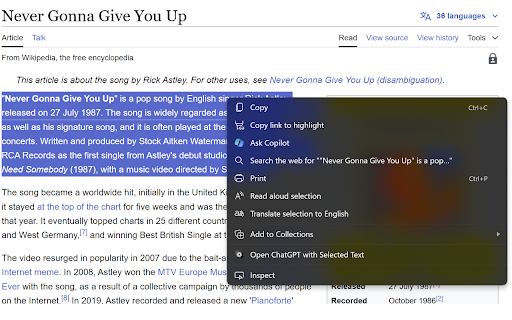
Effortlessly access your favorite AI assistants (ChatGPT, Gemini, or Perplexity) directly from your right-click context menu. Perfect for quick explanations, summaries, translations, or fact-checking without breaking your flow.

✅ Simple, Free, and Privacy-Focused
This lightweight browser extension is designed to boost productivity while respecting user privacy. It’s completely free and does not track or store any user data.

✨ Key Features:
🤖 Multi-Model Support: Choose between ChatGPT, Google Gemini, or Perplexity AI depending on your needs.
🖱️ specific View Modes: Open the AI in the standard Chrome Side Panel (keep your browsing context!), a floating Popup Window, or a New Tab.
⚡ Auto-Send: Option to automatically submit the selected text as soon as the AI opens.
📝 Instant Productivity: Get summaries, translations, or code explanations instantly.
🎨 Customizable: Enable/disable specific services or switch between Light/Dark mode settings.
🔒 No Data Collection: The extension is privacy-focused and does not store, collect, or share any user data.
💯 100% Free: No hidden fees, subscriptions, or restrictions.

🛠️ How It Works:
1. Select text on any webpage.
2. Right-click and hover over "Select to AI".
3. Click your preferred service (ChatGPT, Gemini, or Perplexity).
4. The AI opens in your chosen mode (Side Panel, Window, or Tab) with the text pre-filled and ready to go.

*Pro Tip: If you only enable one service in the settings, the menu item moves to the top level for even faster access!*

🔑 Minimal Permissions: The extension uses minimal permissions (Context Menus, Storage, Side Panel) ensuring a secure experience.

📬 Support and Feedback
For any support, bug reports, or feature requests, feel free to contact [email protected]. We appreciate your feedback to continuously improve the extension.
Technical
- Version
- 2.0
- Manifest
- V3
- Size
- 146KiB
- Min Chrome
- 88
- Languages
- 1
- Featured
- Yes
Metadata
- ID
- ifofkleafhmamganjnoaaipdmffifcgc
- Developer ID
- u6898255d909fcef46227745d009f8516
- Developer Email
- [email protected]
- Created
- Oct 25, 2024
- Last Updated (Store)
- Jan 2, 2026
- Last Scraped
- Jun 4, 2026
- Website
- —
- Support URL
- —
- Privacy Policy
- —
Similar extensions
Alternatives to Select to AI, ranked by description similarity.

Chat with Ai (gpt ,grok ,claude,gemini)
Open ChatGPT, DeepSeek, Gemini, Claude, Grok in sidebar, for explain, summarize, & Fix Grammer.
106
★ 5.0

GPT Anywhere: ChatGPT AI Assistant | Claude 4, GPT-4o, Claude 3.5, o1 &More
Your AI assistant with ChatGPT, Claude & more. Chat, compare, and interact with multiple AI models anywhere in your browser.
23
★ 5.0

Handy AI
An AI-powered Chrome extension that lets you instantly ask AI from anywhere — text, screenshots, or input fields.
8
★ 5.0

Multimodal AI Browser Agent
A multimodal AI assistant for your browser powered by Gemini and OpenAI.
15

AI Side Panel
Easily access AI sites via side panel
3.0K
★ 4.8

Ask ChatGPT - Text Search
Highlight text on any site, right-click to search with ChatGPT instantly. Your AI assistant is always one right-click away.
14
★ 5.0

Quick Ask AI
Select text and ask with AI assistants
18

Assistant context
AI assistant with context menu. Right-click to access AI prompts and chat with OpenAI on any webpage.
40
★ 5.0
Data sourced from the Chrome Web Store · last verified Jun 4, 2026.