
Salesforce MetaData Deployment
View all of your deployed components
As of June 2026, Salesforce MetaData Deployment has 170 users and a 5.00/5 rating from 2 reviews in the Workflow & Planning category.
Usersup 6.9 percent+6.9%
170
170
Ratingno change0%
5.00
2 reviews
Reviewsno change0%
2
Version
3.0.4
Manifest V3
History
8 snapshotsTracking since Apr 2, 2026.
View as table
| Date | Users | Rating | Reviews | Version |
|---|---|---|---|---|
| Apr 2, 2026 | 159 | 5.00 | 2 | 3.0.4 |
| Apr 17, 2026 | 156 | 5.00 | 2 | 3.0.4 |
| Apr 27, 2026 | 169 | 5.00 | 2 | 3.0.4 |
| May 7, 2026 | 169 | 5.00 | 2 | 3.0.4 |
| May 14, 2026 | 163 | 5.00 | 2 | 3.0.4 |
| May 23, 2026 | 170 | 5.00 | 2 | 3.0.4 |
| Jun 2, 2026 | 175 | 5.00 | 2 | 3.0.4 |
| Jun 10, 2026 | 174 | 5.00 | 2 | 3.0.4 |
| Now | 170 | 5.00 | 2 | 3.0.4 |
Permissions & access
- Permissions
- activeTabcookiesstoragetabs
- Host access
- https://*.force.com/*, https://*.salesforce.com/*, https://*.force.com/*, https://*.salesforce.com/*
Screenshots


About
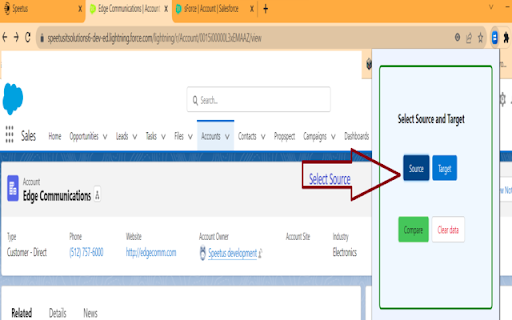
Metapost is an extension designed to facilitate the deployment of Salesforce metadata, such as objects, custom settings, and custom metadata types, from one Salesforce org to another. The tool offers several features that streamline the process of deploying metadata and ensure efficient comparisons between source and target orgs.


1. Utilizing Differentiator Tool Features:
The tool allows for deploying metadata from one Salesforce org to another.
It provides the functionality to switch between the source and target orgs while comparing metadata.
Users can select and deploy fields, layouts, and other elements as needed.

2. Accessing the Metapost tool:
Users need to select the source and target orgs for the metadata deployment.
After selecting the orgs, they can view the details of objects, custom settings, and custom metadata types.
For objects, users can select specific object elements to deploy, such as fields, layouts, list views, and lightning pages.They can also compare these elements between the  source and target orgs and choose the number of fields to deploy. The target and source orgs can be changed during deployment.
Users can also take a backup of the fields, layouts, list views, and lightning pages.
Identical fields will be arranged in head on manner.
For custom settings, the complete custom setting object can be viewed and deployed.
For custom metadata types, the object can be viewed and deployed in its entirety.
Clicking on the deploy button initiates the metadata deployment from the source to the target org.
Ahead of the field box we have added help text.
Users can create custom objects using this tool.

3. Troubleshooting:
The tool aims to address various issues and challenges of metadata deployment.

4. Considerations:
This tool is only available for the lightning experience side and will not gonna work for the classic experience side.
Package field will not be deployable.


5. Summary:
Metapost is an extension used to deploy Salesforce metadata such as objects, custom settings, and custom metadata types from one Salesforce org to another.One of the key features of Metapost is its ability to deploy metadata from one Salesforce org to another.

Users can select the source and target orgs, enabling them to transfer the desired metadata components between the two environments. Metapost also provides a convenient functionality that allows users to switch between the source and target orgs while comparing metadata.

This feature enhances the ability to evaluate and analyze the differences between the two orgs, ensuring accurate and effective deployment.When working with objects, users can view the details of individual objects, such as fields, layouts, list views, and lightning pages. Metapost enables users to selectively deploy specific elements of an object as needed, giving them control over the metadata being transferred. The tool also facilitates a comparison between the elements of the source and target orgs, enabling users to identify discrepancies and make informed decisions during deployment. Additionally, users have the flexibility to adjust the number of fields they want to deploy, adapting to their specific requirements and can take a backup of the object as well.

Custom settings can be easily managed using Metapost. Users can view, deploy, and take a backup of the complete custom setting object, ensuring that all relevant settings are accurately transferred between orgs.

Similarly, Metapost provides support for custom metadata types. Users can view, deploy and take a backup of the entire custom metadata type object, ensuring comprehensive and consistent transfer of metadata.The deployment process is initiated by clicking the deploy button, which triggers the transfer of metadata from the source org to the target org. Throughout the process, users have the flexibility to change the target and source orgs as needed, further enhancing the tool's adaptability.

Metapost is a valuable extension for Salesforce administrators and developers, offering a range of features that simplify the deployment of metadata between Salesforce orgs. Its ability to compare and selectively deploy object elements, custom settings, and custom metadata types enhances the efficiency and accuracy of metadata transfers.
Technical
- Version
- 3.0.4
- Manifest
- V3
- Size
- 2.05MiB
- Min Chrome
- 88
- Languages
- 1
- Featured
- No
Metadata
- ID
- idifjhmggokccpmnkeakojkeinlkldpj
- Developer ID
- u2001bfcb3d8c762cd11439ab17e08908
- Developer Email
- [email protected]
- Created
- Jul 20, 2023
- Last Updated (Store)
- Jan 12, 2026
- Last Scraped
- Jun 10, 2026
- Website
- speetus.com
- Support URL
- https://www.speetus.com/
- Privacy Policy
- —
Similar extensions
Alternatives to Salesforce MetaData Deployment, ranked by description similarity.

MetaFlow
MetaFlow
11
Record and Metadata Comparator for Salesforce
Compare Record data values and object metadata in Salesforce
4.0K
★ 4.7

Panaya ForeSight - Salesforce Discovery
Foresee dependencies and analyze the impact before making any change in your Salesforce Org
226
★ 5.0

Salesforce Metadata Documentation
Document Salesforce MetaData - By FusionHawk
20
★ 5.0

SFshare MV3 - Custom Salesforce Connector
SFshare shares data between your SFDC instance and any webapp
39

Noted Analytics
A Noted Analytics Google Calendar Extension
2

Sonar Web Extension
Sonar's Salesforce and Pardot explorer extension: Great for navigating your Salesforce and Pardot metadata with Sonar constantly by…
517
★ 5.0

MarketoMate: Consistent naming, compliant assets, tidy instance!
Automate your naming conventions. Ensure every Marketo asset is compliant, searchable, and organized.
20
★ 5.0
Data sourced from the Chrome Web Store · last verified Jun 10, 2026.