Combine pdf
Combine pdf instantly. Upload, reorder, and merge pdf right in your browser. Your files are handled locally, ensuring privacy.
As of May 2026, Combine pdf has 1,000 users and a 5.00/5 rating from 4 reviews in the Productivity category.
Usersno change0%
1.0K
1,000
Ratingno change0%
5.00
4 reviews
Reviewsno change0%
4
Version
1.0.0
Manifest V3
Permissions & access
- Permissions
- contextMenusnotifications
- Host access
- <all_urls>
Screenshots
About
Introduction
Welcome to combine pdf, the premier Google Chrome extension designed to revolutionize how you merge, arrange, and manage your pdf files. Our lightning-fast extension ensures a seamless, secure, and serverless experience, keeping your files safe and private throughout the process. 🌐🔒

Key features
🚀 Quick and instant
▸ With combine pdf, you can merge pdf at the speed of light.
▸ Experience instant merging without any unnecessary delays. ⚡
🌈 User-friendly interface
▸ Our intuitive design caters to users of all technical levels.
▸ Simply open the popup, upload files, and merge pdf with unparalleled ease. 🤖🎨
🔄 Drag & drop functionality
▸ Effortlessly rearrange files using the drag and drop feature.
▸ Customize the order of your documents with a simple, intuitive gesture. 🚀🔧

Security matters
🔒 Serverless operation:
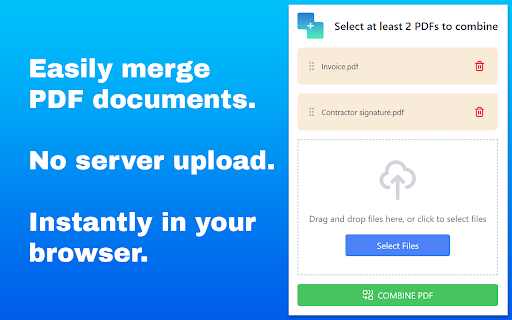
▸ Rest assured, your files never leave your device.
▸ Combine pdf operates without server uploads for maximum security. 🛡️💼
🛡️ Secure file handling:
▸ Your files are handled locally, ensuring utmost confidentiality.
▸ No external servers involved – your files are secure and sound. 🔒📂

How to combine pdf files
💡 Step-by-step guide
1. Open the combine pdf popup by clicking the extension's icon.
2. Upload or drop multiple files with ease.
3. Effortlessly rearrange files using drag and drop.
4. Click combine pdf for an instantaneous merge operation.
5. The merged document automatically opens directly in your preferred pdf viewer. 📝🔄
🚀 Efficiency tips:
▸ Utilize the drag and drop feature for swift rearrangement.
▸ Merge multiple files in one go for optimal efficiency. 🚀💡

Benefits
⏰ Time-saving
▸ Save time by merging pdf quickly and efficiently.
▸ Streamline your workflow with instant results. 🕒🚀
🔐 No upload anxiety
▸ Enjoy peace of mind with serverless operation.
▸ Your files remain on your device throughout the merging process. 🌐🔐
🎨 Versatility
▸ Use combine pdf for work, study, or personal projects.
▸ Adapt the extension to your specific needs effortlessly. 🎨🔄

Our pdf merger at your service
🚀 Effortless operation
▸ With our state-of-the-art pdf combiner, merge your documents seamlessly.
▸ Combine your files without hassle and save valuable time.
📑 Organized document management:
▸ Harness the power of our pdf combiner for organized document handling.
▸ Merge lecture notes, reports, or invoices into a single, well-organized document. 📊📑

FAQ
❓ Is my data safe with your tool?
Absolutely! Your files are handled locally, ensuring privacy.
❓ Can I merge files in a specific order?
Yes, utilize the drag and drop feature to arrange files as you prefer. 🔄🔍

Why combine pdf?
🌟 Simplified distribution
▸ Easily share multiple documents as a single file, simplifying communication. 📤🌐
🌟 Collaborative projects
▸ Streamline collaboration by merging contributions into a unified document. 🤝🔄
🌟 Reduced clutter
▸ Combine related documents to declutter your digital workspace. 🗄️🔄
🌟 Enhanced organization
▸ Merge lecture notes, reports, or invoices into a single, well-organized document. 📑📊

Compatibility
🌐 Chrome compatibility
▸ Combine pdf seamlessly integrates with your Chrome browser.
▸ Experience the benefits of pdf merging without leaving your preferred environment. 🌐🚀
📱 Cross-platform access
▸ Access the document merger across multiple devices for a consistent, efficient experience. 📱💻

Unlocking document merging potential
▸ Discover the simplicity of combine pdf as your go-to pdf merge tool. Seamlessly merge, rearrange, and manage your documents, transforming your document management experience. With combine pdf, you can merge pdf files effortlessly, ensuring a swift and secure process right within your Chrome browser. 🚀📄

Extensive capabilities
▸ Explore the extensive capabilities of combine pdf as your ultimate online pdf merging tool. Whenever you need to combine pdf instantly in your browser, our extension is here to elevate your experience. 🚀🔍

Enhanced functionality
▸ Unlock advanced features with our extension.
▸ Effortlessly merge pdf online with a simple click.
▸ Utilize the combine pdf option in the right-click menu when you open a document in your pdf viewer.
▸ Your file list is not lost even when you close the extension's popup. 🚀🌐

User-centric approach
▸ User satisfaction is our priority.
▸ Regular updates for improved performance and additional features.
▸ We designed the tool with quality in mind: we use it ourselves on everyday basis.
▸ Responsive customer support to address any queries or concerns. 🔄🤝

📧 Contact us📧
If you have any questions, suggestions, bug reports, or feature requests, feel free to send a message to [email protected] anytime. Thank you!

Conclusion
Combine pdf is the ultimate solution for merging pdf instantly and securely within the Chrome browser. Bid farewell to upload anxieties and revel in the speed of serverless document merging.

🚀 Add combine pdf to your Chrome browser and take your document management to unprecedented heights! 🚀
Technical
- Version
- 1.0.0
- Manifest
- V3
- Size
- 434KiB
- Min Chrome
- 88
- Languages
- 52
- Featured
- No
Metadata
- ID
- icldmceajdohhbbbagjpmnodokjjpahp
- Developer ID
- uff6f09bb5061f78d695403709ad25666
- Developer Email
- [email protected]
- Created
- Jan 14, 2024
- Last Updated (Store)
- Jan 14, 2024
- Last Scraped
- May 25, 2026
- Website
- —
- Support URL
- —
Similar extensions
Alternatives to Combine pdf, ranked by description similarity.

Combine PDF – Fast & Easy Tool
Quickly merge multiple PDF files into one: fast, secure, and keeps original quality without limits.
110
★ 5.0

PDF Document Merger
Combine your PDF files quickly and securely, right in Chrome. All processing happens locally.
271
★ 5.0

Merge PDF
Use Merge PDF to efficiently combine pdf files. Our easy-to-use pdf merger helps you organize and create a single file in seconds.
952
★ 5.0

Combine PDF Files
Need to combine PDF files online? If you wish to know how to combine PDF files into one, our extension is the easy way to merge PDFs
97
★ 5.0

Join PDF files
Join PDF files into one. Fast local PDF joiner to merge and combine files in your browser. Private and secure.
318
★ 5.0

Combine PDF - Merge PDF
Quickly Combine PDF files, merge multiple PDF documents and unite pages into one PDF with a simple, secure tool
1.0K
★ 5.0

PDF Merge Files - PDF Tools
20 PDF tools in your browser — merge, split, compress, rotate, watermark and more. Drag and drop, get results instantly.
—

PDF Combiner
A powerful and easy PDF combiner to merge documents in one click. Your go-to tool for PDF files.
20.0K
★ 4.8
Data sourced from the Chrome Web Store · last verified May 25, 2026.