
Merge PDF
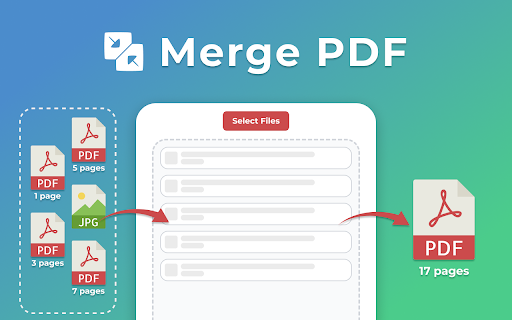
Use Merge PDF to efficiently combine pdf files. Our easy-to-use pdf merger helps you organize and create a single file in seconds.
As of June 2026, Merge PDF has 952 users and a 5.00/5 rating from 1 reviews in the Productivity category.
Usersup 18.0 percent+18.0%
952
952
Ratingno change0%
5.00
1 reviews
Reviewsno change0%
1
Version
1.0.2
Manifest V3
History
3 snapshotsTracking since Apr 22, 2026.
View as table
| Date | Users | Rating | Reviews | Version |
|---|---|---|---|---|
| Apr 22, 2026 | 807 | 5.00 | 1 | 1.0.2 |
| May 12, 2026 | 893 | 5.00 | 1 | 1.0.2 |
| Jun 7, 2026 | 926 | 5.00 | 1 | 1.0.2 |
| Now | 952 | 5.00 | 1 | 1.0.2 |
Permissions & access
- Permissions
- tabsdownloadsstoragecontextMenus
- Host access
- <all_urls>
Screenshots
About
🖥️ Looking for an easy way to merge pdf files online? Our extension simplifies and speeds up the process of combining pdfs. No more complicated software - just a quick and user-friendly tool that makes organizing your documents effortless. 📈 Benefits of our PDF combiner 💠 Secure and private: your documents are processed securely and are never transferred anywhere. 💠 Combine pdfs easily: effortlessly turn multiple files into a single one with just a few clicks. 💠 Regular updates: we constantly improve our merge pdf tool to ensure the best performance and results. 💠 Simplify your work: streamline organizing, reviewing, and sharing your materials with ease. 💠 User-friendly interface: our pdf joiner is simple to navigate, and no technical skills are required. ➤ How to merge pdf files 1️⃣ Select or drag and drop your documents. 2️⃣ Arrange files to ensure they’re in the correct order. 3️⃣ Just click the button to merge pdfs online. 4️⃣ Download your new combined document instantly. ✨ Why use PDF merge online tool? 🔹 Efficient process: Save time and keep your documents well-organized. 🔹 Instant results: Get your merged pdf within seconds, saving you time and effort. 🔹 Seamless printing: Streamlines the process for quicker and easier results. 🔹 No quality loss: The quality remains unchanged after merging pdf files. 🔹 Fast and easy: Effortlessly create a single document from multiple in just a few clicks. 🔹 Combine multiple pdfs into one: Consolidating info into one doc makes access easier. 💼 Who can benefit from merge pdf documents? 🔸 Professionals: Organize business reports, presentations, and other materials into one. 🔸 Students: Combine lecture notes, study guides, and research papers for easy access. 🔸 Marketers: Mergepdf marketing reports, proposals, and presentations for smoother workflows. 🔸 Researchers: Bring together academic papers, articles, and journals for easier reference. 🔸 Lawyers: Merg pdf contracts and legal papers for better organization and faster access. 🔸 Business Owners: Gather invoices, contracts, and reports for easy tracking and management. 🔸 Anyone: Perfect for anyone who needs to organize docs into a more efficient structure. 🎉 When people ask, how to combine pdf files online, the answer is simple: just use our extension! This tool allows you to merge pdf online quickly and effortlessly. It's fast, reliable, and integrates seamlessly into your workflow, making document management easier than ever. 🔧 Key Features of our Merge PDF tool ✅ No installation needed: Handle your documents directly in your browser, saving system resources and time. ✅ Support for multiple files: Whether it's two or twenty, you can quickly and easily use pdf combine. ✅ Offline capability: Use it easily without an internet connection, allowing you to work anytime, anywhere. ✅ No loss of quality: Merging pdfs keeps the original quality and formatting completely intact. 📌 Frequently Asked Questions (FAQ) ❓ How do I merge pdf into one file? 💡 Click select or drag and drop your files. If needed, adjust the order, then click the corresponding button to save your combined documents. ❓ Is it secure to use pdf merger online? 💡 We do not store data or send it to a server; everything is processed directly in your browser on the computer. ❓ How many pages can I include in a merged file? 💡 You can upload unlimited documents, but processing a large number may take a bit more time. ❓ In what order will my merged pdf files appear? 💡 After adding your materials, simply drag and drop them in the desired order, and the top item will appear first in the final combined document. ❓ Can I use the tool without an Internet connection? 💡 Yes, it works offline, allowing you to create a combined pdf without needing an internet connection. ❓ Can I use this app on mobile devices? 💡 Currently, this tool is designed for desktop use via Chrome, but you can access it anytime in your browser to mergepdf. ❓ Can adobe combine pdf? 💡 Yes, Adobe can do it, but our app is optimized for fast, efficient processing directly in your browser. 👩💻 Don’t waste time searching for how to merge multiple pdf files. Get this Chrome extension now and enjoy hassle-free pdf merging anytime! Whenever you’re dealing with multiple docs, use our tool for a smoother and faster experience.
Technical
- Version
- 1.0.2
- Manifest
- V3
- Size
- 1.02MiB
- Min Chrome
- 88
- Languages
- 52
- Featured
- Yes
Metadata
- ID
- bkhaonhfcaokcjommpebdbglhnoidmce
- Developer ID
- u0ab83f118d052f3ac9f560a51f5b747e
- Developer Email
- [email protected]
- Created
- Jan 2, 2025
- Last Updated (Store)
- Jan 21, 2025
- Last Scraped
- Jun 7, 2026
- Website
- —
- Support URL
- —
Similar extensions
Alternatives to Merge PDF, ranked by description similarity.

Combine PDF Files
Need to combine PDF files online? If you wish to know how to combine PDF files into one, our extension is the easy way to merge PDFs
97
★ 5.0

Combine PDF - Merge PDF
Quickly Combine PDF files, merge multiple PDF documents and unite pages into one PDF with a simple, secure tool
1.0K
★ 5.0

Combine PDF – Fast & Easy Tool
Quickly merge multiple PDF files into one: fast, secure, and keeps original quality without limits.
110
★ 5.0

PDF Merger
PDF Merger is a secure on-device alternative to PDF Mergy & iLovePDF. Merge pdf files safely without uploading to external servers.
398
★ 5.0

PDF Joiner
Use PDF Joiner to securely merge PDF files online and offline, combining documents into a single compiled file for easy sharing
920
★ 5.0
Combine pdf
Combine pdf instantly. Upload, reorder, and merge pdf right in your browser. Your files are handled locally, ensuring privacy.
1.0K
★ 5.0

Join PDF files
Join PDF files into one. Fast local PDF joiner to merge and combine files in your browser. Private and secure.
318
★ 5.0

PDF Merge by PDFly
Merge PDFs directly from the browser
100
★ 5.0
Data sourced from the Chrome Web Store · last verified Jun 7, 2026.