
SkyNotes Max - AI Meeting Transcription
AI-powered meeting transcription for Google Meet, Teams, and Zoom. Capture and transcribe conversations with AI processing.
As of May 2026, SkyNotes Max - AI Meeting Transcription has 11 users in the Productivity category.
Usersup 10.0 percent+10.0%
11
11
Ratingno change0%
—
— reviews
Reviewsno change0%
—
Version
1.0.0
Manifest V3
History
4 snapshotsTracking since Apr 20, 2026.
View as table
| Date | Users | Rating | Reviews | Version |
|---|---|---|---|---|
| Apr 20, 2026 | 10 | — | — | 1.0.0 |
| May 6, 2026 | 12 | — | — | 1.0.0 |
| May 17, 2026 | 14 | — | — | 1.0.0 |
| May 30, 2026 | 12 | — | — | 1.0.0 |
| Now | 11 | — | — | 1.0.0 |
Permissions & access
- Permissions
- activeTabstoragetabssidePaneldownloadsidentityidentity.email
- Host access
- https://meet.google.com/*, https://teams.microsoft.com/*, https://*.teams.microsoft.com/*, https://teams.live.com/*, https://*.teams.live.com/*, https://teams.cloud.microsoft/*, https://*.teams.cloud.microsoft/*, https://*.zoom.us/*
Screenshots


About
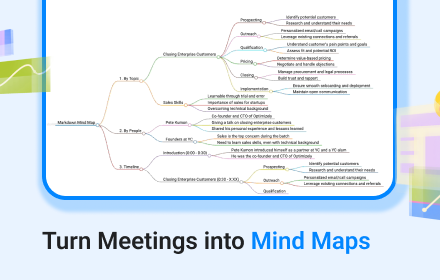
Transform your virtual meetings with AI-powered transcription

SkyNotes Max is the ultimate Chrome extension for professionals who need accurate, organized meeting documentation. Whether you're in Google Meet or Microsoft Teams, our advanced AI technology captures every word and transforms it into actionable insights.

Why Choose SkyNotes Max?

🎯 Real-Time Transcription: Never miss important details again. Our extension captures live transcription as your meeting happens, ensuring you stay focused on the conversation while we handle the documentation.

�� AI-Powered Intelligence: Advanced AI analysis provides smart summaries, key insights, and organized notes from your meeting content. Get more than just text - get understanding.

🔒 Privacy-First Design: Your data stays secure with local storage and optional cloud sync. Full control over your transcripts with enterprise-grade encryption.

📱 Seamless Integration: Clean side panel interface that doesn't interfere with your meeting. Works seamlessly with Google Meet and Microsoft Teams without disrupting your workflow.

💾 Smart Organization: Automatic categorization and intelligent tagging of meeting content. Find what you need quickly with our smart search and organization features.

Perfect for:
- Business professionals and executives
- Students and educators
- Remote workers and distributed teams
- Anyone who needs reliable meeting documentation
- Teams that require accurate meeting records

How it works:
1. Install the extension and sign in with your Google account
2. Join any Google Meet or Microsoft Teams meeting
3. Click the SkyNotes icon to open the side panel
4. Start your meeting - transcription begins automatically
5. Access AI-processed summaries and organized notes

Key Features:
- ✅ Real-time transcription for Google Meet and Microsoft Teams
- ✅ AI-powered summaries and insights
- ✅ Local storage with optional cloud synchronization
- ✅ Clean, non-intrusive side panel interface
- ✅ Secure data handling with Google OAuth
- ✅ Export transcripts in multiple formats
- ✅ Smart organization and search capabilities

Privacy & Security:
- All transcriptions are processed securely
- Data encryption in transit and at rest
- Full control over your data
- GDPR compliant
- Optional cloud sync with user control

Stop missing important details in your virtual meetings. Install SkyNotes Max today and never lose another conversation.

Note: Currently supports Google Meet and Microsoft Teams. Additional platforms coming soon.
Technical
- Version
- 1.0.0
- Manifest
- V3
- Size
- 90.51KiB
- Min Chrome
- 88
- Languages
- 1
- Featured
- No
Metadata
- ID
- iakamfjnpeoggefhbahnoceapbkimldi
- Developer ID
- uca2d34dca903d962ff993b3b6a772ce1
- Developer Email
- [email protected]
- Created
- Sep 21, 2025
- Last Updated (Store)
- Sep 21, 2025
- Last Scraped
- May 30, 2026
- Website
- —
- Support URL
- https://skynotesapp.com/contact
- Privacy Policy
- https://www.skynotesapp.com/privacy-policy-skynotes-max
Similar extensions
Alternatives to SkyNotes Max - AI Meeting Transcription, ranked by description similarity.

Meeting Copilot
Your AI-powered assistant for real-time meeting transcription and smart summaries.
3

Senselens AI
Senselens AI engine to automatically summarize and analyze meetings.
6

VoiceNote Meeting Recorder
Record and transcribe meetings from Google Meet, Teams, and other platforms with speaker identification
5

AI meeting notes
Fast AI meeting notes: meeting minutes ai generator, ai notes taking app for Teams, Zoom, Google Meet & etc. Chrome extension.
336
★ 5.0

Meetez
Effortless meeting transcripts with privacy-first design.
63
★ 5.0

CNotes MS Teams Plugin
Automatically takes notes from your Microsoft Teams meetings, and generates concise meeting summaries and notes.
14

MeetAI - Google Meet, Zoom, or Teams AI Assistant
Google Meet, Zoom, or Teams AI Assistant - Your intelligent meeting companion.Summarizes helps you remember every important detail
12
Google Transcribe & Summarize Live
meetXcc: Instantly summarize Google Meet transcripts. Your AI meeting assistant.
5.0K
★ 4.0
Data sourced from the Chrome Web Store · last verified May 30, 2026.