Google Transcribe & Summarize Live
meetXcc: Instantly summarize Google Meet transcripts. Your AI meeting assistant.
As of June 2026, Google Transcribe & Summarize Live has 5,000 users and a 4.00/5 rating from 9 reviews in the Productivity category.
Usersno change0%
5.0K
5,000
Ratingno change0%
4.00
9 reviews
Reviewsno change0%
9
Version
1.0.64
Manifest V3
90-day change · In the last 90 days this extension 2 version updates.
History
4 snapshotsTracking since Apr 16, 2026.
View as table
| Date | Users | Rating | Reviews | Version |
|---|---|---|---|---|
| Apr 16, 2026 | 5.0K | 4.00 | 9 | 1.0.54 |
| May 7, 2026 | 5.0K | 4.00 | 9 | 1.0.54 |
| Jun 2, 2026 | 5.0K | 4.00 | 9 | 1.0.54 |
| Jun 7, 2026 | 5.0K | 4.00 | 9 | 1.0.62 |
| Now | 5.0K | 4.00 | 9 | 1.0.64 |
Changelog
- Jun 2, 2026description
# Silently Capturing Core Insights #

Why use it: At meetXcc, we believe that everyone should be able to easily grasp the key content of meetings to make informed decisions and stay in sync with their team.

How it work:
1. We provide automatic transcription for Google Meet meetings, allowing users to focus on the discussion without the distraction of taking notes. (Support Zoom, Team too)
2. Our intelligent summarization and visualization features deliver the key points of the meeting, helping users quickly understand the content and take action.
3. meetXcc allows users to effortlessly share meeting records with team members, ensuring everyone is on the same page.

What we provide:
meetXcc is a Chrome extension that helps users master the key content of meetings through the following detailed features:
1. Automatic Transcription:
    * Real-time conversion of speech to text during Google Meet meetings
    * Support for recognizing and transcribing multiple speakers simultaneously
    * Instant meeting assistance, providing real-time summaries of lengthy or unclear conversations
    * Allows users to add notes and highlight key points during the transcription process
2. Intelligent Summarization and Visualization:
    * Utilizes AI to automatically generate comprehensive meeting summaries one minute after the meeting
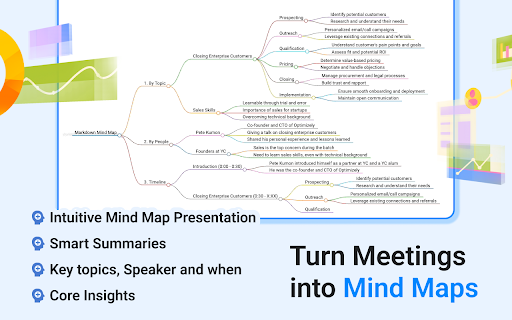
    * Summaries capture meeting information from different perspectives, including people, topic, and timeline
    * Users can customize the length and level of detail in the summaries, experimenting with different instructions
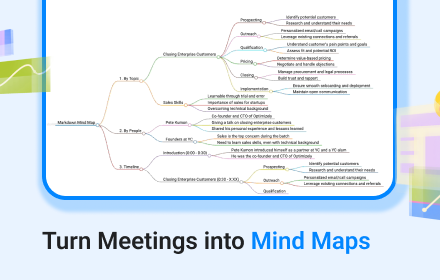
    * Presents a mind map view of the entire meeting, providing an overview of the overall structure and details
3. Easy Sharing:
    * One-click export of meeting transcripts and sharing links to all attendees
    * Supports sending meeting records directly to specified email addresses
    * Provides cloud storage and synchronization for meeting records, enabling easy cross-device access
    * Allows users to control sharing permissions and access to meeting records


AI Meeting Minutes: Six Pain Points and Our Solutions
1. Must add a voice bot to generate meeting minutes
No external services or voice bots needed. Directly obtain high-quality meeting minutes, saying goodbye to awkward situations.
2. Extra charge for AI meeting minute functionality
Unlimited generation of meeting minutes included in the basic service. Unsatisfied? Regenerate as many times as you want.
3. Must inform all participants before starting to record
Works silently, no need to notify or change existing meeting processes.
4. Unable to hide transcription software brand screen
Completely hide software interface when sharing screen, ensuring a professional image.
5. Meeting content can only be stored on vendor's cloud
Immediately after the meeting ends, data is stored in your Google Drive, ensuring your privacy and data security.
6. AI meeting minutes are difficult to understand
Presented in Mind Map format, with intelligent summaries based on topics, people, and time of appearance. Can also be customized according to your needs.


Use Case
1. Recruiters:
* Easily record interview content to make suitable hiring decisions
* Present a professional image and gain candidates' recognition
* Streamline the workflow to improve hiring efficiency and quality
2. Executives:
* Grasp key points in workplace meetings for wise decision-making
* Demonstrate leadership skills and gain team recognition
* Ensure team synchronization to boost efficiency
3. Engineers:
* Accurately record technical details and discussion points in project meetings
* Gain new technical knowledge to continuously enhance professional skills
* Effectively track work progress to ensure timely completion
4. Counselors:
* Thoroughly record counseling sessions for effective follow-up guidance
* Present a professional image and earn clients' trust
* Provide high-quality service to help clients resolve issues
5. Legal Professionals:
* Accurately record legal meeting content to avoid future disputes
* Demonstrate professional capabilities and earn clients' recognition
* Ensure comprehensive coverage to protect clients' rights
6. Teachers:
* Real-time recording of classroom content and student interactions
* Effectively present key teaching points to aid student understanding
* Save time on note-taking to focus on teaching quality
7. Physicians:
* Accurately record patients' symptoms and medical records during consultations
* Present a professional image and gain patients' trust
* Improve efficiency to serve more patients
8. Project Managers:
* Accurately record project meeting resolutions and work assignments
* Effectively control project progress to ensure timely completion
* Demonstrate leadership and gain team recognition
9. Sales Professionals:
* Grasp key customer needs and concerns during meetings
* Present a professional image and gain customer trust
* Efficiently follow up on action items for sales
10. Researchers:
* Record discussion content to stay up-to-date on research progress
* Effectively organize research ideas and experimental data
* Improve research efficiency to facilitate groundbreaking discoveries

Ex. https://www.meetxcc.app/shared/ZKfwvVmY
# Silently Capturing Core Insights # Why use it: At meetXcc, we believe that everyone should be able to easily grasp the key content of meetings to make informed decisions and stay in sync with their team. How it work: 1. We provide automatic transcription for Google Meet meetings, allowing users to focus on the discussion without the distraction of taking notes. (Support Zoom, Team too) 2. Our intelligent summarization and visualization features deliver the key points of the meeting, helping users quickly understand the content and take action. 3. meetXcc allows users to effortlessly share meeting records with team members, ensuring everyone is on the same page. What we provide: meetXcc is a Chrome extension that helps users master the key content of meetings through the following detailed features: 1. Automatic Transcription: * Real-time conversion of speech to text during Google Meet meetings * Support for recognizing and transcribing multiple speakers simultaneously * Instant meeting assistance, providing real-time summaries of lengthy or unclear conversations * Allows users to add notes and highlight key points during the transcription process 2. Intelligent Summarization and Visualization: * Utilizes AI to automatically generate comprehensive meeting summaries one minute after the meeting * Summaries capture meeting information from different perspectives, including people, topic, and timeline * Users can customize the length and level of detail in the summaries, experimenting with different instructions * Presents a mind map view of the entire meeting, providing an overview of the overall structure and details 3. Easy Sharing: * One-click export of meeting transcripts and sharing links to all attendees * Supports sending meeting records directly to specified email addresses * Provides cloud storage and synchronization for meeting records, enabling easy cross-device access * Allows users to control sharing permissions and access to meeting records AI Meeting Minutes: Six Pain Points and Our Solutions 1. Must add a voice bot to generate meeting minutes No external services or voice bots needed. Directly obtain high-quality meeting minutes, saying goodbye to awkward situations. 2. Extra charge for AI meeting minute functionality Unlimited generation of meeting minutes included in the basic service. Unsatisfied? Regenerate as many times as you want. 3. Must inform all participants before starting to record Works silently, no need to notify or change existing meeting processes. 4. Unable to hide transcription software brand screen Completely hide software interface when sharing screen, ensuring a professional image. 5. Meeting content can only be stored on vendor's cloud Immediately after the meeting ends, data is stored in your Google Drive, ensuring your privacy and data security. 6. AI meeting minutes are difficult to understand Presented in Mind Map format, with intelligent summaries based on topics, people, and time of appearance. Can also be customized according to your needs. Use Case 1. Recruiters: * Easily record interview content to make suitable hiring decisions * Present a professional image and gain candidates' recognition * Streamline the workflow to improve hiring efficiency and quality 2. Executives: * Grasp key points in workplace meetings for wise decision-making * Demonstrate leadership skills and gain team recognition * Ensure team synchronization to boost efficiency 3. Engineers: * Accurately record technical details and discussion points in project meetings * Gain new technical knowledge to continuously enhance professional skills * Effectively track work progress to ensure timely completion 4. Counselors: * Thoroughly record counseling sessions for effective follow-up guidance * Present a professional image and earn clients' trust * Provide high-quality service to help clients resolve issues 5. Legal Professionals: * Accurately record legal meeting content to avoid future disputes * Demonstrate professional capabilities and earn clients' recognition * Ensure comprehensive coverage to protect clients' rights 6. Teachers: * Real-time recording of classroom content and student interactions * Effectively present key teaching points to aid student understanding * Save time on note-taking to focus on teaching quality 7. Physicians: * Accurately record patients' symptoms and medical records during consultations * Present a professional image and gain patients' trust * Improve efficiency to serve more patients 8. Project Managers: * Accurately record project meeting resolutions and work assignments * Effectively control project progress to ensure timely completion * Demonstrate leadership and gain team recognition 9. Sales Professionals: * Grasp key customer needs and concerns during meetings * Present a professional image and gain customer trust * Efficiently follow up on action items for sales 10. Researchers: * Record discussion content to stay up-to-date on research progress * Effectively organize research ideas and experimental data * Improve research efficiency to facilitate groundbreaking discoveries
Permissions & access
- Permissions
- storagecookies
- Host access
- https://*.openai.com/, https://*.meetxcc.app/, https://bard.google.com/, http://127.0.0.1:4000/, http://localhost:3000/, https://api.mixpanel.com/, https://www.google-analytics.com/*, https://*.zoom.us/, https://*.zoom.com/, https://teams.live.com/*
Screenshots


About
# Silently Capturing Core Insights #

Why use it: At meetXcc, we believe that everyone should be able to easily grasp the key content of meetings to make informed decisions and stay in sync with their team.

How it work:
1. We provide automatic transcription for Google Meet meetings, allowing users to focus on the discussion without the distraction of taking notes. (Support Zoom, Team too)
2. Our intelligent summarization and visualization features deliver the key points of the meeting, helping users quickly understand the content and take action.
3. meetXcc allows users to effortlessly share meeting records with team members, ensuring everyone is on the same page.

What we provide:
meetXcc is a Chrome extension that helps users master the key content of meetings through the following detailed features:
1. Automatic Transcription:
    * Real-time conversion of speech to text during Google Meet meetings
    * Support for recognizing and transcribing multiple speakers simultaneously
    * Instant meeting assistance, providing real-time summaries of lengthy or unclear conversations
    * Allows users to add notes and highlight key points during the transcription process
2. Intelligent Summarization and Visualization:
    * Utilizes AI to automatically generate comprehensive meeting summaries one minute after the meeting
    * Summaries capture meeting information from different perspectives, including people, topic, and timeline
    * Users can customize the length and level of detail in the summaries, experimenting with different instructions
    * Presents a mind map view of the entire meeting, providing an overview of the overall structure and details
3. Easy Sharing:
    * One-click export of meeting transcripts and sharing links to all attendees
    * Supports sending meeting records directly to specified email addresses
    * Provides cloud storage and synchronization for meeting records, enabling easy cross-device access
    * Allows users to control sharing permissions and access to meeting records


AI Meeting Minutes: Six Pain Points and Our Solutions
1. Must add a voice bot to generate meeting minutes
No external services or voice bots needed. Directly obtain high-quality meeting minutes, saying goodbye to awkward situations.
2. Extra charge for AI meeting minute functionality
Unlimited generation of meeting minutes included in the basic service. Unsatisfied? Regenerate as many times as you want.
3. Must inform all participants before starting to record
Works silently, no need to notify or change existing meeting processes.
4. Unable to hide transcription software brand screen
Completely hide software interface when sharing screen, ensuring a professional image.
5. Meeting content can only be stored on vendor's cloud
Immediately after the meeting ends, data is stored in your Google Drive, ensuring your privacy and data security.
6. AI meeting minutes are difficult to understand
Presented in Mind Map format, with intelligent summaries based on topics, people, and time of appearance. Can also be customized according to your needs.


Use Case
1. Recruiters:
* Easily record interview content to make suitable hiring decisions
* Present a professional image and gain candidates' recognition
* Streamline the workflow to improve hiring efficiency and quality
2. Executives:
* Grasp key points in workplace meetings for wise decision-making
* Demonstrate leadership skills and gain team recognition
* Ensure team synchronization to boost efficiency
3. Engineers:
* Accurately record technical details and discussion points in project meetings
* Gain new technical knowledge to continuously enhance professional skills
* Effectively track work progress to ensure timely completion
4. Counselors:
* Thoroughly record counseling sessions for effective follow-up guidance
* Present a professional image and earn clients' trust
* Provide high-quality service to help clients resolve issues
5. Legal Professionals:
* Accurately record legal meeting content to avoid future disputes
* Demonstrate professional capabilities and earn clients' recognition
* Ensure comprehensive coverage to protect clients' rights
6. Teachers:
* Real-time recording of classroom content and student interactions
* Effectively present key teaching points to aid student understanding
* Save time on note-taking to focus on teaching quality
7. Physicians:
* Accurately record patients' symptoms and medical records during consultations
* Present a professional image and gain patients' trust
* Improve efficiency to serve more patients
8. Project Managers:
* Accurately record project meeting resolutions and work assignments
* Effectively control project progress to ensure timely completion
* Demonstrate leadership and gain team recognition
9. Sales Professionals:
* Grasp key customer needs and concerns during meetings
* Present a professional image and gain customer trust
* Efficiently follow up on action items for sales
10. Researchers:
* Record discussion content to stay up-to-date on research progress
* Effectively organize research ideas and experimental data
* Improve research efficiency to facilitate groundbreaking discoveriesTechnical
- Version
- 1.0.64
- Manifest
- V3
- Size
- 198KiB
- Min Chrome
- 88
- Languages
- 15
- Featured
- No
Metadata
- ID
- dgijgfdodcankfloblhnngmlkdaahbco
- Developer ID
- u298411db41d4c901a9eb274a6ecfa090
- Developer Email
- [email protected]
- Created
- Oct 9, 2023
- Last Updated (Store)
- Jun 5, 2026
- Last Scraped
- Jun 12, 2026
- Website
- meetxcc.app
- Support URL
- —
- Privacy Policy
- https://www.meetxcc.com/privacy
Similar extensions
Alternatives to Google Transcribe & Summarize Live, ranked by description similarity.

meetXcc: AI Meeting Notes for Google Meet
Automated meeting documentation via transcripts, summaries and intuitive AI-generated mind maps.
4.0K
★ 4.5

Briefly - AI notetaker & Meeting Recorder
Record meetings, transcribe audio, and generate summaries with AI
12
★ 5.0

Sharpen AI: AI meeting summary for Google Meet and Microsoft Teams
AI Meeting Summaries for Google Meet and Microsoft Teams
205
★ 5.0

Klu Meet
Automatically transcribe and summarize your Google Meet, Teams & Zoom calls. AI meeting notetaker for effortless knowledge capture.
38
★ 5.0

AI meeting notes
Fast AI meeting notes: meeting minutes ai generator, ai notes taking app for Teams, Zoom, Google Meet & etc. Chrome extension.
336
★ 5.0

MeetAI - Google Meet, Zoom, or Teams AI Assistant
Google Meet, Zoom, or Teams AI Assistant - Your intelligent meeting companion.Summarizes helps you remember every important detail
12

Senselens AI
Senselens AI engine to automatically summarize and analyze meetings.
6

MeetNot - Smart Meeting Notes
Automatic transcription, AI summary, and advanced recording management for Google Meet.
8
★ 5.0
Data sourced from the Chrome Web Store · last verified Jun 12, 2026.