
YouTube Clickbait-Buster
Check whether it's worth watching a video before watching. Peek content, description, comments, full-size thumbnail and full titles.
As of June 2026, YouTube Clickbait-Buster has 209 users and a 2.83/5 rating from 6 reviews in the Entertainment category.
Usersup 8.9 percent+8.9%
209
209
Ratingdown 5.7 percent−5.7%
2.83
6 reviews
Reviewsno change0%
6
Version
3.0.6
Manifest V3
History
11 snapshotsTracking since Apr 1, 2026.
View as table
| Date | Users | Rating | Reviews | Version |
|---|---|---|---|---|
| Apr 1, 2026 | 192 | 3.00 | 6 | 3.0.6 |
| Apr 8, 2026 | 222 | 3.00 | 6 | 3.0.6 |
| Apr 19, 2026 | 202 | 2.83 | 6 | 3.0.6 |
| Apr 25, 2026 | 252 | 2.83 | 6 | 3.0.6 |
| Apr 29, 2026 | 258 | 2.83 | 6 | 3.0.6 |
| May 5, 2026 | 252 | 2.83 | 6 | 3.0.6 |
| May 9, 2026 | 212 | 2.83 | 6 | 3.0.6 |
| May 12, 2026 | 181 | 2.83 | 6 | 3.0.6 |
| May 21, 2026 | 209 | 2.83 | 6 | 3.0.6 |
| May 31, 2026 | 202 | 2.83 | 6 | 3.0.6 |
| Jun 8, 2026 | 233 | 2.83 | 6 | 3.0.6 |
| Now | 209 | 2.83 | 6 | 3.0.6 |
Permissions & access
- Permissions
- storage
- Host access
- https://www.youtube.com/*, https://m.youtube.com/*, <all_urls>
Screenshots


About
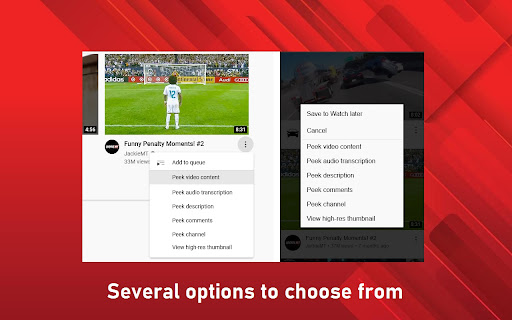
Sometimes you see a video in your recommendations with an interesting title or eye-catching thumbnail and clicks on it, just to find out the content wasn't what you were expecting or it was a clickbait. This extension enables you to take a closer look on the video content before actually clicking on it, by peeking the:

- Video content
- Audio transcription or subtitles
- Description
- Comments
- Channel

You can also view the:

- Thumbnail in the highest resolution available
- Full titles

To do that, you just need to click on the recommended video's menu (the three dots button) and choose the option you want. It works on pretty much all pages, and is compatible with both YouTube's desktop and mobile layouts, and dark theme.

Peek video content
----------------

When you peek the video content, it's shown to you the video's storyboard, which is a series of snapshots from the video in different moments from the beginning to the end. You can click the timestamps to open the video directly in the part you are interested in.

Peek audio transcription
----------------

While the "Peek video content" feature enables you to check the *visual* content of the video, the "Peek audio transcription" feature enables you to check the *verbal* content. This is most useful for videos that are just someone talking about something, or videos that you don't know exactly what it is about and you just need to peek the first few spoken sentences where the presenter explains it.

You can click the timestamps to open the video directly in the part you are interested in. You also have the option of choosing a language to which the transcript should be translated, and in the extension's settings you can set a preferred language which the transcript should always be in.

Peek description
----------------

Some videos add a summary of the video content in the description, and others elaborate a little more on what the video is about, which is an alternative for confirming the video's subject.

Peek comments
----------------

The "Peek comments" feature makes you able to check what the viewers think of the video in a minimalist interface.

Peeking the comments is useful for cases when there's something clearly incorrect in the video and at least someone in the comments points that out, or when you're not really interested in the video, but only in what people say about the subject. This can also be used as an alternative method for confirming what the video is about or its content.

Peek channel
----------------

When you peek a channel a small viewport is opened so you can take a look on the video's channel content and even watch videos without leaving the page.

This is useful to make sure whether you can hide the whole channel from your recommendations, or just to take a look on the channel's other videos.

View high-res thumbnail
----------------

You can also view the video cover (thumbnail) in the highest resolution available.

Full titles
----------------

Additionally, the extension also makes all titles be displayed in full, without any trimming or ellipsis.
Technical
- Version
- 3.0.6
- Manifest
- V3
- Size
- 29.24KiB
- Min Chrome
- 88
- Languages
- 1
- Featured
- Yes
Metadata
- ID
- iajoojjhhcjojdealgfdeehagopjaogm
- Developer ID
- u428572491faa3776182dfd0f45a9a428
- Developer Email
- [email protected]
- Created
- Aug 29, 2022
- Last Updated (Store)
- Feb 10, 2026
- Last Scraped
- Jun 8, 2026
- Website
- —
- Privacy Policy
- https://github.com/hjk789/NXEnhanced/wiki/Privacy-Policy
Similar extensions
Alternatives to YouTube Clickbait-Buster, ranked by description similarity.

Previews (For Twitch & YouTube & Kick)
Live hover previews for Twitch & YouTube & Kick | A bunch of quality of life improvements for Twitch & YouTube & Kick
60.0K
★ 4.8

Youtube Preview Popup
Watch and control YouTube videos in a sleek preview popup for a more immersive and cool viewing experience.
35
★ 5.0

MiMic - The YouTube Horror Co-Viewer
Co-view original YT horror creators' videos from the source links in the descriptions of your favorite YT horror reviewers!
14

Viral View
Highlights videos with rainbow borders based on view ratios
6

YouTube Customizer
Customize your YouTube.
1.0K
★ 4.0

SkipCut - YouTube Ad Blocker
Add SkipCut buttons to YouTube videos for ad-free viewing in one click
639
★ 5.0

YouTube Focus Mode (Stay Focused on Videos)
Focus only on the video. Dim comments, related videos, and the sidebar to fully control your attention.
52
'Improve YouTube!' TEST (for YouTube)
YouTube, tidy & smart? Supercharge YouTube! Give it strong features, filter only the videos you want & exactly the look you like
20.0K
★ 4.0
Data sourced from the Chrome Web Store · last verified Jun 8, 2026.