
Previews (For Twitch & YouTube & Kick)
Live hover previews for Twitch & YouTube & Kick | A bunch of quality of life improvements for Twitch & YouTube & Kick
As of June 2026, Previews (For Twitch & YouTube & Kick) has 70,000 users and a 4.76/5 rating from 1,418 reviews in the Entertainment category.
Usersup 16.7 percent+16.7%
70.0K
70,000
Ratingno change0%
4.76
1.4K reviews
Reviewsup 0.6 percent+0.6%
1.4K
Version
17.0
Manifest V3
90-day change · In the last 90 days this extension gained 10.0K users, 7 version updates.
History
14 snapshotsTracking since Apr 14, 2026.
View as table
| Date | Users | Rating | Reviews | Version |
|---|---|---|---|---|
| Apr 14, 2026 | 60.0K | 4.76 | 1.4K | 16.0 |
| Apr 19, 2026 | 50.0K | 4.76 | 1.4K | 16.0 |
| Apr 22, 2026 | 60.0K | 4.76 | 1.4K | 16.0 |
| Apr 30, 2026 | 60.0K | 4.76 | 1.4K | 16.0 |
| May 7, 2026 | 60.0K | 4.76 | 1.4K | 16.1 |
| May 11, 2026 | 60.0K | 4.76 | 1.4K | 16.2 |
| May 16, 2026 | 60.0K | 4.76 | 1.4K | 16.2 |
| May 18, 2026 | 60.0K | 4.76 | 1.4K | 16.3 |
| May 21, 2026 | 60.0K | 4.76 | 1.4K | 16.4 |
| May 23, 2026 | 60.0K | 4.76 | 1.4K | 16.5 |
| May 29, 2026 | 70.0K | 4.76 | 1.4K | 16.5 |
| Jun 1, 2026 | 70.0K | 4.76 | 1.4K | 16.6 |
| Jun 9, 2026 | 70.0K | 4.76 | 1.4K | 16.6 |
| Jun 17, 2026 | 70.0K | 4.75 | 1.4K | 16.6 |
| Now | 70.0K | 4.76 | 1.4K | 17.0 |
Changelog
- Jun 17, 2026description
Hover previews, sidebar favorites, multi-stream, FlashBang Defender, auto-refresh on errors, fast-forward and dozens more Quality-Of-Life features — all for Twitch & YouTube & Kick.

Previews is a browser add-on for people who watch a lot of streaming content. Peek at any channel before you click. Pin your favorites to the top. Watch multiple streams at once. Stop the video from breaking. Snipe predictions. Catch up to the action with one click. Fast-Forward. Record streams. Maintained since 2020 and rated 4.8/5 stars!

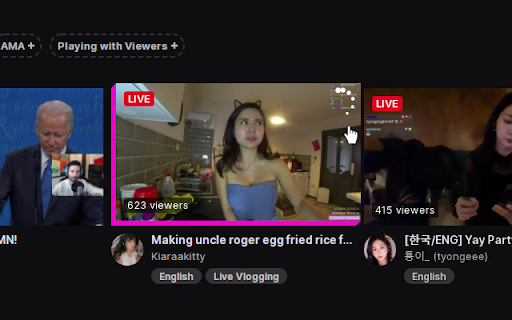
🖱️ HOVER PREVIEWS
Live video or image thumbnails appear when you hover over channels — in the side panel, directories, and clips. Adjustable size and audio.

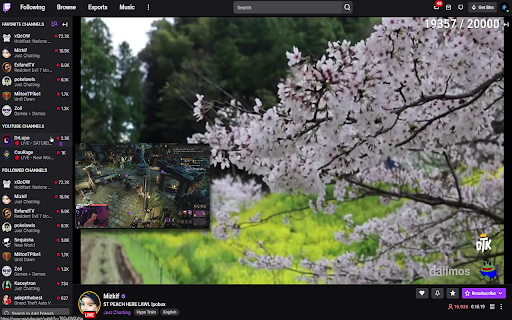
⭐ SIDEBAR FAVORITES
A dedicated Favorites list pinned to the top of your sidebar, just for the streamers you actually care about. Optional custom categories. Show offline favorites too if you want.

🔆 FLASHBANG DEFENDER
For 2 AM moments when the streamer opens a white browser tab. One click dims the video so your eyes survive.

🔁 AUTO REFRESH ON PLAYER ERRORS
Automatically refreshes the player on errors #1000, #2000, #3000, #4000, and #5000. No more dead streams.

🎚️ AUTO SET PLAYER QUALITY
Forces the video to your selected quality on every page load and channel change, with a fallback if your first choice isn't available.

🛡️ PREVENT QUALITY DROPS IN BACKGROUND
Stops the video from sliding to 160p when you switch tabs. Also kills 99% of #1000 and #2000 errors before they happen.

🚀 FAST-FORWARD
One-click jump back to the live edge — perfect when the stream is delayed or the buffer pulled you behind. Shows in the player controls.

⌨️ KEYBOARD SEEK
Use SHIFT + left/right arrow keys to seek 5 seconds back or forward through the live buffer. Shortcuts are customizable in settings.

🎤 VOICE TYPING IN CHAT
Click the mic icon to dictate your messages — speech-to-text powered by AI. Multi-language support.

🎯 PREDICTIONS SNIPER
A few seconds before each prediction closes, the sniper picks the option leading in votes — based on configurable rules for bet size, max points, vote-margin, and timing.

🎬 CLIP DOWNLOADER
Download Twitch clips straight from the video controls. No third-party sites.

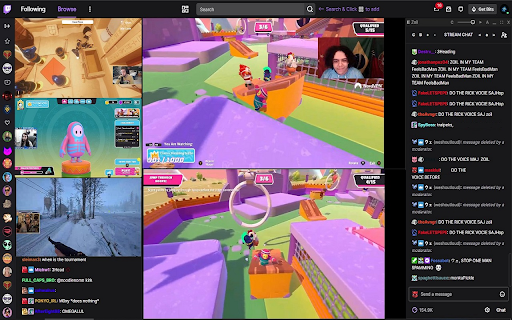
📺 MULTI-STREAM & MULTI-CHAT
Watch and message across multiple channels at once on Twitch, YouTube, and Kick. Save layout presets. Switch between them on the fly.

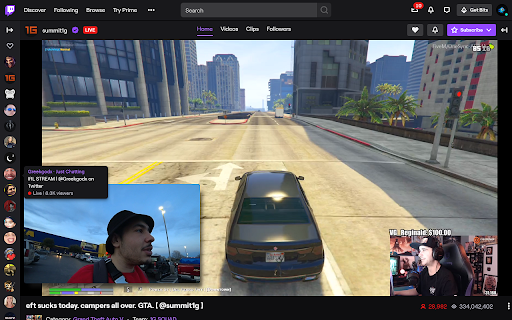
🪟 PICTURE-IN-PICTURE
Pop streams out into a floating window. Native browser PiP plus a custom multi-window mode.

🎞️ FULLSCREEN WITH CHAT OVERLAY
Theater or fullscreen mode with a transparent or solid messaging overlay. Fully customizable.

📸 SCREENSHOT & RECORD
Capture stills at the stream's native resolution, or record at 60fps.

⚡ AUTO CHANNEL POINTS CLICKER
Clicks the bonus claim button for you. Works in background tabs too.

PLUS many more: predictions notifications, leave raids automatically, raid to random favorite, incognito chat, clear chat, sidebar search, expand sidebar, YouTube + Kick channels in the side panel, streamer self-preview, hide platform overlays, mute videos that play in the background, layout presets, cloud sync for settings + favorites, playback speed controls, copy URL at current time, and more.

WORKS ON
✓ Twitch
✓ YouTube (including live streams)
✓ Kick

WHY USERS LOVE IT
✓ 60,000+ active users
✓ 4.8/5 ★ rating
✓ Maintained since February 2020
✓ Featured by the Chrome Web Store
✓ Recommended by the Mozilla Add-ons team
✓ Praised by Dexerto
✓ Translated into 7 languages: English, German, Spanish, French, Portuguese (Brazil), Japanese, Korean
✓ Actively maintained and updated regularly

LEARN MORE
Website: https://previews-app.com
All links: https://allmylinks.com/previews-app
Discord: https://discord.gg/kNhHhs6p9Q
GitHub (issues / feature requests): https://github.com/previews-app/Previews/issues

© MarkM.
- If you are a content creator or a developer in the sphere, have a look at the Affiliates Program -> https://previews-app.com/affiliate
Hover previews, sidebar favorites, multi-stream, FlashBang Defender, auto-refresh on errors, fast-forward and dozens more Quality-Of-Life features — all for Twitch & YouTube & Kick.

Previews is a browser add-on for people who watch a lot of streaming content. Peek at any channel before you click. Pin your favorites to the top. Watch multiple streams at once. Stop the video from breaking. Snipe predictions. Catch up to the action with one click. Fast-Forward. Record streams. Maintained since 2020 and rated 4.8/5 stars!

🖱️ HOVER PREVIEWS
Live video or image thumbnails appear when you hover over channels — in the side panel, directories, and clips. Adjustable size and audio.

⭐ SIDEBAR FAVORITES
A dedicated Favorites list pinned to the top of your sidebar, just for the streamers you actually care about. Optional custom categories. Show offline favorites too if you want.

🔆 FLASHBANG DEFENDER
For 2 AM moments when the streamer opens a white browser tab. One click dims the video so your eyes survive.

🔁 AUTO REFRESH ON PLAYER ERRORS
Automatically refreshes the player on errors #1000, #2000, #3000, #4000, and #5000. No more dead streams.

🎚️ AUTO SET PLAYER QUALITY
Forces the video to your selected quality on every page load and channel change, with a fallback if your first choice isn't available.

🛡️ PREVENT QUALITY DROPS IN BACKGROUND
Stops the video from sliding to 160p when you switch tabs. Also kills 99% of #1000 and #2000 errors before they happen.

🚀 FAST-FORWARD
One-click jump back to the live edge — perfect when the stream is delayed or the buffer pulled you behind. Shows in the player controls.

⌨️ KEYBOARD SEEK
Use SHIFT + left/right arrow keys to seek 5 seconds back or forward through the live buffer. Shortcuts are customizable in settings.

🎤 VOICE TYPING IN CHAT
Click the mic icon to dictate your messages — speech-to-text powered by AI. Multi-language support.

🎯 PREDICTIONS SNIPER
A few seconds before each prediction closes, the sniper picks the option leading in votes — based on configurable rules for bet size, max points, vote-margin, and timing.

🎬 CLIP DOWNLOADER
Download Twitch clips straight from the video controls. No third-party sites.

📺 MULTI-STREAM & MULTI-CHAT
Watch and message across multiple channels at once on Twitch, YouTube, and Kick. Save layout presets. Switch between them on the fly.

🪟 PICTURE-IN-PICTURE
Pop streams out into a floating window. Native browser PiP plus a custom multi-window mode.

🎞️ FULLSCREEN WITH CHAT OVERLAY
Theater or fullscreen mode with a transparent or solid messaging overlay. Fully customizable.

📸 SCREENSHOT & RECORD
Capture stills at the stream's native resolution, or record at 60fps.

⚡ AUTO CHANNEL POINTS CLICKER
Clicks the bonus claim button for you. Works in background tabs too.

PLUS many more: predictions notifications, leave raids automatically, raid to random favorite, incognito chat, clear chat, sidebar search, expand sidebar, YouTube + Kick channels in the side panel, streamer self-preview, hide platform overlays, mute videos that play in the background, layout presets, cloud sync for settings + favorites, playback speed controls, copy URL at current time, and more.

WORKS ON
✓ Twitch
✓ YouTube (including live streams)
✓ Kick

WHY USERS LOVE IT
✓ 60,000+ active users
✓ 4.8/5 ★ rating
✓ Maintained since February 2020
✓ Featured by the Chrome Web Store
✓ Recommended by the Mozilla Add-ons team
✓ Praised by Dexerto
✓ Translated into 7 languages: English, German, Spanish, French, Portuguese (Brazil), Japanese, Korean
✓ Actively maintained and updated regularly

LEARN MORE
Website: https://previews-app.com
All links: https://allmylinks.com/previews-app
Discord: https://discord.gg/kNhHhs6p9Q
GitHub (issues / feature requests): https://github.com/previews-app/Previews/issues

© MarkM.
- May 16, 2026category
productivity/tools
lifestyle/entertainment
- May 11, 2026category
lifestyle/entertainment
productivity/tools
- May 7, 2026description
Previews (For Twitch & YouTube & Kick) creates a live video or image preview when hovering over streams and offers a bunch of quality of life improvement features for the three platforms.

Check the features list below for more quality of life improvement features.

Features:

* Twitch:
- Image or live video stream previews in the sidebar & directories.
- Preview resize & volume control.
- Clips Previews.
- Streaming: See your own live stream thumbnail as seen by viewers.
- Sidebar Favorite Channels List.
- Sidebar YouTube Channels List.
- Sidebar Kick Channels List.
- Multi Stream & Multi Chat.
- Voice Typing in chat (Speech Recognition Speech-To-Text into chat).
- Auto Set Player Quality.
- Transparent / Dynamic Chat Overlay.
- Full Screen With Chat Mode.
- Auto Channel Points Clicker.
- Clip Downloader.
- Auto Refresh on player errors (#1000, #2000, #3000, #4000, #5000).
- Predictions Notifications when you don't know it's happening (for example if your chat is closed or you are not in the tab or browser).
- Predictions Sniper (will participate in predictions for you).
- Prevent Automatic Video Quality Change.
- Seek Streams Using Keyboard Arrow Keys.
- Fast-Forward Stream (with latency display).
- Screenshot Stream.
- Record Stream.
- FlashBang Defender.
- Prevent raids or Raid to a Previews Favorite instead.
- Clear Chat Button.
- Incognito Chat.
- Native Picture In Picture in current stream (Browser's PIP feature).
- Custom Picture In Picture.
- Auto Extend the sidebar to show all live streamers (when sidebar is open).
- Sidebar Stream Search: A purple search button at the top of the sidebar to find live streamers easily in the sidebar.
- Hide All Sidebar Sections Except The Followed Channels.
- Full Sidebar Channel Tooltips.
- Mute Auto-Playing Videos In Various Pages.
- Advanced Video Embeds.
- Hide TTV Extensions Overlays.
- Hide Volume Percentage Indicator.
- Keyboard shortcuts for applicable features.
- Also supports inverted layout (when chat is on the left and streamers on the right).

* YouTube:
- Image or live video stream previews in the sidebar.
- Preview resize & volume control.
- Sidebar Favorite Channels List.
- Sidebar Kick Channels List.
- Auto Set Player Quality.
- Theater / Full Screen With Chat Mode.
- Multi Stream & Multi Chat.
- Transparent / Dynamic Chat Overlay.
- Voice Typing in chat (Speech Recognition Speech-To-Text into chat).
- Fast-Forward Stream.
- Screenshot Stream.
- Record Stream.
- FlashBang Defender.
- Player Playback Speed Controls.
- Go Directly To Live Streams From The Sidebar.
- Show Live Streamers' View-Count In The Sidebar.
- Native Picture In Picture in current stream (Browser's PIP feature).
- Custom Picture In Picture.
- Prevent Video Click-To-Pause / Play.
- Copy URL At Current Time Button.
- Auto Theater Mode.
- Auto Hide Chat.
- Keyboard shortcuts for applicable features.
- Also supports Right-To-Left (RTL) layout.

* Kick:
- Image or live video stream previews in the sidebar & directories.
- Preview resize & volume control.
- Sidebar Favorite Channels List.
- Multi Stream & Multi Chat.
- Voice Typing in chat (Speech Recognition Speech-To-Text into chat).
- Full Screen With Chat Mode.
- Prevent Automatic Video Quality Change.
- Seek Streams Using Keyboard Arrow Keys.
- Fast-Forward Stream (with latency display).
- Screenshot Stream.
- Record Stream.
- FlashBang Defender.
- Player Playback Speed Controls.
- Native Picture In Picture in current stream (Browser's PIP feature).
- Custom Picture In Picture.
- Hide All Sidebar Sections Except The Followed Channels.
- Keyboard shortcuts for applicable features.
- Hide Volume Percentage Indicator.


* To change any feature setting click the extension at the top bar to open the extension's options menu.


How to use:
1. Add the extension to your browser.
- If you already have a stream tab opened - refresh it.

2. Hover your mouse over a streamer on the sidebar / directories.
- A preview will appear next to the hovered stream.


Feature Notes:

** Stream Previews
- Live image and video previews when hovering over streams in the sidebar and directories.


** Streaming - see your own live stream thumbnail
- Shows your own stream's live thumbnail preview, as seen by viewers, when hovering over the logo at the top left.


** Multi Stream & Multi Chat
- You can add Multi-Stream and Multi-Chat on the fly to any page you're on directly from the sidebar or via the top search bar (if the Multi-Stream feature is enabled).
- There is also a button that is located next to the stream uptime under the stream.
- Clicking it will start Multi Stream on a new TTV tab - so you can still enjoy the benefits of the sidebar and the search function at the top bar.
- In the new Multi-Stream tab, add a stream from the sidebar or search for a stream at the top search bar and click the Multi-Stream button in the results to add the stream.
- You can scroll the page, change background color & transparency, font color, weight, increase/decrease size, fullscreen, drag, resize and minimize the boxes (top bar and bottom right corner of the boxes).
- If the Auto Channel Points feature is enabled, it will collect points in the chat box.
- If you enable the 'Sidebar YT Channels' features, you can also add their streams to the Multi-Stream and use it cross-platform.


** Full Screen With Chat
- The button will show next to the 'theater mode' or 'fullscreen' button in the player controls.
- Hovering over it will show two options: Full Screen with Custom chat overlay or Default Chat.
- The Custom chat will automatically position itself over the video to the right and stretch to screen height.
- You can resize, move it around, align to each side and change styles with the controls at the top of the chat box.
- The Custom chat's settings (position, size, colors, etc..) will be saved for the current page session.
- Exit the mode by clicking the button again or just by exiting fullscreen.


** Sidebar Favorite Channels
- A new Favorites list at the top of the sidebar (for your most favorite streamers).
- Add streams to your favorites list by clicking the Favorites button next to the bell under the stream.
- The list will show only the currently live streams in your favorites list.
- Note: the feature relies on the followed channels list, so it will auto-expand (show more) when the sidebar is opened. if it's closed, the list will still populate but will be partial.
- Note: it might take a few seconds for the list to show or update.


** Sidebar YouTube Channels
- A new list at the top of the TTV sidebar to show your subscribed YT channels that are currently live.
- The list data will update every 15 minutes.
- Supported by the Custom Picture-In-Picture and Multi-Stream & Multi-Chat features so you can use the Multi-Stream cross-platform.
- You need to be logged in to YT.


** Auto Channel Points Clicker
- This feature automatically clicks the green channel points redeem button.
- It also works when chat is closed and when the tab or window is in the background.


** Clip Downloader
- The button will show in the player controls of clips.


** Sidebar Stream Search
- A purple search button on the top of the sidebar to find live streamers easily.
- Searches within the currently shown streamers so the sidebar will automatically extend to show all live streamers when you start searching.


** Sidebar Extend
- Auto extends the sidebar to show all live streamers (when sidebar is open).


** Hide All Sidebar Sections Except The Followed Channels
- Hides all the other sections in the sidebar except the followed channels.


** Mute Auto-Playing Videos In Various Pages
- Mutes the auto-playing video players in various pages.


** Native Picture In Picture
- The button will show next to the 'theater mode' button in the player controls.
- Clicking it will start the browser's Picture In Picture for the current stream.


** Custom Picture In Picture
- A small button will appear under the view count when you hover a streamer - click it and a persistent preview window will appear (you can add as many as you like).


** Auto Refresh On Player Error (#1000, #2000, #3000, #4000)
- Refreshes the player if an error occurs.


** Prevent Automatic Video Quality Change When In Background
- Prevents automatic video quality change when the player is in the background (when switching tabs / tasks).
- Prevents 99% of player errors (#1000, #2000).


** Seek Streams Using Keyboard Arrow Keys
- Seeks 5 seconds back or forward using the keyboard left/right arrow keys.
- Note: the buffer size varies between 0 seconds to two minutes.


** Fast-Forward Stream
- Useful if your stream is delayed.
- The button will show in the player controls next to the 'play/pause' button.
- Click it to fast-forward the stream to the latest point in the buffer.


** Screenshot Stream
- The button will show in the player controls.
- You can capture multiple screenshots and then save only the ones you like.
- The screenshots are captured at the same resolution as the stream.


** Record Stream
- Click to start recording, click again to stop recording and save.
- Works great with the "Seek Using Keyboard Arrows" feature.


** FlashBang Defender
- For when it's late night and the streamer opens a white screen.
- Toggles a semi-transparent overlay on top of the stream.
- The button will show in the player controls.


** Clear Chat Button
- The button will show under the chat.
- Clears all the messages in chat.


** Predictions Notifications
- Predictions started and Predictions results notifications when you don't know it's happening (for example if your chat is closed or you are not in the tab or browser).


** Predictions Sniper
- The predictions sniper will participate in predictions for you.
- The sniper will choose the prediction option with the most amount of votes received at the time of entry (x seconds before prediction closes).
- If you have your chat open (no need), you will see the prediction menu for a split second when the sniper is entering a prediction.
- You can enable the 'Predictions notifications' feature if you want to know what's happening in real-time.
- If there is already a bet made on the prediction, the sniper will not add more points.
- To change Sniper settings for individual streams, click the Sniper settings button under the chat.
-- Default Settings:
- Bet % - the percentage of channel points you want the sniper to bet.
- Max num of points - the maximum amount of points the sniper is allowed to vote with.
- Min vote margin % - a percentage representation of the minimum required vote margin between the two prediction options for the sniper to participate.
-- For example: option A- 100 votes, option B- 115 votes, vote spread: A-46.51% B-53.49%, vote margin: 6.98% (53.49% - 46.51%). if the minimum vote margin is lower than 6.98%, the sniper will participate in the prediction.
- Seconds - the amount of seconds the sniper will make a prediction before the prediction closes (min 2s).
- Remember that this is a statistical tool and wins are not guaranteed.


** Advanced Video Embeds
- This applies to the Multi-Stream feature and on-the-fly video embeds (not previews).
- Bypasses purple screen.
- Adds enabled features to embeds (seek, fast-forward, auto-refresh, picture-in-picture, fullscreen with custom chat, flashbang defender, stream screenshot).
- Seeking using the keyboard arrow keys in these embeds will be in 1.5 seconds intervals instead of the normal 5 seconds to allow easier streams synchronization for Multi-Stream.
- Note: this feature will use more resources when using said embeds. if you notice performance issues you can turn this feature off.
- Note: if you're using a different extension that replaces the main player, you might still experience a purple screen.


** Go Directly To Live Streams From The Sidebar
- Goes to a channel's live stream directly from the sidebar instead of the channel's home directory.
- Only on live channels.


** Show Live Streamers' View-Count In The Sidebar
- Shows live streamers' view-count on their card in the sidebar.


** Player Playback Speed Controls
- Increase, Decrease and Reset the video playback speed.


** Prevent Video Click-To-Pause / Play
- Prevents the video from pausing / playing when clicking on it.


** Copy URL At Current Time Button
- Opens a small box with the URL to the video at the current time.
- Useful in live streams where this is not possible by default.


© MarkM.
- If you are a content creator or a developer in the sphere, have a look at the Affiliates Program -> https://previews-app.com/affiliate
- this extension is not affiliated with any of the companies mentioned or any of their related companies.
Hover previews, sidebar favorites, multi-stream, FlashBang Defender, auto-refresh on errors, fast-forward and dozens more Quality-Of-Life features — all for Twitch & YouTube & Kick.

Previews is a browser add-on for people who watch a lot of streaming content. Peek at any channel before you click. Pin your favorites to the top. Watch multiple streams at once. Stop the video from breaking. Snipe predictions. Catch up to the action with one click. Fast-Forward. Record streams. Maintained since 2020 and rated 4.8/5 stars!

🖱️ HOVER PREVIEWS
Live video or image thumbnails appear when you hover over channels — in the side panel, directories, and clips. Adjustable size and audio.

⭐ SIDEBAR FAVORITES
A dedicated Favorites list pinned to the top of your sidebar, just for the streamers you actually care about. Optional custom categories. Show offline favorites too if you want.

🔆 FLASHBANG DEFENDER
For 2 AM moments when the streamer opens a white browser tab. One click dims the video so your eyes survive.

🔁 AUTO REFRESH ON PLAYER ERRORS
Automatically refreshes the player on errors #1000, #2000, #3000, #4000, and #5000. No more dead streams.

🎚️ AUTO SET PLAYER QUALITY
Forces the video to your selected quality on every page load and channel change, with a fallback if your first choice isn't available.

🛡️ PREVENT QUALITY DROPS IN BACKGROUND
Stops the video from sliding to 160p when you switch tabs. Also kills 99% of #1000 and #2000 errors before they happen.

🚀 FAST-FORWARD
One-click jump back to the live edge — perfect when the stream is delayed or the buffer pulled you behind. Shows in the player controls.

⌨️ KEYBOARD SEEK
Use SHIFT + left/right arrow keys to seek 5 seconds back or forward through the live buffer. Shortcuts are customizable in settings.

🎤 VOICE TYPING IN CHAT
Click the mic icon to dictate your messages — speech-to-text powered by AI. Multi-language support.

🎯 PREDICTIONS SNIPER
A few seconds before each prediction closes, the sniper picks the option leading in votes — based on configurable rules for bet size, max points, vote-margin, and timing.

🎬 CLIP DOWNLOADER
Download Twitch clips straight from the video controls. No third-party sites.

📺 MULTI-STREAM & MULTI-CHAT
Watch and message across multiple channels at once on Twitch, YouTube, and Kick. Save layout presets. Switch between them on the fly.

🪟 PICTURE-IN-PICTURE
Pop streams out into a floating window. Native browser PiP plus a custom multi-window mode.

🎞️ FULLSCREEN WITH CHAT OVERLAY
Theater or fullscreen mode with a transparent or solid messaging overlay. Fully customizable.

📸 SCREENSHOT & RECORD
Capture stills at the stream's native resolution, or record at 60fps.

⚡ AUTO CHANNEL POINTS CLICKER
Clicks the bonus claim button for you. Works in background tabs too.

PLUS many more: predictions notifications, leave raids automatically, raid to random favorite, incognito chat, clear chat, sidebar search, expand sidebar, YouTube + Kick channels in the side panel, streamer self-preview, hide platform overlays, mute videos that play in the background, layout presets, cloud sync for settings + favorites, playback speed controls, copy URL at current time, and more.

WORKS ON
✓ Twitch
✓ YouTube (including live streams)
✓ Kick

WHY USERS LOVE IT
✓ 60,000+ active users
✓ 4.8/5 ★ rating
✓ Maintained since February 2020
✓ Featured by the Chrome Web Store
✓ Recommended by the Mozilla Add-ons team
✓ Praised by Dexerto
✓ Translated into 7 languages: English, German, Spanish, French, Portuguese (Brazil), Japanese, Korean
✓ Actively maintained and updated regularly

LEARN MORE
Website: https://previews-app.com
All links: https://allmylinks.com/previews-app
Discord: https://discord.gg/kNhHhs6p9Q
GitHub (issues / feature requests): https://github.com/previews-app/Previews/issues

© MarkM.
- If you are a content creator or a developer in the sphere, have a look at the Affiliates Program -> https://previews-app.com/affiliate
- May 7, 2026category
lifestyle/fun
lifestyle/entertainment
Permissions & access
- Permissions
- storagescripting
- Host access
- *://*.twitch.tv/*, *://*.youtube.com/*, *://previews-app.com/*
Screenshots


About
Hover previews, sidebar favorites, multi-stream, FlashBang Defender, auto-refresh on errors, fast-forward and dozens more Quality-Of-Life features — all for Twitch & YouTube & Kick.

Previews is a browser add-on for people who watch a lot of streaming content. Peek at any channel before you click. Pin your favorites to the top. Watch multiple streams at once. Stop the video from breaking. Snipe predictions. Catch up to the action with one click. Fast-Forward. Record streams. Maintained since 2020 and rated 4.8/5 stars!

🖱️ HOVER PREVIEWS
Live video or image thumbnails appear when you hover over channels — in the side panel, directories, and clips. Adjustable size and audio.

⭐ SIDEBAR FAVORITES
A dedicated Favorites list pinned to the top of your sidebar, just for the streamers you actually care about. Optional custom categories. Show offline favorites too if you want.

🔆 FLASHBANG DEFENDER
For 2 AM moments when the streamer opens a white browser tab. One click dims the video so your eyes survive.

🔁 AUTO REFRESH ON PLAYER ERRORS
Automatically refreshes the player on errors #1000, #2000, #3000, #4000, and #5000. No more dead streams.

🎚️ AUTO SET PLAYER QUALITY
Forces the video to your selected quality on every page load and channel change, with a fallback if your first choice isn't available.

🛡️ PREVENT QUALITY DROPS IN BACKGROUND
Stops the video from sliding to 160p when you switch tabs. Also kills 99% of #1000 and #2000 errors before they happen.

🚀 FAST-FORWARD
One-click jump back to the live edge — perfect when the stream is delayed or the buffer pulled you behind. Shows in the player controls.

⌨️ KEYBOARD SEEK
Use SHIFT + left/right arrow keys to seek 5 seconds back or forward through the live buffer. Shortcuts are customizable in settings.

🎤 VOICE TYPING IN CHAT
Click the mic icon to dictate your messages — speech-to-text powered by AI. Multi-language support.

🎯 PREDICTIONS SNIPER
A few seconds before each prediction closes, the sniper picks the option leading in votes — based on configurable rules for bet size, max points, vote-margin, and timing.

🎬 CLIP DOWNLOADER
Download Twitch clips straight from the video controls. No third-party sites.

📺 MULTI-STREAM & MULTI-CHAT
Watch and message across multiple channels at once on Twitch, YouTube, and Kick. Save layout presets. Switch between them on the fly.

🪟 PICTURE-IN-PICTURE
Pop streams out into a floating window. Native browser PiP plus a custom multi-window mode.

🎞️ FULLSCREEN WITH CHAT OVERLAY
Theater or fullscreen mode with a transparent or solid messaging overlay. Fully customizable.

📸 SCREENSHOT & RECORD
Capture stills at the stream's native resolution, or record at 60fps.

⚡ AUTO CHANNEL POINTS CLICKER
Clicks the bonus claim button for you. Works in background tabs too.

PLUS many more: predictions notifications, leave raids automatically, raid to random favorite, incognito chat, clear chat, sidebar search, expand sidebar, YouTube + Kick channels in the side panel, streamer self-preview, hide platform overlays, mute videos that play in the background, layout presets, cloud sync for settings + favorites, playback speed controls, copy URL at current time, and more.

WORKS ON
✓ Twitch
✓ YouTube (including live streams)
✓ Kick

WHY USERS LOVE IT
✓ 60,000+ active users
✓ 4.8/5 ★ rating
✓ Maintained since February 2020
✓ Featured by the Chrome Web Store
✓ Recommended by the Mozilla Add-ons team
✓ Praised by Dexerto
✓ Translated into 7 languages: English, German, Spanish, French, Portuguese (Brazil), Japanese, Korean
✓ Actively maintained and updated regularly

LEARN MORE
Website: https://previews-app.com
All links: https://allmylinks.com/previews-app
Discord: https://discord.gg/kNhHhs6p9Q
GitHub (issues / feature requests): https://github.com/previews-app/Previews/issues

© MarkM.
Technical
- Version
- 17.0
- Manifest
- V3
- Size
- 863KiB
- Min Chrome
- 88
- Languages
- 7
- Featured
- Yes
Metadata
- ID
- hpmbiinljekjjcjgijnlbmgcmoonclah
- Developer ID
- u13c1fe145347294b6c02604c61513eb3
- Developer Email
- [email protected]
- Created
- Feb 29, 2020
- Last Updated (Store)
- Jun 15, 2026
- Last Scraped
- Jun 17, 2026
- Website
- https://previews-app.com/
- Privacy Policy
- https://previews-app.com/privacy
Similar extensions
Alternatives to Previews (For Twitch & YouTube & Kick), ranked by description similarity.

Plus 2
Enhances Twitch and YouTube chat with message highlighting, activity gauges, polls, and more for streamers.
16

Twitch-in-Twitch
Open Twitch players inside Twitch player.
10.0K
★ 4.3

Live Stream Panel
A modern Twitch dashboard for Chrome. See your followed streams, get live previews, sort, multiview, and more!
29
★ 5.0

YouTube Player for Twitch
Watch YouTube livestreams with Twitch chat - the best of both worlds
62
★ 5.0

SidebarTTV
Sidebar on-demand in Twitch theatre & fullscreen. Hover left edge to reveal. Clean, distraction-free streams with easy access.
1

Twitch Link Hover Preview
Shows quick preview popups for YouTube and Twitter links when hovering in Twitch chat
32
★ 5.0

YouTube Booster
Video speed, AI summary, Subtitles, audio normalization, OSINT, auto pause, looped #shorts, video markers, keywords, and more...
8.0K
★ 3.2

Twitch Mini Player — Multi-Stream, Clips, VODs, Emotes
Floating Twitch mini player to watch live streams while you browse. Followed channels, clips, VODs, schedule, and emotes.
677
★ 4.6
Data sourced from the Chrome Web Store · last verified Jun 17, 2026.