
Habitica Pomodoro SiteKeeper
Pomodoro Timer and Site Blocker that Plugs into Habitica and turns your time-wasting navigation tendencies into rewards.
As of May 2026, Habitica Pomodoro SiteKeeper has 10,000 users and a 4.72/5 rating from 184 reviews in the Workflow & Planning category.
Usersno change0%
10.0K
10,000
Ratingno change0%
4.72
184 reviews
Reviewsup 0.5 percent+0.5%
184
Version
8.0.4
Manifest V3
History
2 snapshotsTracking since Apr 20, 2026.
View as table
| Date | Users | Rating | Reviews | Version |
|---|---|---|---|---|
| Apr 20, 2026 | 10.0K | 4.72 | 183 | 8.0.4 |
| May 30, 2026 | 10.0K | 4.72 | 183 | 8.0.4 |
| Now | 10.0K | 4.72 | 184 | 8.0.4 |
Permissions & access
- Permissions
- storageunlimitedStoragenotificationsscriptingtabsoffscreen
- Host access
- *://*/*
Screenshots


About
To report a bug or suggesting new features please use this link:
https://github.com/ofekmiz/Habitica-Pomodoro-SiteKeeper/issues

-----------------------------------------

This extension has two main features:

1."Pay to Pass" Website Blocker:
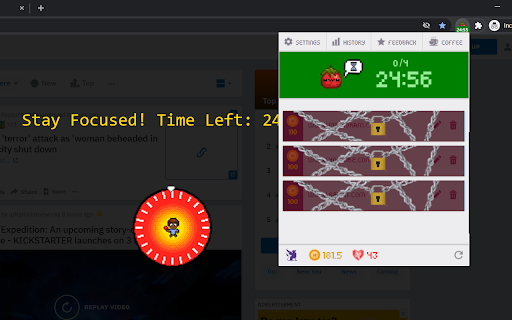
Website Blocker that plugs into Habitica and limits you from visiting websites that you decide. You can decide to visit these sites by spending Habitica currency, which you'll earn by developing good habits and doing chores.

2.Pomodoro Timer:
Including a Pomodoro Timer.
You can read about the pomodoro technique here:
https://habitica.fandom.com/wiki/Pomodoro

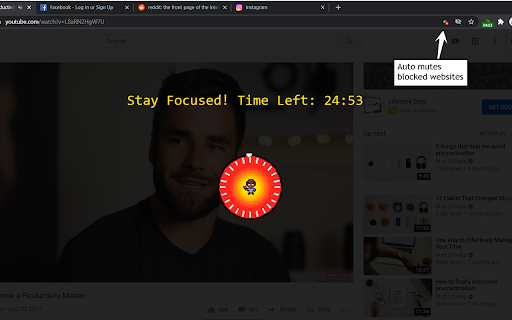
During Pomodoro mode, all websites in the list are blocked, websites with cost 0 are blocked only during pomodoro.
A Pomodoro habit is created automatically for the user in Habitica, with an option in the extension settings to automatically score [+] or [-] of the habit when a Pomodoro is done successfully or fails accordingly.

How to use:
After installing the extension, click on the icon at the top right to open the menu. In here, you must set your API Credentials. You can then block a site by navigating to it and clicking block site. It will ask you to enter a cost. From this point on, when you visit this site, the extension will ask you if you'd like to spend GP to access it. To start a pomodoro timer simply click on the Tomato character. Click again to stop the timer. In the settings you will find a lot of option that allow you tweak and change the pomodoro behavior to fit best for you.

-----------------------------------------

For more information, recommended settings and version update log:
https://habitica.fandom.com/wiki/Habitica_Pomodoro_SiteKeeper
Technical
- Version
- 8.0.4
- Manifest
- V3
- Size
- 7.58MiB
- Min Chrome
- 88
- Languages
- 1
- Featured
- Yes
Metadata
- ID
- iaanigfbldakklgdfcnbjonbehpbpecl
- Developer ID
- u7846837eeebcc975c4515dfa6a9720ee
- Developer Email
- [email protected]
- Created
- Jun 12, 2019
- Last Updated (Store)
- Aug 25, 2025
- Last Scraped
- May 30, 2026
- Website
- https://ofex.me/
- Privacy Policy
- https://ofex.me/privacy-policy/
Similar extensions
Alternatives to Habitica Pomodoro SiteKeeper, ranked by description similarity.

BlockSite Pomodoro: Block Sites & Focus
Stay focused & Boost productivity with a custom blocklist & pomodoro-based site blocking.
543
★ 5.0

Pomodoro Timer
A Pomodoro timer that blocks distractions and boosts productivity.
27

Pomodoro Pro - Focus Timer & Website Blocker
Pomodoro timer with website blocking and time tracking for YouTrack, Jira, Asana, and GitHub
17
★ 5.0

PomodoroFocus
Boost your productivity with PomodoroFocus! A powerful timer to manage work & breaks with extra features.
—

Purrfect Pomodoro Timer: Productivity, Time Management & Daily Journal
Purrfect Pomodoro Timer
1.0K
★ 4.9

Study Buddy
Pomodoro timer and website blocker for better focus sessions
26
★ 5.0

pomoAI Companion
A companion browser extension for pomoAI, enhancing productivity with website blocking and more!
2

Pomodoro Tab Freezer
Automatically freeze distracting tabs during focus sessions with Pomodoro timer
3
Data sourced from the Chrome Web Store · last verified May 30, 2026.