
Pomodoro Timer
A Pomodoro timer that blocks distractions and boosts productivity.
As of June 2026, Pomodoro Timer has 27 users in the Workflow & Planning category.
Usersup 3.8 percent+3.8%
27
27
Ratingno change0%
—
— reviews
Reviewsno change0%
—
Version
1.0
Manifest V3
History
3 snapshotsTracking since Apr 1, 2026.
View as table
| Date | Users | Rating | Reviews | Version |
|---|---|---|---|---|
| Apr 1, 2026 | 26 | — | — | 1.0 |
| May 2, 2026 | 29 | — | — | 1.0 |
| Jun 1, 2026 | 26 | — | — | 1.0 |
| Now | 27 | — | — | 1.0 |
Permissions & access
- Permissions
- activeTabnotificationsdeclarativeNetRequestdeclarativeNetRequestWithHostAccessstorage
- Host access
- None declared
Screenshots
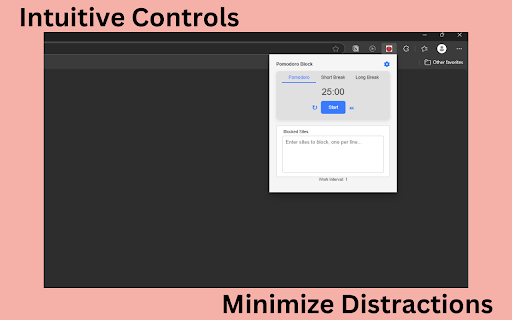


About
Pomodoro Block: Stay Focused and Beat Distractions

Overview
Pomodoro Block is a simple, yet powerful extension designed to help you manage your time effectively and reduce online distractions. Whether you’re working, studying, or just need to stay on task, Pomodoro Block brings you a classic Pomodoro timer plus site-blocking features—right in your browser!

Key Features:

Easy Access

-Open the popup instantly with Ctrl + Shift + F on Windows/Linux or Cmd + Shift + F on macOS. No more hunting around for the extension icon!

Customizable Pomodoro Timer

-Set your work interval (Pomodoro), short break, and long break durations.
-Choose how many work intervals you need before triggering a long break.
-Automatically switch between work and break sessions to keep your productivity on track.

Site Blocking for Distraction-Free Work

-Add any websites you find distracting to the “Blocked Sites” list.
-While the timer is running, these sites are automatically blocked—helping you stay laser-focused on your tasks.

Notifications & Alarms

-Receive an audible alarm or on-screen notification when each session ends.
-Adjust volume for the built-in alarm to suit your environment—anything from mute to full volume.

Volume Controls

-Fine-tune the alarm’s volume to your preference. Mute it during meetings or turn it up for extra motivation!

Modern, Intuitive UI

-Quickly start, pause, or reset the timer from a clean, minimal popup.
-Easily switch between Pomodoro, Short Break, and Long Break tabs.

Automatic & Manual Control

-Let Pomodoro Block automatically move you into breaks or the next Pomodoro session, or manually skip ahead if you need flexibility.

How It Works

1. Open the extension with Ctrl + Shift + F or Cmd + Shift + F.
2. Choose your session type (Pomodoro, Short Break, or Long Break).
3. Click Start. Your timer begins, and distracting sites on your blocked list are, well, blocked!
4. Get an alarm when time is up—adjust volume as needed.
5. Repeat as many intervals as you want. Feel free to skip or reset anytime.

Why Pomodoro Block?

-Reduce Distractions: Block the sites that derail your productivity—Facebook, YouTube, Twitter, or any others you find tempting.
-Work Smarter, Not Harder: The Pomodoro Technique breaks tasks into manageable intervals, boosting your efficiency and reducing burnout.
-Fully Customizable: Tweak durations, add new break lengths, or modify the volume. Make it fit your workflow perfectly.
-Simple & Lightweight: No need for complicated setups—just install and start using immediately.

Stay on task, beat procrastination, and make the most of your time with Pomodoro Block. Give it a try and see how it transforms your productivity today!
Technical
- Version
- 1.0
- Manifest
- V3
- Size
- 394KiB
- Min Chrome
- 88
- Languages
- 1
- Featured
- No
Metadata
- ID
- dgppbhgnbfkpaofpejeafmkjbdjnjdcf
- Developer ID
- u2c1c65cf2d30ee57011eeaabf18b3878
- Developer Email
- [email protected]
- Created
- Dec 31, 2024
- Last Updated (Store)
- Dec 31, 2024
- Last Scraped
- Jun 1, 2026
- Website
- —
- Support URL
- —
Similar extensions
Alternatives to Pomodoro Timer, ranked by description similarity.

BlockSite Pomodoro: Block Sites & Focus
Stay focused & Boost productivity with a custom blocklist & pomodoro-based site blocking.
543
★ 5.0

Pomodoro Assistant
A tool to help you stay focused
6

Focus Tab
Hide distracting tabs and Pomodoro timer
6
★ 5.0

Pomodoro Tab Freezer
Automatically freeze distracting tabs during focus sessions with Pomodoro timer
3

Focus Timer & Website Blocker
Stay focused with Pomodoro timer and website blocker. Block distracting sites and manage your study/work time effectively.
47
★ 5.0

Pomodoro Timer & Website Blocker – Focus Orbit
Boost Your Focus with Focus Orbit – Combination of Pomodoro Timer and Website Blocker for Chrome
24

LockdIn
Focus on your tasks at hand using LockdIn
5
★ 5.0

Focus: Pomodoro Timer, Website Blocker
Helps you be focused and productive
24
★ 3.5
Data sourced from the Chrome Web Store · last verified Jun 1, 2026.