
Speakex Selected Text - any website
Select text and right-click to hear it spoken. Customize voice and speed.
As of June 2026, Speakex Selected Text - any website has 43 users and a 5.00/5 rating from 2 reviews in the household category.
Usersup 95.5 percent+95.5%
43
43
Ratingno change0%
5.00
2 reviews
Reviewsno change0%
2
Version
1.0
Manifest V3
History
9 snapshotsTracking since Apr 1, 2026.
View as table
| Date | Users | Rating | Reviews | Version |
|---|---|---|---|---|
| Apr 1, 2026 | 22 | 5.00 | 2 | 1.0 |
| Apr 8, 2026 | 23 | 5.00 | 2 | 1.0 |
| Apr 19, 2026 | 30 | 5.00 | 2 | 1.0 |
| Apr 25, 2026 | 29 | 5.00 | 2 | 1.0 |
| May 5, 2026 | 32 | 5.00 | 2 | 1.0 |
| May 11, 2026 | 37 | 5.00 | 2 | 1.0 |
| May 20, 2026 | 41 | 5.00 | 2 | 1.0 |
| May 30, 2026 | 37 | 5.00 | 2 | 1.0 |
| Jun 8, 2026 | 44 | 5.00 | 2 | 1.0 |
| Now | 43 | 5.00 | 2 | 1.0 |
Permissions & access
- Permissions
- contextMenusttsstorageactiveTab
- Host access
- None declared
Screenshots

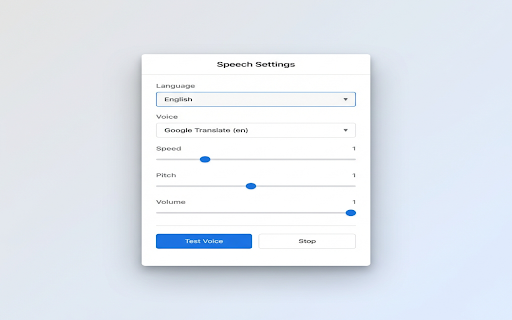
About
Speaker Selected Text - Text to Speech for Any Website

Listen to any text on the web with natural-sounding voices! Speakex allows you to select any text, right-click, and hear it read aloud instantly. Perfect for multitasking, learning pronunciation, or simply resting your eyes.

Key Features:
- 🌍 Massive Voice Library: Access over 50+ languages and accents using high-quality Google Translate "Web Voices" alongside your native system voices.
- 🚀 Instant Context Menu: Just right-click "Speak it" to start listening immediately.
- ⚙️ Customizable Experience: Adjust speaking rate (speed), pitch, and volume to match your preference.
- 💾 Auto-Save Settings: Your preferred voice and speed settings are saved automatically.
- 🎨 Modern Interface: Clean, professional, and easy-to-use popup dashboard.

Whether you're reading a long article, learning a new language, or just prefer listening, Speakex makes the web audible.
Technical
- Version
- 1.0
- Manifest
- V3
- Size
- 26.63KiB
- Min Chrome
- 88
- Languages
- 1
- Featured
- Yes
Metadata
- ID
- hpodloolnlodljngbclhajmpfpbhmfga
- Developer ID
- ubd4cb841acfcd34eb3402b04eb5790e3
- Developer Email
- [email protected]
- Created
- Feb 3, 2026
- Last Updated (Store)
- Feb 3, 2026
- Last Scraped
- Jun 8, 2026
- Website
- —
- Support URL
- —
- Privacy Policy
- https://sites.google.com/view/ext-privacypolicy77/
Similar extensions
Alternatives to Speakex Selected Text - any website, ranked by description similarity.

Zoom Web Enhancement Suite
Zoom Enhance your web browsing experience with customizable visual controls and productivity features.
669

Edit Anything with Creative Power
Edit any website, take screenshots, and enhance any webpage with powerful tools
494
★ 5.0

Yes Chef
A cooking voice assistant for recipes from around the web.
19
★ 5.0

Edit anything - Boost any page
A powerful extension that allows you to edit text, take screenshots, and perform various actions on any webpage
1.0K
★ 3.5

Browser Boost - Extra Tools for Chrome
Boost Volume, Change User Agent, Enable Right Click, Copy & Select, Disable WebRTC, and Save Image as Type (JPG, PNG & WebP).
1.0K
★ 3.7

Quick Brain
Never lose track of anything you've learned. Quick Brain remembers every article, video, PDF, and screenshot - searchable with AI.
6

Tab Silencer Pro
Mute individual tabs effortlessly with Tab Silencer Pro! Streamline your browsing for a quieter, more focused experience.
194
★ 5.0

Extension Word Edit Documents for Chrome
Extension Word Edit Documents.
539
Data sourced from the Chrome Web Store · last verified Jun 8, 2026.