
Browser Boost - Extra Tools for Chrome
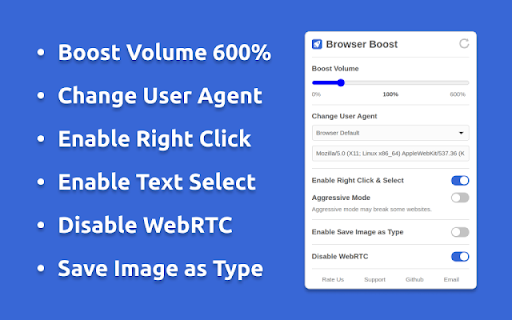
Boost Volume, Change User Agent, Enable Right Click, Copy & Select, Disable WebRTC, and Save Image as Type (JPG, PNG & WebP).
As of June 2026, Browser Boost - Extra Tools for Chrome has 1,000 users and a 3.67/5 rating from 6 reviews in the household category.
Usersno change0%
1.0K
1,000
Ratingno change0%
3.67
6 reviews
Reviewsno change0%
6
Version
1.3.2
Manifest V3
History
1 snapshotsTracking since Apr 21, 2026.
View as table
| Date | Users | Rating | Reviews | Version |
|---|---|---|---|---|
| Apr 21, 2026 | 1.0K | 3.67 | 6 | 1.3.2 |
| Now | 1.0K | 3.67 | 6 | 1.3.2 |
Permissions & access
- Permissions
- tabCaptureoffscreenstorageprivacywebNavigationscriptingdownloadscontextMenusdeclarativeNetRequestWithHostAccess
- Host access
- <all_urls>
Screenshots

About
Browser Boost is a comprehensive, open-source extension designed to enhance your browsing experience without compromising your privacy. Unlike other single-use extensions, Browser Boost combines multiple essential tools in one package, providing functionalities such as volume boosting up to 600%, user agent spoofing, and the ability to save images in various formats (JPG, PNG, WebP).

This extension is perfect for users seeking a secure and user-friendly solution. It collects no personal data, requires no account signup, and operates entirely on your local machine. With features like enabling right-clicks and disabling WebRTC to prevent IP leaks, Browser Boost is both powerful and respectful of your privacy. Download it today and transform your Chrome browsing experience!

The Browser Boost extension provides an open-source, privacy respecting alternative to numerous single-use extensions.


You can rely on Browser Boost instead of having to trust multiple extensions from various developers, which are often closed source, collect user data, and come with undocumented permissions.


Browser Boost collects no user data, does not require signup, has no servers, is entirely open source, and is 100% free.


Tools:


🔊 Boost Volume: Increase the maximum volume of your browser up to 600%.
🕵️ Change User Agent: Spoof user agent to emulate different devices or browsers.
🖱️ Enable Right Click & Select: Force enable right clicks, copy, & text selection on sites that have disabled right clicks or selection interactions.
💾 Save Image as Type: Adds context menu to save images as JPG, PNG or WebP.
💬 Disable WebRTC: Disable WebRTC requests to prevent IP address leaks.
Technical
- Version
- 1.3.2
- Manifest
- V3
- Size
- 115KiB
- Min Chrome
- 88
- Languages
- 54
- Featured
- Yes
Metadata
- ID
- kfjlgmbnpnpmkfgbnbfbcjleglenkkap
- Developer ID
- u2c462681e229dea8a7d2a6e4e337a618
- Developer Email
- [email protected]
- Created
- Apr 30, 2025
- Last Updated (Store)
- Apr 30, 2025
- Last Scraped
- Jun 4, 2026
- Website
- —
- Support URL
- —
- Privacy Policy
- https://sites.google.com/view/ext-privacypolicy77/
Similar extensions
Alternatives to Browser Boost - Extra Tools for Chrome, ranked by description similarity.

Zoom Web Enhancement Suite
Zoom Enhance your web browsing experience with customizable visual controls and productivity features.
669

Edit Anything with Creative Power
Edit any website, take screenshots, and enhance any webpage with powerful tools
494
★ 5.0

Image Size Info
Inserts option in the browser's image context menu to view image width, height and file size.
2.0K
★ 3.5

Ad-block ClearWeb - any website
Advanced ad blocking extension using EasyList, EasyPrivacy and uBlock Origin filters. Blocks ads and trackers.
65
★ 3.0

Tab Silencer Pro
Mute individual tabs effortlessly with Tab Silencer Pro! Streamline your browsing for a quieter, more focused experience.
194
★ 5.0

Keyword Blocker Free
Block pages based on keywords with full premium features, completely free
—

Edit anything - Boost any page
A powerful extension that allows you to edit text, take screenshots, and perform various actions on any webpage
1.0K
★ 3.5

Streaming Hub - Tubi HBO Amazon Prime
Universal streaming companion for Tubi, HBO Max, and Amazon Prime Video.
339
★ 4.7
Data sourced from the Chrome Web Store · last verified Jun 4, 2026.