
Deep Search - Data Layer & Storage Explorer
Advanced search tool for exploring JavaScript data layers and browser storage (localStorage, sessionStorage, cookies)
As of May 2026, Deep Search - Data Layer & Storage Explorer has 17 users in the Developer Tools category.
Usersup 13.3 percent+13.3%
17
17
Ratingno change0%
—
— reviews
Reviewsno change0%
—
Version
1.0.1
Manifest V3
History
3 snapshotsTracking since Apr 20, 2026.
View as table
| Date | Users | Rating | Reviews | Version |
|---|---|---|---|---|
| Apr 20, 2026 | 15 | — | — | 1.0.1 |
| May 6, 2026 | 20 | — | — | 1.0.1 |
| May 17, 2026 | 15 | — | — | 1.0.1 |
| Now | 17 | — | — | 1.0.1 |
Permissions & access
- Permissions
- activeTabstoragescripting
- Host access
- None declared
Screenshots
About
Deep Search - Advanced Data Layer & Storage Inspector for Chrome

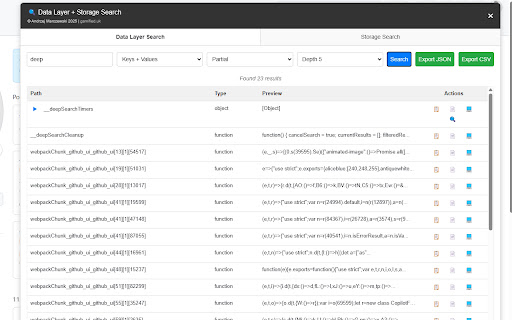
Powerful developer tool for inspecting website data layers, local storage, session storage, and cookies with advanced search capabilities.

Deep Search is a comprehensive Chrome extension designed for developers, marketers, and QA engineers who need to quickly analyze and debug website data structures. With over advanced search capabilities and intuitive interface, it's the essential tool for modern web development.

== Features ==

✓ Advanced Data Layer Search - Find specific values across complex nested objects instantly
✓ Storage Inspector - View and analyze localStorage, sessionStorage, and cookies
✓ Smart Copy Tools - Copy data as JSON, formatted text, or code snippets
✓ Real-time Updates - Monitor data changes as they happen
✓ Nested Object Navigation - Drill down through complex data structures easily
✓ Search Filters - Filter by data type, key names, or value patterns
✓ Export Capabilities - Save data for analysis or documentation
✓ Clean Interface - Modern, intuitive design that doesn't clutter your workflow
✓ Performance Optimized - Lightweight and fast, won't slow down your browsing
✓ Cross-platform Compatible - Works on all websites and web applications

== Perfect for ==

• Web Developers - Debug data layer implementations and storage issues
• Digital Marketers - Verify tracking data and analytics implementations • QA Engineers - Test data persistence and state management
• Data Analysts - Extract and analyze website data structures

== Privacy & Security ==

Deep Search operates entirely within your browser and DOES NOT collect, store, or transmit any of your data. All analysis happens locally on your machine. Your privacy and data security are our top priorities.

== Getting Started ==

1.   Install the extension
2.   Navigate to any website
3.   Click the Deep Search icon in your toolbar
4.   Start exploring data layers and storage instantly

== Need Help? ==

Visit our GitHub repository for documentation, examples, and support: https://github.com/daverage/DeepSearch

== Enjoying Deep Search? ==

If Deep Search helps your workflow, please consider giving it a 5-star rating! For issues or feature requests, please contact us through our GitHub repository.

Make data inspection simple, fast, and powerful with Deep Search.
Technical
- Version
- 1.0.1
- Manifest
- V3
- Size
- 31.37KiB
- Min Chrome
- 88
- Languages
- 1
- Featured
- No
Metadata
- ID
- hpnemmkaejjdojaoenmikegbofmlpbli
- Developer ID
- u349967832ebd53bad20e77872728d149
- Developer Email
- [email protected]
- Created
- Sep 12, 2025
- Last Updated (Store)
- Sep 17, 2025
- Last Scraped
- May 30, 2026
- Website
- marczewski.me.uk
- Support URL
- marczewski.me.uk/deepsearch
- Privacy Policy
- http://marczewski.me.uk/deepsearch
Similar extensions
Alternatives to Deep Search - Data Layer & Storage Explorer, ranked by description similarity.

Network Deepscan
Search through all network requests and responses in DevTools.
36
★ 5.0

DeepDive SEO - PRO
Chrome extension for in-depth analysis of on-page SEO elements, optimizing content for search engine visibility.
51
★ 5.0

1nsp3ct0rG4dg3t - Web Developer Tools
Web debugging tool for developers. Manage localStorage, sessionStorage, and cookies with inspection and security analysis.
10
★ 5.0

Data Scraper - Extract & Copy
Select and scrape data from web pages, then copy it in JSON, CSV, or plain text format. Perfect for data extraction and analysis.
—

DataLayer Inspector
Inspects the dataLayer in Chrome DevTools, inspired by DataSlayer. Made by Bart Warrot
51

ShadowSeeker - Advanced DOM Search
Search and visualize DOM & Shadow DOM paths. Instantly find XPath, CSS, or text for QA automation.
8

DataLayer Inspector
Monitor and debug data layer implementations in real-time.Track Adobe, GTM, and custom data layer events with an interactive viewer.
158
★ 4.0

Show Data Variables
Powerful side panel browser extension that discovers, organizes, and helps inspect hidden or non-obvious page data across the DOM,…
11
Data sourced from the Chrome Web Store · last verified May 30, 2026.