
Codesana
Codesana adds formatted coding text to Asana task descriptions and comments. Syntax highlighting & indentation improve readability.
As of June 2026, Codesana has 33 users and a 5.00/5 rating from 2 reviews in the Developer Tools category.
Usersno change0%
33
33
Ratingno change0%
5.00
2 reviews
Reviewsno change0%
2
Version
0.2.6
Manifest V3
History
3 snapshotsTracking since Apr 23, 2026.
View as table
| Date | Users | Rating | Reviews | Version |
|---|---|---|---|---|
| Apr 23, 2026 | 33 | 5.00 | 2 | 0.2.6 |
| May 12, 2026 | 37 | 5.00 | 2 | 0.2.6 |
| Jun 7, 2026 | 30 | 5.00 | 2 | 0.2.6 |
| Now | 33 | 5.00 | 2 | 0.2.6 |
Permissions & access
- Permissions
- storage
- Host access
- None declared
Screenshots


About
Introducing "Codesana", a Chrome extension designed for developers who use Asana for task management.
With this extension, you can quickly and easily insert formatted coding text into your Asana task descriptions. It supports a variety of coding languages, including Python, JavaScript, HTML, CSS, and more.

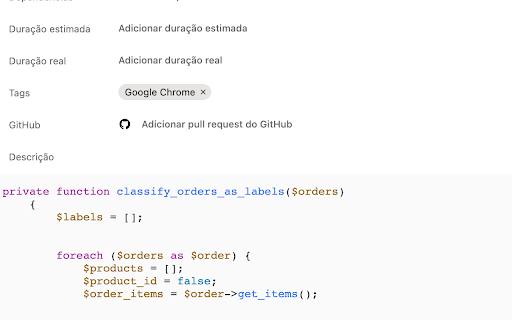
The extension automatically formats your code to make it more readable and visually appealing. It uses syntax highlighting to color code your code and improves the indentation to make it easier to read.
This extension saves time for developers who frequently add code snippets to their task descriptions, as it eliminates the need to manually format code or use external tools to generate formatted code snippets.
Install Codesana  today to streamline your workflow and make task management a breeze!

HOW TO USE IT
To have a correct format you have to type ```at the beginning and the end of your code.
Example:
```
console.log('Hello world!');
```
Technical
- Version
- 0.2.6
- Manifest
- V3
- Size
- 3.15MiB
- Min Chrome
- 88
- Languages
- 1
- Featured
- No
Metadata
- ID
- holmoaoenhfjldbakekgnanlifgooilk
- Developer ID
- u30e584e33c1323636fbd87ca5583543d
- Developer Email
- [email protected]
- Created
- Nov 17, 2023
- Last Updated (Store)
- Dec 7, 2023
- Last Scraped
- Jun 7, 2026
- Website
- —
- Support URL
- —
- Privacy Policy
- https://volcanicinternet.com/en/privacy-policy/
Similar extensions
Alternatives to Codesana, ranked by description similarity.

Reddit Syntax Highlighting
Enhance Your Reddit Browsing Experience with Code Syntax Highlighting!
14
★ 5.0

Code Snippet Saver
Save and organize your code snippets.
8

Prettier Now
Yet another Prettier browser extension for code formatting.
708
★ 4.0

JavaScript Code Beautifier
Transform plain JavaScript files into beautifully formatted, syntax-highlighted code
81
★ 5.0

JSANIFY
Why to open a site to format your JSON when you can do it in just one click? Switch to JSANIFY - make your life simple!
—

Codify: Code Snippet Manager for Chrome
Unlock your coding potential with the Code Snippet Manager, a Chrome extension specifically designed to boost the productivity and…
165
★ 4.6

Colorful Comments for online code editors
Color and Highlight special comment tags
2

Code Snippet Saver
Provides users with the ability to reuse code with built-in storage instead of having to write frequently used code from scratch.
47
★ 5.0
Data sourced from the Chrome Web Store · last verified Jun 7, 2026.