
Trainn
Creating videos and interactive guides for your digital product is now delightfully simple — for beginners and pros alike.
As of June 2026, Trainn has 2,000 users and a 4.43/5 rating from 7 reviews in the Workflow & Planning category.
Usersno change0%
2.0K
2,000
Ratingup 2.3 percent+2.3%
4.43
7 reviews
Reviewsup 16.7 percent+16.7%
7
Version
2.0.0
Manifest V3
History
3 snapshotsTracking since Apr 23, 2026.
View as table
| Date | Users | Rating | Reviews | Version |
|---|---|---|---|---|
| Apr 23, 2026 | 2.0K | 4.33 | 6 | 2.0.0 |
| May 12, 2026 | 2.0K | 4.33 | 6 | 2.0.0 |
| Jun 7, 2026 | 2.0K | 4.33 | 6 | 2.0.0 |
| Now | 2.0K | 4.43 | 7 | 2.0.0 |
Permissions & access
- Permissions
- storagetabsalarms
- Host access
- None declared
Screenshots


About
Trainn is an AI content-creation tool that helps you create product videos and instructional guides in less than 5 minutes. SaaS companies use Trainn to create training content to train customers, partners, and teams.

✳️ How does Trainn work?
1. Record your screen
2. Trainn turns your screen recording into a studio-quality video or instructional guide.
3. For videos, add AI voiceovers in multiple languages.
4. Share or embed in seconds.
-------------------------------------------------------------------------------------------------------------------------------------------------

✳️ Why use Trainn when you have a thousand screen recording tools on Earth?
1. Trainn is the only all-in-one tool that offers a screen recorder, editor with advanced features, text-to-speech converter, analytics, and hosting capabilities.
2. Trainn’s voiceover functionality is best-in-class. You can automatically generate AI voiceovers, transform your voice into AI with various accents and languages, or record your voice in the highest quality.
3. Trainn is a no-code tool.
4. No design or video experience is required.
5. Trainn lets you create videos in 20+ global languages in just a click of a button.
6. You can keep your videos evergreen and up-to-date without re-recording your entire video.
7. The only tool to automate your content creation process. Once you finish recording your screen, Trainn automatically generates clips, removes dead clicks from your recording, intelligently applies zoom and transition effects, and syncs with your audio track.
-------------------------------------------------------------------------------------------------------------------------------------------------

✳️ Who uses Trainn
Anybody who wants to create a video or guide of their digital or web-based product can use Trainn. Predominantly, customer-facing teams in SaaS companies use Trainn to create DIY videos. Customer success managers, customer support managers, customer onboarding specialists, product marketing managers, and product managers enjoy using Trainn.
-------------------------------------------------------------------------------------------------------------------------------------------------

✳️ Read why SaaS companies trust Trainn

🏆 Trainn is an alternative to help documentation. Trainn lets us record videos and add speech in a jiffy. The Video engagement data helps us understand how the videos are fairing
— Rwiddha Mitra, HackerRank

🏆 For the first time, our product team is not perturbed by the thought of making a product video. It brings in a layer of professionalism that we require and enables us to seamlessly merge the video with the subtitles to make it feel rehearsed and effortless.
— Nikhil G, Limechat

🏆Our customers always ask for quick 1-minute tutorial videos to learn the product. It took exactly 45 days to create over 100 tutorial videos, review, and publish the Learning Center on Trainn.
— Sabina Rana I Dangal, Head of Support, BuildOps

🏆The best feature is that you can auto-translate a single video into multiple languages.
— Shambhavi Pandey, Manager, RestroWorks Academy (previous Posist)

🏆We needed a tool to easily create training and support videos in multiple languages despite our English-only support staff. Trainn’s unique functionality for screen capture + video + closed captions + natural sounding text to speech was the perfect combination for our needs. Other vendors in the space did a solid job with 2 of 3 requirements, but not all four. Additionally, I can't say enough about their excellent support.
— Henry C, LocalClarity
-------------------------------------------------------------------------------------------------------------------------------------------------

✳️ Key features:

Record any workflow
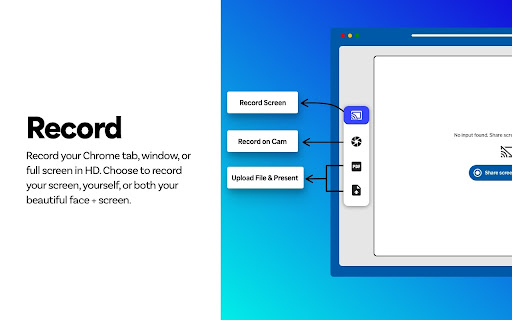
‣ Trainn helps record your Chrome tab, entire window, or full screen.
‣ Record stunning Full HD, 1080p quality videos by default.
‣ Create engaging video presentations. Upload your PPT & record while you navigate through the slides.

Add Rich Audio with AI voiceovers
‣ Automatically generate AI voiceovers: Trainn generates voiceovers based on your recorded actions without requiring a script input using the built-in text-to-speech convertor.
‣ Transform your voice into AI with various accents and languages, catering to a diverse audience.
‣ Record your voice in high quality to add a personalized touch to your videos.

Edit videos and guides like a pro
‣ Let our smart editor do the hard work. It automatically adds zoom and spotlights to your content.
‣ Choose the layout that works for you.
‣ Keep your content on-brand with your brand color, logos, and fonts.
‣ Add intro and outro slides, objects, text, annotations, and music. Blur sections you don't wanna show.

Share and embed videos and guides in seconds
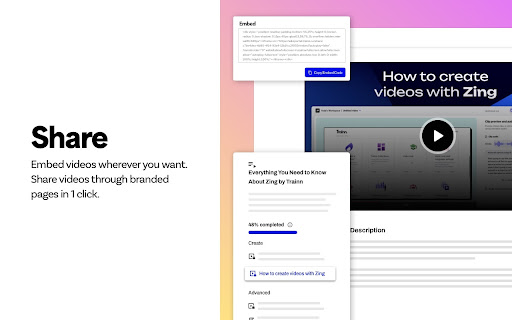
‣ Embed videos and guides across any platform – your product, socials, website, and more.
‣ Add CTAs to your videos and guides to capture leads and grow your business.
‣ Configure privacy settings to restrict access to your content.
‣ Trainn's Analytics dashboard gives you a contour view of your content performance.
-------------------------------------------------------------------------------------------------------------------------------------------------

📍Important links:
‣ Email us for support at [email protected]
‣ Try Trainn for free at app.trainn.co/sign_up/
‣ Follow us for updates on www.linkedin.com/company/trainn
‣ View our affordable pricing plans on trainn.co/pricing/
‣ Read our customer love on G2 at www.g2.com/products/guider-labs-inc-trainn/reviews
Technical
- Version
- 2.0.0
- Manifest
- V3
- Size
- 2.09MiB
- Min Chrome
- 88
- Languages
- 1
- Featured
- No
Metadata
- ID
- holcgkoaafmeehahhkpmpidmmdmbokfo
- Developer ID
- u8eab8d3c47769a194dbf9bb17e2ff05a
- Developer Email
- [email protected]
- Created
- Aug 4, 2020
- Last Updated (Store)
- Sep 29, 2024
- Last Scraped
- Jun 7, 2026
- Website
- trainn.co
- Privacy Policy
- https://trainn.co/privacy/
Similar extensions
Alternatives to Trainn, ranked by description similarity.

Guidde - Magically create video documentation
Magically create video documentation with AI
100.0K
★ 4.7

Guideless: AI Documentation & Video Guides
Guideless captures your flow and turns it into a narrated video guide — ready to share or embed.
946
★ 5.0

Webcam + Screen Video Recorder Video Editor
Screen Recorder App with Webcam Video Recorder, Video Editor, Upload Video in a Single Extension.
60.0K
★ 3.6

Video Translator - Translate Video & Voice online
AIT (Translate, TTS) based Video and Voice Translator for easy and fast translation of videos into 100+ languages.
80.0K
★ 3.0

Cinema8 - Screen Recording & Video Engagement
Easily capture your screen and camera. Add calls to action to drive leads and sales, then share instantly with a link.
146
★ 5.0

Screencastify - Screen Video Recorder
An easy-to-use screen recorder for your browser. Capture, edit and share videos in seconds.
6.0M
★ 4.0

Screen recorder
Elevate your productivity with Screen Recorder tool. Effortlessly capture and share your screen recordings for optimal efficiency.
4.0K
★ 3.6

Tactiq: AI note taker for Google Meet, Zoom and MS Teams
Meeting note taker and AI transcription for Google Meet, Zoom, and MS Teams.
1.0M
★ 4.8
Data sourced from the Chrome Web Store · last verified Jun 7, 2026.