
Aria2 Integration
Download files with Aria2
As of June 2026, Aria2 Integration has — users and a 4.79/5 rating from 14 reviews in the Productivity category.
Usersno change0%
—
—
Ratingup 0.8 percent+0.8%
4.79
14 reviews
Reviewsup 16.7 percent+16.7%
14
Version
4.14.0
Manifest V3
90-day change · In the last 90 days this extension 4 version updates.
History
9 snapshotsTracking since Apr 18, 2026.
View as table
| Date | Users | Rating | Reviews | Version |
|---|---|---|---|---|
| Apr 18, 2026 | 2.0K | 4.75 | 12 | 4.12.3 |
| Apr 23, 2026 | 2.0K | 4.77 | 13 | 4.13.3 |
| May 8, 2026 | 2.0K | 4.77 | 13 | 4.13.3 |
| May 12, 2026 | 5.0K | 4.77 | 13 | 4.13.3 |
| May 20, 2026 | 3.0K | 4.77 | 13 | 4.13.3 |
| May 24, 2026 | 4.0K | 4.77 | 13 | 4.13.4 |
| May 29, 2026 | 9.0K | 4.77 | 13 | 4.13.4 |
| Jun 7, 2026 | 10.0K | 4.77 | 13 | 4.13.5 |
| Jun 13, 2026 | 10.0K | 4.77 | 13 | 4.14.0 |
| Now | — | 4.79 | 14 | 4.14.0 |
Changelog
- Jun 3, 2026description
Aria2 Integration brings powerful download management to your browser by connecting it directly to your Aria2 server.

Send links, selected text, browser downloads, torrent files, and metalink files to Aria2 in just a few clicks. Manage multiple servers, monitor active and queued tasks, and keep everything under control from a clean, easy-to-use popup.

Features
- Send links and selected text directly to Aria2
- Automatically capture browser downloads and redirect them to your server
- Add torrent and metalink files from URLs or local files
- Manage multiple Aria2 servers
- View active, waiting, paused, completed, and failed tasks
- Pause, resume, retry, or remove downloads from the popup
- See progress, speed, ETA, and task status at a glance
- Customize capture behavior with:
  - minimum file size
  - excluded protocols
  - excluded sites
  - excluded file types
- Preserve the full destination file path when needed
- Receive notifications for successful additions and errors
- Choose light, dark, or automatic theme mode
- Incognito mode options, including:
  - automatic download purging
  - RPC parameters overrides
Aria2 Integration brings powerful download management to your browser by connecting it directly to your Aria2 server or Motrix instance.

Send links, selected text, browser downloads, torrent files, and metalink files to Aria2/Motrix in just a few clicks. Manage multiple servers, monitor active and queued tasks, and keep everything under control from a clean, easy-to-use popup.

Features
- Send links and selected text directly to Aria2/Motrix
- Automatically capture browser downloads and redirect them to your server
- Add torrent and metalink files from URLs or local files
- Manage multiple Aria2 servers/Motrix instances
- View active, waiting, paused, completed, and failed tasks
- Pause, resume, retry, or remove downloads from the popup
- See progress, speed, ETA, and task status at a glance
- Customize capture behavior with:
  - minimum file size
  - excluded protocols
  - excluded sites
  - excluded file types
- Preserve the full destination file path when needed
- Receive notifications for successful additions and errors
- Choose light, dark, or automatic theme mode
- Incognito mode options, including:
  - automatic download purging
  - RPC parameters overrides
- Apr 23, 2026description
Aria2 Integration brings powerful download management to your browser by connecting it directly to your Aria2 server.

Send links, selected text, browser downloads, torrent files, and metalink files to Aria2 in just a few clicks. Manage multiple servers, monitor active and queued tasks, and keep everything under control from a clean, easy-to-use popup.

Features
- Send links and selected text directly to Aria2
- Automatically capture browser downloads and redirect them to your server
- Add torrent and metalink files from URLs or local files
- Manage multiple Aria2 servers
- View active, waiting, paused, completed, and failed tasks
- Pause, resume, retry, or remove downloads from the popup
- See progress, speed, ETA, and task status at a glance
- Customize capture behavior with:
  - minimum file size
  - excluded protocols
  - excluded sites
  - excluded file types
- Preserve the full destination file path when needed
- Receive notifications for successful additions and errors
- Choose light, dark, or automatic theme mode
Aria2 Integration brings powerful download management to your browser by connecting it directly to your Aria2 server.

Send links, selected text, browser downloads, torrent files, and metalink files to Aria2 in just a few clicks. Manage multiple servers, monitor active and queued tasks, and keep everything under control from a clean, easy-to-use popup.

Features
- Send links and selected text directly to Aria2
- Automatically capture browser downloads and redirect them to your server
- Add torrent and metalink files from URLs or local files
- Manage multiple Aria2 servers
- View active, waiting, paused, completed, and failed tasks
- Pause, resume, retry, or remove downloads from the popup
- See progress, speed, ETA, and task status at a glance
- Customize capture behavior with:
  - minimum file size
  - excluded protocols
  - excluded sites
  - excluded file types
- Preserve the full destination file path when needed
- Receive notifications for successful additions and errors
- Choose light, dark, or automatic theme mode
- Incognito mode options, including:
  - automatic download purging
  - RPC parameters overrides
- Apr 18, 2026description
Aria2 Integration is a web extension that allows you to download files/torrents directly to one of your Aria2 instance.

* You can configure multiple Aria2 instance.
* You can send a download to one of your Aria2 instance by selecting URLs, right-clicking > Download with Aria2 > your Aria2 instance name.
* You can automatically send every download to your Aria2 instance by enabling `Capture downloads` in the extension's options or directly in the pop-up.
  * You can exclude some downloads to be sent by excluding protocols, domain names or extension files in the extension's options.
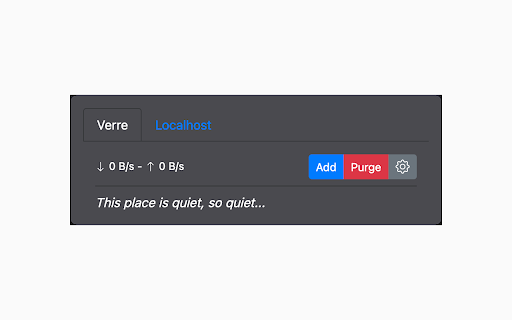
* You can see the state of each configured Aria2 server by clicking on the extension's icon in the toolbar. It will reveal a pop-up containing:
  * the total download/upload speed
  * the progress of each task and possibility to pause/resume/delete
  * delete all finished tasks
  * Add links, magnet links/files, torrent links/files
  * A quick settings to enable/disable capture downloads
* The extension is available in light/dark theme depending on your system preferences.
Aria2 Integration brings powerful download management to your browser by connecting it directly to your Aria2 server.

Send links, selected text, browser downloads, torrent files, and metalink files to Aria2 in just a few clicks. Manage multiple servers, monitor active and queued tasks, and keep everything under control from a clean, easy-to-use popup.

Features
- Send links and selected text directly to Aria2
- Automatically capture browser downloads and redirect them to your server
- Add torrent and metalink files from URLs or local files
- Manage multiple Aria2 servers
- View active, waiting, paused, completed, and failed tasks
- Pause, resume, retry, or remove downloads from the popup
- See progress, speed, ETA, and task status at a glance
- Customize capture behavior with:
  - minimum file size
  - excluded protocols
  - excluded sites
  - excluded file types
- Preserve the full destination file path when needed
- Receive notifications for successful additions and errors
- Choose light, dark, or automatic theme mode
Permissions & access
- Permissions
- contextMenuscookiesdownloadsnotificationsstorageactiveTabalarms
- Host access
- *://*/*
Screenshots



About
Aria2 Integration brings powerful download management to your browser by connecting it directly to your Aria2 server or Motrix instance.

Send links, selected text, browser downloads, torrent files, and metalink files to Aria2/Motrix in just a few clicks. Manage multiple servers, monitor active and queued tasks, and keep everything under control from a clean, easy-to-use popup.

Features
- Send links and selected text directly to Aria2/Motrix
- Automatically capture browser downloads and redirect them to your server
- Add torrent and metalink files from URLs or local files
- Manage multiple Aria2 servers/Motrix instances
- View active, waiting, paused, completed, and failed tasks
- Pause, resume, retry, or remove downloads from the popup
- See progress, speed, ETA, and task status at a glance
- Customize capture behavior with:
  - minimum file size
  - excluded protocols
  - excluded sites
  - excluded file types
- Preserve the full destination file path when needed
- Receive notifications for successful additions and errors
- Choose light, dark, or automatic theme mode
- Incognito mode options, including:
  - automatic download purging
  - RPC parameters overrides
Technical
- Version
- 4.14.0
- Manifest
- V3
- Size
- 620KiB
- Min Chrome
- 88
- Languages
- 3
- Featured
- No
Metadata
- ID
- hnenidncmoeebipinjdfniagjnfjbapi
- Developer ID
- u7869cb562868aa7e7486c4650d44bd12
- Developer Email
- [email protected]
- Created
- Feb 8, 2020
- Last Updated (Store)
- Jun 7, 2026
- Last Scraped
- Jun 13, 2026
- Website
- —
- Privacy Policy
- —
Similar extensions
Alternatives to Aria2 Integration, ranked by description similarity.

Aria2 Explorer
Speed up your downloads with Aria2, manage your download tasks easily.
80.0K
★ 4.6

Aria2 Interceptor
Intercepts Chrome downloads and sends them to Aria2 with a rename dialog and dashboard.
101
★ 5.0

Aria2 Indicator
An indicator displaying aria2 download tasks.
21

Links Hero
扫描当前页面的下载链接并推送到 aria2
12

Varia Integrator
Route all downloads to Varia if it's running.
6.0K
★ 4.7
Download Tools - Multi threaded
Multi-threaded download utility with aria2 engine for your browser!
1.0K
★ 1.0

Aria: Audio & Voice Recorder, Editor & Downloader
Record, Edit, and Download Audio & Mic Audio with Aria.
374
★ 3.8

Magnet2Deluge
Send magnet and torrent links directly to your Deluge server.
730
★ 3.9
Data sourced from the Chrome Web Store · last verified Jun 13, 2026.