DicePhrase
A tool for making strong, memorable passphrases.
As of May 2026, DicePhrase has 139 users and a 4.00/5 rating from 1 reviews in the Privacy & Security category.
Usersup 3.7 percent+3.7%
139
139
Ratingno change0%
4.00
1 reviews
Reviewsno change0%
1
Version
2.2.0
Manifest V3
History
2 snapshotsTracking since Apr 25, 2026.
View as table
| Date | Users | Rating | Reviews | Version |
|---|---|---|---|---|
| Apr 25, 2026 | 134 | 4.00 | 1 | 2.2.0 |
| May 21, 2026 | 148 | 4.00 | 1 | 2.2.0 |
| Now | 139 | 4.00 | 1 | 2.2.0 |
Permissions & access
- Permissions
- clipboardWriteoffscreenalarms
- Host access
- None declared
Screenshots


About
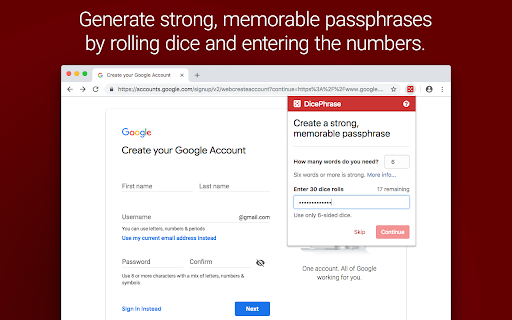
DicePhrase helps you easily create strong, memorable passphrases, such as "FragrantRenewedAnyoneBakedPossum" or "BazookaClangUnstuckTransferQuoteJokingly", by rolling six-sided dice to randomly select from a set of thousands of words. This system creates passphrases that are more unguessable than if you were to pick words on your own or trust the computer to generate words automatically.

🎲 Passphrases, not passwords
Long, random passphrases are more secure because they're more difficult for an attacker to guess than simple passwords. While a password like "Batman1989" is too easily guessed and "&1KJl6a8y$g*01W}i21!MZ" is too hard to remember, random passphrases like "DonutConfinedCurveHurricaneJuggleWidget" are strong and memorable. Passphrases don't need to be personal to be memorable. Personal things like birthdays, addresses, anniversaries, names, lyrics, books, movies, etc. are not very secret; anyone can find out your address, pet's name, or favourite songs. Picking words randomly ensures your passphrase is unbiased and unpredictable.

🎲 Roll the dice
You do five dice rolls to randomly select each word for your passphrase, so if you need a 6-word passphrase, that's 30 dice rolls. Input the numbers into DicePhrase, which will then use them to look up corresponding words in a table of 7776 possible words to generate your new passphrase. With each additional word, the chances that anyone could ever guess your passphrase become exponentially smaller.

🎲 Why use dice?
Dice are a more reliable and transparent source of randomness than choosing numbers yourself or having a computer generate random numbers. Humans tend to have too much bias when attempting to make random selections, and it's hard to prove that the complex systems used by computers for creating randomness are truly unpredictable. If you don't need such a high level of unpredictability, DicePhrase can generate pseudo-random numbers without dice when you click "Skip" in the main window, although using dice is still recommended.

🎲 When to use passphrases
Passphrases are ideal when used to encrypt information. They're perfect as the master password for a password manager so you only need to remember a single strong passphrase. They're also great for securing WiFi networks, disk encryption, PGP or SSH encryption keys, and any other encryption system. Use them whenever you need memorable authentication in general. For online accounts, having strong passphrases is good, but may not be enough protection from attackers who use techniques like phishing to steal credentials. You should enable Two-Factor Authentication, which adds a second step to the login process, and consider saving unique passphrases for each account in a password manager.

🎲 Secure design
DicePhrase is built to protect the confidentiality of your passphrases. Most importantly, passphrases aren't saved, they're automatically cleared 10 minutes after they've been created (you should memorize them or save them in a password manager application). DicePhrase is also free and open source software, so anyone can inspect the code to verify its safety. You can read more about DicePhrase's security design, as well as how to report bugs, in the Help document.

DicePhrase is based on best practice strategies for creating passphrases by the Electronic Frontier Foundation, security technologist Micah Lee, and the Diceware project.
https://www.eff.org/dice
https://firstlook.org/theintercept/2015/03/26/passphrases-can-memorize-attackers-cant-guess/
http://world.std.com/~reinhold/diceware.html

For more info about DicePhrase, please see:
https://www.lucaspetter.com/software/dicephrase/

For support and help, please see:
https://github.com/dicephrase/dicephrase/blob/master/doc/help.md

To see the code, report bugs, or help build DicePhrase, please see:
https://github.com/dicephrase/dicephrase
Technical
- Version
- 2.2.0
- Manifest
- V3
- Size
- 1.26MiB
- Min Chrome
- 109
- Languages
- 1
- Featured
- Yes
Metadata
- ID
- hlcidibhelknhpnimiiogjclajfopdag
- Developer ID
- u27fa1b015b8a0252cdab46fea2f7b475
- Developer Email
- [email protected]
- Created
- Nov 16, 2018
- Last Updated (Store)
- Apr 1, 2024
- Last Scraped
- May 21, 2026
- Website
- —
- Privacy Policy
- —
Similar extensions
Alternatives to DicePhrase, ranked by description similarity.

Memorable Passphrase Generator
Generate secure and memorable passphrases for better online security.
5

Smart Password Generator
Generates secure passwords based on a master password and а website’s domain.
—

Pass Snap
Chaotic. Secure. Aesthetic. The only password generator with ✨vibes✨.
6

Phrase Sprout
Generate fun, memorable passwords in the format Noun-ActionVerb-Object#. Kid-friendly and workplace-safe!
—

PokeBit - High Entropy Wallet Generator
Generate high-entropy seed phrases and private keys and public addresses for ETH and BTC. 100% offline, zero data collection.
1

Memorable Passwords
Generate memorable, secure passwords from real words. Easy to remember, hard to crack.
2

Powerful Random Password Generator
Generate secure random passwords with customizable options: uppercase, lowercase, numbers, special chars, and passphrases.
2

CastlePass - Chess password generator
Convert chess moves into secure passwords for login protection. Fun, Private and Secure.
31
★ 5.0
Data sourced from the Chrome Web Store · last verified May 21, 2026.