
SEO DOM Monitor
Monitor and detect dynamically added content on web pages for SEO analysis and identify hidden content search engines might miss.
As of May 2026, SEO DOM Monitor has 269 users and a 5.00/5 rating from 3 reviews in the Developer Tools category.
Usersdown 1.1 percent−1.1%
269
269
Ratingno change0%
5.00
3 reviews
Reviewsno change0%
3
Version
1.0.0
Manifest V3
History
1 snapshotsTracking since May 21, 2026.
View as table
| Date | Users | Rating | Reviews | Version |
|---|---|---|---|---|
| May 21, 2026 | 272 | 5.00 | 3 | 1.0.0 |
| Now | 269 | 5.00 | 3 | 1.0.0 |
Permissions & access
- Permissions
- activeTabscripting
- Host access
- None declared
Screenshots


About
# SEO DOM Monitor

A Chrome extension for monitoring dynamically added content on web pages. Perfect for SEO professionals who need to ensure all content is accessible to search engines.

This extension is lightweight, privacy-focused, and requires no special permissions beyond what's needed for basic functionality.

Ideal for:
- SEO Professionals
- Web Developers
- Content Auditors
- Technical SEO Specialists

Use this tool to ensure all your important content is accessible to search engines, not just users.

##Features

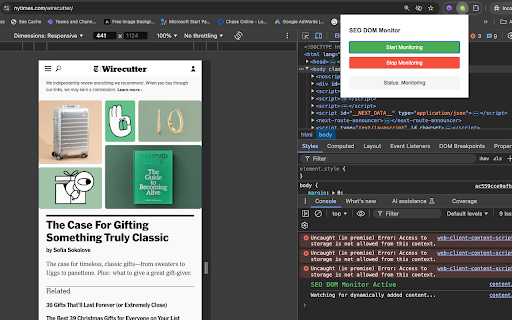
- Detects dynamically added content in real-time
- Monitors content added after user interactions
- Shows detailed DOM path for detected elements
- Perfect for identifying hidden content in:
  - Mobile menus
  - Accordion panels
  - Tab interfaces
  - "Load more" sections

## Installation

1. Install from the Chrome Web Store [link to be added]
2. Click the extension icon in your browser
3. Click "Start Monitoring"
4. Open Chrome DevTools (F12) to see detected content
5. Interact with the page to detect dynamic content

## Usage

1. Navigate to the page you want to analyze
2. Click the SEO DOM Monitor icon
3. Click "Start Monitoring"
4. Interact with the page (click menus, buttons, etc.)
5. Check the Console in DevTools for detected content
6. Click "Stop Monitoring" when finished

## Privacy Policy

This extension does not collect or transmit any data. All monitoring is done locally in your browser and logs are only visible to you through the browser's DevTools console.
Technical
- Version
- 1.0.0
- Manifest
- V3
- Size
- 10.25KiB
- Min Chrome
- 88
- Languages
- 1
- Featured
- No
Metadata
- ID
- hkghmlojdiokegjckfiecnilmamjgckf
- Developer ID
- u6b799ab6e06eeb56fd97f2bc994592d5
- Developer Email
- [email protected]
- Created
- Dec 15, 2024
- Last Updated (Store)
- Jan 13, 2025
- Last Scraped
- May 21, 2026
- Website
- —
- Privacy Policy
- https://www.movingtrafficmedia.com/privacy-policy/
Similar extensions
Alternatives to SEO DOM Monitor, ranked by description similarity.

SEO DOM Logger
Track and log dynamic DOM changes for SEO analysis
36

SEO Assistant
Analyze webpages for SEO metrics.
1

Ai SEO Meta Show
Displays the meta title and description of the current webpage.
101
★ 5.0

Franz Enzenhofer SEO Live Test
Modern MV3 side-panel extension for live tests.
589
★ 4.9

SEO Researcher Pro
Advanced SEO analysis and research tool for websites
18
★ 5.0

SEO Analyser
Analyse meta tags, headings, images, links, keywords, schema and more—directly in your browser.
12
★ 5.0

SEO Path
Analyze on-page SEO elements like title, H1, meta tags, links, and more.
557
★ 3.0

Meta SEO Viewer - SuperIntent.IO
Your all in one tool for detailed SEO Meta analysis. Get detailed, comprehensive insights with our powerful side panel tool.
666
★ 5.0
Data sourced from the Chrome Web Store · last verified May 21, 2026.