
SEO Researcher Pro
Advanced SEO analysis and research tool for websites
As of June 2026, SEO Researcher Pro has 18 users and a 5.00/5 rating from 1 reviews in the Developer Tools category.
Usersup 80.0 percent+80.0%
18
18
Ratingno change0%
5.00
1 reviews
Reviewsno change0%
1
Version
1.0.0
Manifest V3
History
4 snapshotsTracking since Apr 1, 2026.
View as table
| Date | Users | Rating | Reviews | Version |
|---|---|---|---|---|
| Apr 1, 2026 | 10 | 5.00 | 1 | 1.0.0 |
| Apr 21, 2026 | 12 | 5.00 | 1 | 1.0.0 |
| May 11, 2026 | 14 | 5.00 | 1 | 1.0.0 |
| Jun 7, 2026 | 17 | 5.00 | 1 | 1.0.0 |
| Now | 18 | 5.00 | 1 | 1.0.0 |
Permissions & access
- Permissions
- activeTabstoragescripting
- Host access
- None declared
Screenshots



About
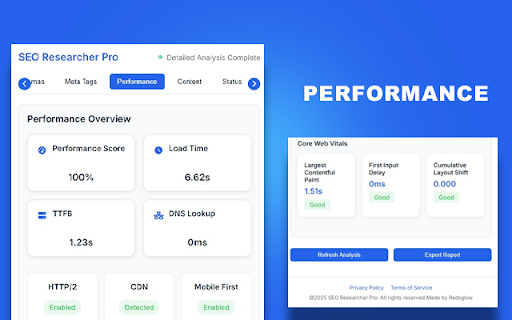
A powerful Chrome extension for analyzing SEO elements on any webpage. This extension helps you identify and analyze various SEO components including headings, links, images, and meta tags.

Features
- Headings Analysis: Detect and analyze H1-H6 tags on the page
- Link Analysis: Identify internal and external links
- Image Analysis: Find broken images and check alt tags
- Meta Tags Analysis: Review important meta tags
- Export Reports: Export analysis results as JSON
- Real-time Analysis: Get instant feedback on page elements
- Beautiful UI: Modern and intuitive interface

Installation

1. Download or clone this repository
2. Open Chrome and go to `chrome://extensions/`
3. Enable "Developer mode" in the top right corner
4. Click "Load unpacked" and select the extension directory

Usage

1. Click the extension icon in your Chrome toolbar
2. The extension will automatically analyze the current page
3. Use the tabs to navigate between different analysis sections:
   - Overview: Quick stats about the page
   - Headings: Detailed analysis of H1-H6 tags
   - Links: Internal and external link analysis
   - Images: Image analysis and broken image detection
4. Click "Refresh Analysis" to update the results
5. Use "Export Report" to save the analysis as JSON

Privacy

This extension:
- Only analyzes the current webpage
- Does not collect or send any data to external servers
- Works entirely locally in your browser
- Complies with Chrome's privacy policies

Development

The extension is built using:
- HTML5
- CSS3
- JavaScript (ES6+)
- Chrome Extension APIs

Contributing

Feel free to submit issues and enhancement requests!

License

This project is licensed under the MIT License - see the LICENSE file for details.
Technical
- Version
- 1.0.0
- Manifest
- V3
- Size
- 84.52KiB
- Min Chrome
- 88
- Languages
- 1
- Featured
- No
Metadata
- ID
- ehjhjdcdmjfikedcgdddifcghcomnokc
- Developer ID
- u79c2bbfbd5fb14b1efb025762aa3bd14
- Developer Email
- [email protected]
- Created
- Apr 8, 2025
- Last Updated (Store)
- Apr 8, 2025
- Last Scraped
- Jun 7, 2026
- Website
- —
- Support URL
- redsglow.com
- Privacy Policy
- /privacy-policy.html
Similar extensions
Alternatives to SEO Researcher Pro, ranked by description similarity.

SEO Insights: On-Page Analyzer & Exporter
Instant on-page SEO audit. Analyze Title, Meta, Headings, Links, Images & Export to CSV.
15

GROWSEB SEO
Extract SEO and website details like meta tags, HTTP status, headings, and more.
20
★ 5.0

SEO Meta & Structure by AIO.com.ai
Analyze meta tags, headings, images, links, and Open Graph data on any webpage for better SEO optimization.
2

SEO Analyzer
Quick on-page SEO checker (title tags, meta, headings, alt text, etc.)
39
★ 5.0

Meta SEO Viewer - SuperIntent.IO
Your all in one tool for detailed SEO Meta analysis. Get detailed, comprehensive insights with our powerful side panel tool.
666
★ 5.0

Webpage Analyzer - SEO Tool
The official extension to discover on-page SEO meta data
821
★ 5.0

SEO Assistant
Analyze webpages for SEO metrics.
1

SEO Analyser
Analyse meta tags, headings, images, links, keywords, schema and more—directly in your browser.
12
★ 5.0
Data sourced from the Chrome Web Store · last verified Jun 7, 2026.