
Upload Better
Upload your clipboard, recent downloads, or a pinned file to any file input, anywhere.
As of June 2026, Upload Better has 209 users and a 5.00/5 rating from 7 reviews in the Workflow & Planning category.
Workflow & Planning★ Featured
Usersup 81.7 percent+81.7%
209
209
Ratingno change0%
5.00
7 reviews
Reviewsup 40.0 percent+40.0%
7
Version
2.1.9
Manifest V3
90-day change · In the last 90 days this extension 2 version updates.
History
14 snapshotsTracking since Apr 1, 2026.
View as table
| Date | Users | Rating | Reviews | Version |
|---|---|---|---|---|
| Apr 1, 2026 | 115 | 5.00 | 5 | 1.1.6 |
| Apr 16, 2026 | 117 | 5.00 | 5 | 1.1.6 |
| Apr 26, 2026 | 107 | 5.00 | 5 | 1.1.6 |
| May 1, 2026 | 138 | 5.00 | 5 | 2.1.7 |
| May 6, 2026 | 138 | 5.00 | 5 | 2.1.9 |
| May 10, 2026 | 156 | 5.00 | 5 | 2.1.9 |
| May 14, 2026 | 145 | 5.00 | 5 | 2.1.9 |
| May 18, 2026 | 172 | 5.00 | 5 | 2.1.9 |
| May 22, 2026 | 199 | 5.00 | 6 | 2.1.9 |
| May 27, 2026 | 186 | 5.00 | 6 | 2.1.9 |
| Jun 1, 2026 | 177 | 5.00 | 6 | 2.1.9 |
| Jun 5, 2026 | 200 | 5.00 | 6 | 2.1.9 |
| Jun 9, 2026 | 196 | 5.00 | 6 | 2.1.9 |
| Jun 18, 2026 | 189 | 5.00 | 6 | 2.1.9 |
| Now | 209 | 5.00 | 7 | 2.1.9 |
Changelog
- May 1, 2026description
Stop digging through your file manager every time a website asks for a file.

Upload Better replaces the standard file picker with a smart popup that
shows what you actually want to upload, your clipboard, your pinned files,
or your recent downloads. One click and it's uploaded.

Works on every sitewith a file upload button.

✦ FEATURES

- Clipboard upload — paste a screenshot or copied text directly into any
  upload field. No saving to disk first.

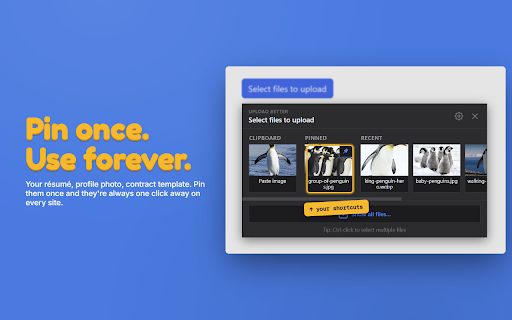
- Pinned files — your résumé, profile photo, or any file you upload often.
  Pin once, use everywhere instantly.

- Recent downloads — the last few files you downloaded appear automatically,
  so you can re-upload without hunting for them.

- Smart filtering — only shows files that match what the upload field
  accepts (images, PDFs, etc).

- Multi-select — Cmd/Ctrl-click to upload several files at once.

- Per-domain controls — disable on specific sites if you don't want it there.

✦ PRIVACY

Everything runs locally in your browser. No accounts, no data collection,
no servers. Your files never leave your computer except to go to the site
you're uploading to.
Stop digging through your file manager every time a website asks for a file.

Upload Better replaces the standard file picker with a smart popup that
shows what you actually want to upload, your clipboard, your pinned files,
or your recent downloads. One click and it's uploaded.

Works on every site with a file upload button.

✦ FEATURES

- Clipboard upload — paste a screenshot or copied text directly into any
  upload field. No saving to disk first.

- Pinned files — your résumé, profile photo, or any file you upload often.
  Pin once, use everywhere instantly.

- Recent downloads — the last few files you downloaded appear automatically,
  so you can re-upload without hunting for them.

- Smart filtering — only shows files that match what the upload field
  accepts (images, PDFs, etc).

- Multi-select — Cmd/Ctrl-click to upload several files at once.

- Per-domain controls — disable on specific sites if you don't want it there.

✦ PRIVACY

Everything runs locally in your browser. No accounts, no data collection,
no servers. Your files never leave your computer except to go to the site
you're uploading to.
- May 1, 2026short_description
Upload your last download, a pinned file, or your clipboard — to any file input, anywhere.
Upload your clipboard, recent downloads, or a pinned file to any file input, anywhere.
- May 1, 2026category
productivity/tools
productivity/workflow
- Apr 26, 2026description
Upload Better replaces the standard, clunky file manager with a simple pop-up that lives right inside your browser.

Whether you are applying for jobs, submitting homework assignments, or sharing design work, this extension helps you upload those files more easily.

✨ Features:

▪ Upload Clipboard Files: Upload any files on your clipboard directly into any upload button as a real file. No need to waste time saving it to your desktop first.

▪ Pin Files: Pin your most important documents (Resume, Logo, Profile Picture) and easily access them when uploading files.

▪ Upload Recent Downloads: Access the files you just downloaded without needing to open the file manager.

▪ Dark Mode: Built-in Dark Mode toggle to match your preference.

▪ Privacy: All processing happens locally on your device. No data is sent to the cloud.


❓ How it works:

1. Click any "Upload" or "Attach File" button on any website.

2. Instead of the slow and clunky file manager window, the Upload Better overlay appears instantly.

3. Select a file from your clipboard, recents, pinned list, or choose to open the file manager to see all files.
Stop digging through your file manager every time a website asks for a file.

Upload Better replaces the standard file picker with a smart popup that
shows what you actually want to upload, your clipboard, your pinned files,
or your recent downloads. One click and it's uploaded.

Works on every sitewith a file upload button.

✦ FEATURES

- Clipboard upload — paste a screenshot or copied text directly into any
  upload field. No saving to disk first.

- Pinned files — your résumé, profile photo, or any file you upload often.
  Pin once, use everywhere instantly.

- Recent downloads — the last few files you downloaded appear automatically,
  so you can re-upload without hunting for them.

- Smart filtering — only shows files that match what the upload field
  accepts (images, PDFs, etc).

- Multi-select — Cmd/Ctrl-click to upload several files at once.

- Per-domain controls — disable on specific sites if you don't want it there.

✦ PRIVACY

Everything runs locally in your browser. No accounts, no data collection,
no servers. Your files never leave your computer except to go to the site
you're uploading to.
- Apr 26, 2026short_description
Instantly upload files via a smart pop-up.
Upload your last download, a pinned file, or your clipboard — to any file input, anywhere.
Permissions & access
- Permissions
- clipboardReaddownloadsstorage
- Host access
- <all_urls>, file:///*
Screenshots




About
Stop digging through your file manager every time a website asks for a file.

Upload Better replaces the standard file picker with a smart popup that
shows what you actually want to upload, your clipboard, your pinned files,
or your recent downloads. One click and it's uploaded.

Works on every site with a file upload button.

✦ FEATURES

- Clipboard upload — paste a screenshot or copied text directly into any
  upload field. No saving to disk first.

- Pinned files — your résumé, profile photo, or any file you upload often.
  Pin once, use everywhere instantly.

- Recent downloads — the last few files you downloaded appear automatically,
  so you can re-upload without hunting for them.

- Smart filtering — only shows files that match what the upload field
  accepts (images, PDFs, etc).

- Multi-select — Cmd/Ctrl-click to upload several files at once.

- Per-domain controls — disable on specific sites if you don't want it there.

✦ PRIVACY

Everything runs locally in your browser. No accounts, no data collection,
no servers. Your files never leave your computer except to go to the site
you're uploading to.
Technical
- Version
- 2.1.9
- Manifest
- V3
- Size
- 47.91KiB
- Min Chrome
- 114
- Languages
- 1
- Featured
- Yes
Metadata
- ID
- hjcjljinhoneonjajdnjjdbdfppgjkpm
- Developer ID
- u66bc5a76318dc74df9790cc3c22cd7a3
- Developer Email
- [email protected]
- Created
- Nov 25, 2025
- Last Updated (Store)
- Apr 28, 2026
- Last Scraped
- Jun 18, 2026
- Website
- —
- Support URL
- —
- Privacy Policy
- https://vinsonchang.dev/upload-better-privacy
Similar extensions
Alternatives to Upload Better, ranked by description similarity.

Velvet Drop
Elegant, sexy drag and drop zone for your file inputs.
—

ShareMe for PC Windows - 100% Free Download-latest version
ShareMe For PC: Share files Smoothly on PC, Windows, and Mac with Share it - Lightning-fast, secure and free
1.0K
★ 5.0

Upload image from clipboard or URL
Upload images & files directly from a URL or the clipboard (ctrl+v), without needing to have them on your computer!
5.0K
★ 5.0

URL Manager
A lightweight Chrome extension to manage and save frequently used links effortlessly. Ideal for quick access to important URLs.
5
★ 5.0

Download Link Generator
Generate direct download link from Dropbox, Google Drive, OneDrive file share link.
6.0K
★ 3.4

Bulk File Downloader
Download files from any site. Free: one at a time. Pro: bulk download.
10.0K
★ 3.1

Download Button
Quick access to Chrome downloads page with a single click. Adds convenient toolbar button and context menu.
10.0K
★ 4.6

PURLS (Profile URL Saver)
Save and access your profile links quickly and easily — all stored securely in your browser, no login required.
9
★ 5.0
Data sourced from the Chrome Web Store · last verified Jun 18, 2026.